
Cloudflare One Client for Windows (version 2026.6.880.0)
A new GA release for the Windows Cloudflare One Client is now available on the stable releases downloads page.
This hotfix resolves a regression that caused a large increase in DNS-over-TCP queries to fallback and internal DNS servers. The client now sends fallback DNS queries over UDP first, falling back to TCP only when a response is truncated, instead of querying both protocols in parallel.
Cloudflare One Client for macOS (version 2026.6.880.0)
A new GA release for the macOS Cloudflare One Client is now available on the stable releases downloads page.
This hotfix resolves a regression that caused a large increase in DNS-over-TCP queries to fallback and internal DNS servers. The client now sends fallback DNS queries over UDP first, falling back to TCP only when a response is truncated, instead of querying both protocols in parallel.
Cloudflare One Client for Linux (version 2026.6.880.0)
A new GA release for the Linux Cloudflare One Client is now available on the stable releases downloads page.
This hotfix resolves a regression that caused a large increase in DNS-over-TCP queries to fallback and internal DNS servers. The client now sends fallback DNS queries over UDP first, falling back to TCP only when a response is truncated, instead of querying both protocols in parallel.
针对明文 HTTP 私有应用程序的基于浏览器的登录
Cloudflare Access 现在对通过端口 80 上的明文 HTTP 提供服务的私有应用程序使用标准的基于浏览器的登录流程。
以前,明文 HTTP 私有应用程序会回退到与 SSH、RDP 和其他非 HTTP 协议相同的会话流程:用户会从 Cloudflare One Client 收到一个“需要身份验证(Authentication required)”弹窗,然后必须选择该通知以打开浏览器并登录。现在,访问 HTTP 私有应用程序的用户会直接在浏览器中看到 Access 登录页面,并在成功后收到标准的 Access 应用程序令牌(application token)。
这使得 HTTP 体验与 HTTPS 应用程序(开启了 Gateway TLS 解密)保持一致。无需更改配置。仍然需要 Cloudflare One Client 将流量路由到私有网络,但它不再管理 HTTP 应用程序的 Access 会话。
其他非 HTTP 协议(SSH、RDP、任意 TCP/UDP)继续使用 Cloudflare One Client 通知流程。
Gateway HTTP 策略的新请求头控制选项
Cloudflare Gateway 现在支持在允许策略上进行高级请求头控制。管理员可以使用静态值或动态变量来添加、重写或删除匹配请求上的请求头。
使用“允许”(Allow)操作的 Gateway HTTP 策略在 rule_settings 中支持三种操作:
| 操作 | API 字段 | 行为 |
|---|---|---|
| 添加 | add_headers |
向请求头追加值。保留现有值。 |
| 重写 | set_headers |
替换请求头的值。如果请求头不存在,则创建它。 |
| 删除 | delete_headers |
从请求中移除该请求头。 |
Gateway 按以下顺序应用操作:首先删除,然后重写,最后添加。
请求头的值可以包含使用 @{...} 语法的动态变量。Gateway 会在请求时根据身份、设备和网络上下文解析变量。
| 变量 | 说明 |
|---|---|
@{identity.email} |
来自身份提供商的用户电子邮件 |
@{identity.name} |
来自身份提供商的用户显示名称 |
@{identity.id} |
Cloudflare 身份 UUID |
@{identity.groups} |
身份提供商群组成员身份 |
@{identity.SAML} |
SAML 属性(如果配置了) |
@{identity.OIDC} |
OIDC 声明(如果配置了) |
@{source.ip} |
连接的源 IP |
@{destination.ip} |
请求的目的 IP |
@{device.id} |
Cloudflare One 客户端设备 UUID |
@{device.posture} |
设备状态检查结果(JSON 字符串) |
您可以在单个请求头值中混合使用静态文本和动态变量。例如,user-@{identity.email} 会解析为 [email protected]。
有关更多信息,请参阅自定义请求头。
用于基于浏览器的 RDP 的批量打印 PDF
在基于浏览器的 RDP 会话中,用户现在可以将多个 PDF 文件作为单个打印作业进行打印。在远程计算机上将文件复制到剪贴板,然后选择剪贴板面板中的 Print all PDFs(打印所有 PDF)。这些文件将合并为一个 PDF 并发送到您的本地打印机。
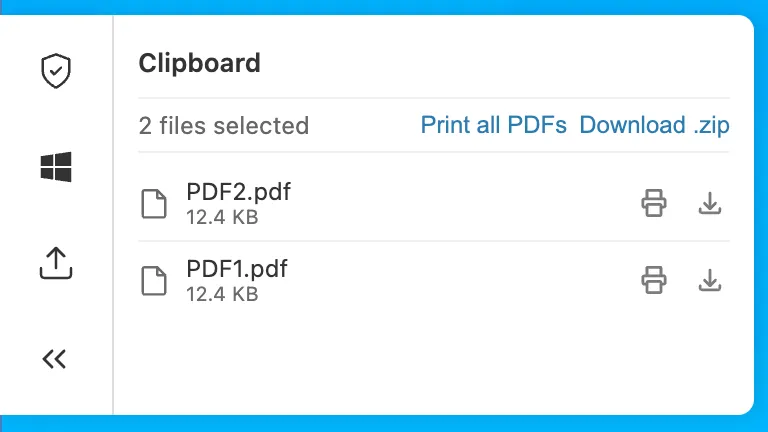
批量打印在基于 Chromium 的浏览器和 Firefox 中可用。欲了解更多信息,请参阅为基于浏览器的 RDP 打印 PDF。
内部 DNS 现在正式发布(Generally Available)
内部 DNS 现在已正式发布。内部 DNS 在您已用于公共 DNS、Zero Trust 和应用程序服务的同一个全球网络和控制平面上,为私有网络提供权威和递归 DNS 服务。
- 整合 DNS 运营。 公共和私有 DNS 运行在同一个平台上,拥有统一的 API、审计跟踪和策略设置入口。
- 简化水平分割 DNS。 内部和外部解析被定义为共享区域上独立的视图,并从单个控制平面进行管理 — 因此无需排查配置偏差。
- 将 Zero Trust 扩展到 DNS。 解析器策略决定哪些用户和设备针对哪个视图进行解析,并由已经监管您其余流量的同一个 Gateway 来执行。
设置内部 DNS 需要三个步骤:创建区域、创建视图并定义解析器策略。
POST /zones
{
  "account": {
    "id": "<ACCOUNT_ID>"
  },
  "name": "corp.internal",
  "type": "internal"
}
内部 DNS 已包含在面向企业级客户的 Cloudflare Gateway 中。要开始使用,请参阅 Internal DNS documentation。
源代码检测改进
数据丢失防护 (DLP) 源代码检测现在专注于识别整个源代码文件的上传和下载。以前,源代码检测执行部分扫描,导致误报率较高。由于现在仅对整个源代码文件进行评估,因此嵌入在其他内容(例如聊天消息、文档或代码示例)中的代码不再被标记为源代码,从而消除了常见的误报来源。
源代码检测需要至少 500 个字符来评估文件。低于此阈值的文件不会被标记,以减少噪点。此阈值过滤掉了缺乏足够上下文以进行可靠分类的小片段。
启用并设置置信度级别以调整匹配敏感度。较高的置信度级别通过需要更强烈的信号来表明内容确实是源代码,从而减少误报。较低的置信度级别会捕获更多文件,但代价是会产生额外的噪点。
源代码检测适用于 Gateway HTTP 策略中的独立源代码文件。它不会检测嵌入在其他文件类型或有效负载(例如 .docx 文件或聊天消息)中的源代码。
有关更多详细信息,请参阅 Source Code predefined profiles。
Zero Trust Networks 路由终点和 Cloudflare Tunnel 连接字段将于 2026 年 10 月 5 日停用
在 2026 年 10 月 5 日,两项变更将在 Zero Trust Networks API 和 Cloudflare Tunnel API 中生效:移除经过 CIDR 编码的路由终点,且 tunnel list 和 get 响应将不再包含 connections 字段。如果您通过 API、cloudflared、Terraform 或其他集成管理私有网络路由或读取 tunnel 连接详情,请阅读以下部分中的变更说明并在移除日期之前完成迁移。
经过 CIDR 编码的路由终点已被弃用,转而使用目前已存在的基于标准 route_id 的终点。这两组终点都是通过 Cloudflare Tunnel 或 Cloudflare Mesh 路由私有网络(API 仍将 Mesh 节点称为 warp_connector)— 仅请求形状(request shape)发生了变化。
已弃用的终点(将于 2026 年 10 月 5 日移除):
- 创建 tunnel 路由(CIDR 终点):
POST /accounts/{account_id}/teamnet/routes/network/{ip_network_encoded} - 更新 tunnel 路由(CIDR 终点):
PATCH /accounts/{account_id}/teamnet/routes/network/{ip_network_encoded} - 删除 tunnel 路由(CIDR 终点):
DELETE /accounts/{account_id}/teamnet/routes/network/{ip_network_encoded}
替代终点:
- 创建 tunnel 路由:
POST /accounts/{account_id}/teamnet/routes - 更新 tunnel 路由:
PATCH /accounts/{account_id}/teamnet/routes/{route_id} - 删除 tunnel 路由:
DELETE /accounts/{account_id}/teamnet/routes/{route_id}
| 已弃用(CIDR 编码路径) | 替代方案 | |
|---|---|---|
| 路由标识符 | 路径中经过 URL 编码的 CIDR (/network/{ip_network_encoded}) |
路径中的 route_id(创建时 network 移动到请求体中) |
| 创建 | POST .../teamnet/routes/network/{ip_network_encoded} |
请求体中包含 network 和 tunnel_id 的 POST .../teamnet/routes |
| 更新 | PATCH .../teamnet/routes/network/{ip_network_encoded} |
PATCH .../teamnet/routes/{route_id} |
| 删除 | DELETE .../teamnet/routes/network/{ip_network_encoded} |
DELETE .../teamnet/routes/{route_id} |
- 通过调用列出 tunnel 路由获取每个路由的
route_id,或者在首次使用替代终点创建路由时从响应中读取它。 - 更新任何直接调用经过 CIDR 编码的终点的脚本、后端服务或 CI/CD 流水线。
- 如果您使用
cloudflared tunnel route ip add | delete命令管理路由,请将cloudflared升级到最新版本 ↗。 - 如果您使用 Terraform 管理路由,请确保您使用的是最新版本的
cloudflare_zero_trust_tunnel_cloudflared_route↗ 资源以及 Cloudflare Terraform 提供商 ↗。
# Before: create a route by URL-encoding the CIDR into the path
curl https://api.cloudflare.com/client/v4/accounts/$ACCOUNT_ID/teamnet/routes/network/172.16.0.0%2F16 \
     -H 'Content-Type: application/json' \
     -H "Authorization: Bearer $CLOUDFLARE_API_TOKEN" \
     -d '{"tunnel_id": "'$TUNNEL_ID'", "comment": "Example comment for this route."}'

# After: create a route with the network in the request body
curl https://api.cloudflare.com/client/v4/accounts/$ACCOUNT_ID/teamnet/routes \
     -H 'Content-Type: application/json' \
     -H "Authorization: Bearer $CLOUDFLARE_API_TOKEN" \
     -d '{"network": "172.16.0.0/16", "tunnel_id": "'$TUNNEL_ID'", "comment": "Example comment for this route."}'

# After: update or delete a route using its route_id
curl -X PATCH https://api.cloudflare.com/client/v4/accounts/$ACCOUNT_ID/teamnet/routes/$ROUTE_ID \
     -H 'Content-Type: application/json' \
     -H "Authorization: Bearer $CLOUDFLARE_API_TOKEN" \
     -d '{"comment": "Updated comment for this route."}'

curl -X DELETE https://api.cloudflare.com/client/v4/accounts/$ACCOUNT_ID/teamnet/routes/$ROUTE_ID \
-H "Authorization: Bearer $CLOUDFLARE_API_TOKEN"自同一天起,将从 Cloudflare Tunnel 和 Cloudflare Mesh 节点(cfd_tunnel 和 warp_connector API 资源)的 list 和 get 响应中移除 connections 数组。请查询专用的连接终点,而不是从 tunnel 或节点对象中读取该字段。
这会影响:
GET /accounts/{account_id}/cfd_tunnel— 从result中的每个项目中移除connectionsGET /accounts/{account_id}/cfd_tunnel/{tunnel_id}— 从result中移除connectionsGET /accounts/{account_id}/warp_connector— 从result中的每个项目中移除connectionsGET /accounts/{account_id}/warp_connector/{tunnel_id}— 从result中移除connections
从特定于 tunnel 的连接终点获取连接详情,而不是从 list 或 get 响应中解析。对于 Cloudflare Tunnel,请调用 GET /accounts/{account_id}/cfd_tunnel/{tunnel_id}/connections。对于 Cloudflare Mesh,请调用 GET /accounts/{account_id}/warp_connector/{tunnel_id}/connections。
# Before: read connections off the tunnel object
curl https://api.cloudflare.com/client/v4/accounts/$ACCOUNT_ID/cfd_tunnel/$TUNNEL_ID \
     -H "Authorization: Bearer $CLOUDFLARE_API_TOKEN"

# After: query connections directly
curl https://api.cloudflare.com/client/v4/accounts/$ACCOUNT_ID/cfd_tunnel/$TUNNEL_ID/connections \
     -H "Authorization: Bearer $CLOUDFLARE_API_TOKEN"
更新任何从 tunnel list 或 get 响应中解析 connections 的仪表板、监控脚本或自动化。cloudflared 和 Cloudflare Terraform 提供商不读取此字段,因此它们的这一部分更新不需要做任何更改。
- 响应更小、速度更快。 具有许多连接的 Cloudflare Tunnel 和 Cloudflare Mesh 节点不再膨胀每次 list 和 get 调用 — 仅在您需要时才获取连接详情。
- 静态或标识路由的单一方式。 统一使用
route_id消除了对路径中 CIDR 范围进行 URL 编码的需要,并且与 Zero Trust Networks API 中所有其他资源的寻址方式一致。 - 跨 API 的一致性。 这两项变更使这些终点与 Cloudflare 针对资源标识符和嵌套详情终点的标准 REST 约定保持一致。
要了解更多信息,请参阅 Zero Trust Networks API、Cloudflare Tunnel API 和路由文档。
IPsec 降级保护 (Beta)
Cloudflare IPsec 现在支持 IKE_SA_INIT_FULL_TRANSCRIPT_AUTH ↗ IKEv2 扩展,以防御 IPsec 隧道上的降级攻击。
IKEv2 的原始身份验证设计是让每个端点仅对其自己的出网消息进行签名,而不是对完整的握手脚本进行签名。具有量子计算能力的路径上(on-path)攻击者 ↗可以利用这一点,通过将连接降级为传统密码学,从而绕过后量子密钥交换。IKE_SA_INIT_FULL_TRANSCRIPT_AUTH 扩展通过在身份验证交换期间让双方对整个握手脚本进行签名来解决此问题,从而防止攻击者在不被发现的情况下操纵协商。
关键详情:
- 在 Cloudflare WAN 和 Magic Transit IPsec 隧道中提供 Beta 版。
- 启用该功能标志后,Cloudflare 会作为响应方(responder)无条件发送
IKE_SA_INIT_FULL_TRANSCRIPT_AUTH通知。 - 发起方(您的设备)和响应方(Cloudflare)都必须支持该扩展,降级保护才能生效。
- 此功能目前由每个账户的功能标志控制。请联系您的账户团队将其开启。
请参阅降级保护了解更多详情。
Cloudflare One Client for Windows (version 2026.6.850.0)
A new GA release for the Windows Cloudflare One Client is now available on the stable releases downloads page.
This hotfix addresses a Windows authentication issue in the embedded WebView2 browser. Single sign-on could fail to use the Windows primary account, causing users to be prompted for an interactive sign-in. The embedded authentication browser now allows SSO providers to use the OS primary account when available.
用于基于浏览器的 RDP 的文件传输控制(Beta)
您现在可以为使用 Cloudflare Access 的基于浏览器的 RDP 配置文件传输控制,允许您限制用户是否可以在其本地计算机与远程 Windows 服务器之间上传或下载文件。
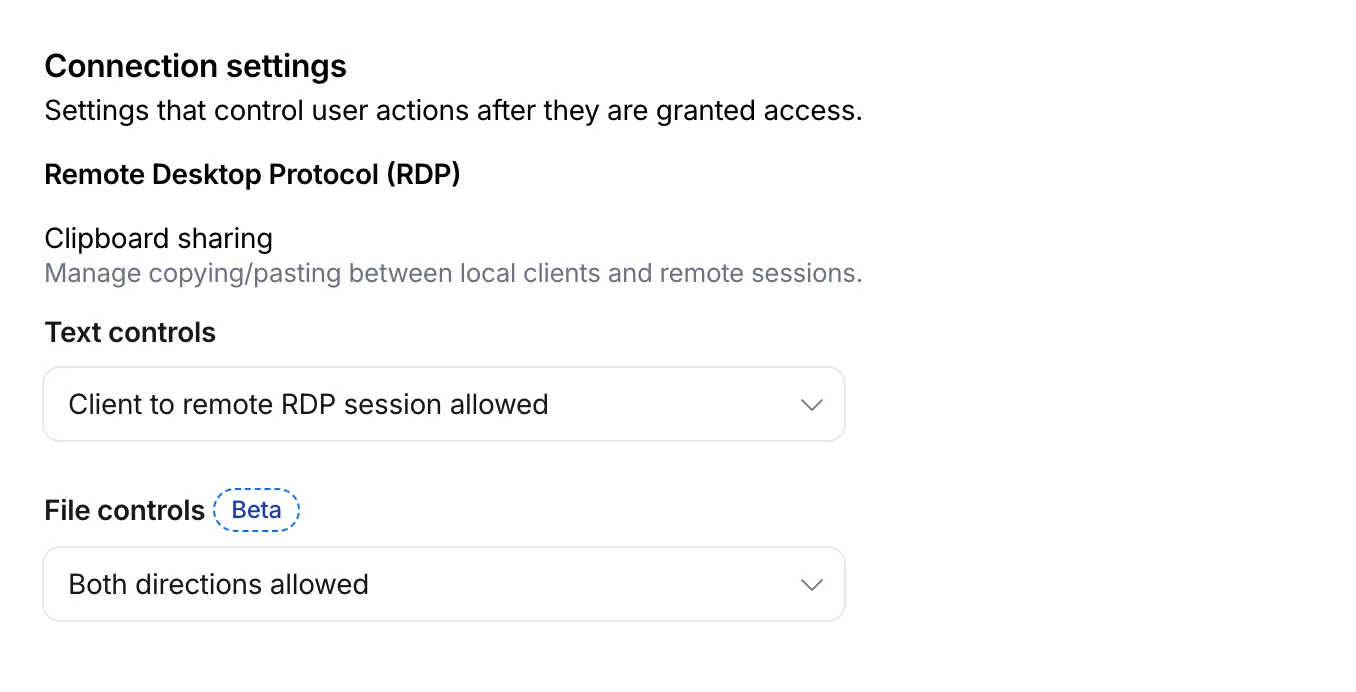
对于支持自带设备(BYOD)政策或使用未托管设备的第三方承包商的组织,此功能非常有用。通过限制文件传输,您可以防止敏感数据从远程会话转移到用户的个人设备。
文件传输控制在您的 Access 应用程序中针对每个策略进行配置,与现有的文本剪贴板控制并列。对于每个策略,您可以选择以下选项之一:
- 允许从客户端到远程 RDP 会话 — 用户可以从其本地计算机上传文件到基于浏览器的 RDP 会话中。
- 允许从远程 RDP 会话到客户端 — 用户可以从基于浏览器的 RDP 会话下载文件到其本地计算机中。
- 允许双向 — 用户可以在其本地计算机与基于浏览器的 RDP 会话之间上传和下载文件。
- 禁用复制/粘贴 — 不允许用户在其本地计算机与基于浏览器的 RDP 会话之间传输文件。
默认情况下,新策略的文件传输功能是被拒绝的。对于在此功能可用之前创建的现有 Access 应用程序,文件传输依然被拒绝。
要上传,请将文件拖入浏览器窗口,或选择 RDP 会话左侧的设置齿轮图标。要下载,请在远程会话中复制文件,然后选择设置齿轮以进行下载、将多个文件下载为 zip 包,或者将 PDF 打印到本地打印机。
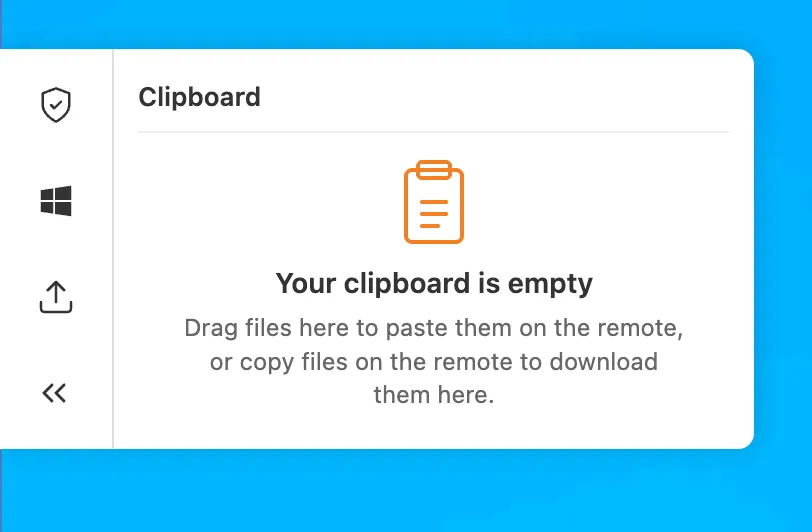
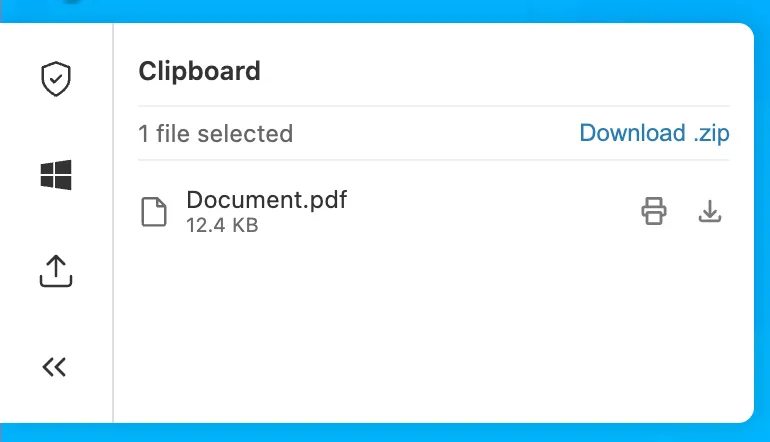
此功能处于 Beta 阶段,可在所有 Zero Trust 方案中使用。欲了解更多信息,请参阅基于浏览器的 RDP 的文件传输。
浏览器隔离支持授权代理端点
浏览器隔离现在支持 Gateway 授权代理端点。您可以对通过授权代理端点路由的流量应用 HTTP 隔离策略,方式与对来自 Cloudflare One 客户端的流量相同。
此前,只有源 IP 代理端点支持浏览器隔离,且仅支持非基于身份的策略。由于授权代理端点通过身份提供商对用户进行认证,您现在无需 Cloudflare One 客户端即可对 PAC 文件代理流量应用基于身份的隔离策略。
在仪表板中自助注册 Cloudflare One 虚拟 Appliance
您现在可以直接从仪表板注册 Cloudflare One 虚拟 Appliance 并生成其许可证密钥,而无需联系您的账户团队。

- 在 Connectors(连接器) 页面上,选择 Add an appliance(添加设备) 并选择 Virtual appliance(虚拟设备) 以注册虚拟 Appliance 并生成其身份验证密钥。
- 从虚拟 Appliance 连接器的菜单中,使用 Regenerate authentication key 来轮换其密钥。先前的密钥会立即且不可逆地撤销。
- 身份验证密钥仅显示一次——请复制并妥善保存。
这对现有的用于配置虚拟 Appliance 的 API 和 Terraform 自助服务工作流进行了补充。硬件 Appliance 继续使用现有的账户团队履行工作流。
有关详细信息,请参阅配置 Cloudflare One 虚拟 Appliance。
Cloudflare Mesh 的主机名路由
除了 CIDR 路由之外,您现在还可以向 Cloudflare Mesh 节点添加主机名路由。
Requests
wiki.internal.local- DNS query
Returns a token IP, then rewrites the destination to the real private IP.
100.80.0.0/16- Hostname route
Forwards traffic to the host on the local network
- Private host
wiki.internal.local·10.0.0.50
您可以通过将主机名的流量引导到 Mesh 节点来代替管理 IP 范围:
- 私有主机名(例如
wiki.internal.local)—— 通过名称访问内部应用程序,这在它具有未知或临时 IP 时非常有用。在 Mesh 上,您不需要运行 DNS 服务器;只需节点上的本地 hosts 文件条目即可,或者您可以使用 Gateway 解析器策略进行 split DNS。 - 公共主机名(例如
www.example.com)—— 通过该节点路由该主机名的流量,并经由该节点的公共 IP 出站。
有关设置步骤、先决条件和 DNS 选项,请参阅主机名路由。
Cloudflare One Client for Linux (version 2026.6.836.0)
A new GA release for the Linux Cloudflare One Client is now available on the stable releases downloads page.
This package is the same release as 2026.6.822.0, with a fix for our RPM package. Previously the repository served a single build to every OS version, so an install could pull a dependency that isn't available on that release. The repository now serves the correct build for each operating system version, so installs automatically pull the dependencies that version requires. Debian and Ubuntu were not affected.
If you installed version 2026.6.822.0 on an RPM-based distribution, we recommend refreshing your repository configuration:
sudo curl -fsSL https://pkg.cloudflareclient.com/cloudflare-warp-ascii.repo | sudo tee /etc/yum.repos.d/cloudflare-warp.repo
sudo dnf clean all
sudo dnf install cloudflare-warp
修复单页应用程序的重定向 URL 片段(fragment)编码
Access 现在在登录后将用户重定向回应用程序时,能够正确保留 URL 片段(fragment)字符(/、?、=、&、;)。以前,这些字符是使用 encodeURIComponent 进行编码的,这会破坏单页应用程序(SPA)使用的基于片段的路由。
例如,像 https://app.example.com/#/dashboard?tab=settings&view=advanced 这样的 SPA URL 以前在登录后会重定向到一个损坏的 URL。这现在已得到正确处理。
如果您的 SPA 用户在通过 Access 进行身份验证后遇到导航损坏的问题,此修复将解决该问题,而无需进行任何配置更改。
用于基础设施应用程序的独立 MFA
Access for Infrastructure 现在支持使用 YubiKey PIV 密钥对 SSH 连接实施独立多因素身份验证(MFA)。这为 SSH 访问添加了基于硬件的第二因素,确保仅凭受损的设备会话不足以访问您的服务器。
通过针对每个应用程序和每个策略的配置,您可以对敏感用户名(例如 root)强制执行 PIV 密钥身份验证,同时对其他用户名应用不同的要求。您还可以设置 MFA 会话时长,以控制用户必须重新进行身份验证的频率。
用户通过应用程序启动器注册其 YubiKey PIV 密钥。有关注册说明和 SSH 客户端设置,请参阅为基础设施应用程序注册 PIV 密钥。
有关设置说明,请参阅为基础设施应用程序强制执行 MFA。
Gateway 策略和列表的新权限与角色
您现在可以为 Cloudflare Gateway 防火墙策略和 Zero Trust 列表分配细粒度的资源作用域角色。管理员可以委派对特定策略类型或列表管理的访问权限,而无需授予账户范围或产品范围的控制权。
当您添加成员或创建权限策略时,现在可以使用以下资源作用域角色:
| 角色 | 说明 |
|---|---|
| Zero Trust Gateway Firewall Policies Admin | 可以查看和编辑所有 Gateway 防火墙策略,包括 DNS、HTTP 和网络策略。 |
| Zero Trust Gateway DNS Policies Admin | 可以查看和编辑 Gateway DNS 策略。 |
| Zero Trust Gateway HTTP Policies Admin | 可以查看和编辑 Gateway HTTP 策略。 |
| Zero Trust Gateway Network Policies Admin | 可以查看和编辑 Gateway 网络策略。 |
| Zero Trust Gateway Egress Policies Admin | 可以查看和编辑 Gateway 出口策略。 |
| Zero Trust Gateway Resolver Policies Admin | 可以查看和编辑 Gateway 解析器策略。 |
| Zero Trust Gateway Policies Admin | 可以查看和编辑所有 Gateway 策略。 |
| Zero Trust Gateway Policies Read | 可以查看所有 Gateway 策略。 |
| Zero Trust Gateway Read Only | 可以查看所有 Gateway 资源。 |
| Zero Trust DNS Locations Admin | 可以查看和编辑 DNS 位置。 |
| Zero Trust Proxy Endpoints Admin | 可以查看和编辑 Gateway 代理端点。 |
| Zero Trust Account Lists Admin | 可以查看和编辑所有 Gateway 和 Access 列表。 |
| Zero Trust Account Lists Read | 可以查看所有 Gateway 和 Access 列表。 |
这些角色允许您:
- 仅向网络工程师授予网络策略的写入权限,而不暴露 DNS 或 HTTP 策略配置。
- 允许安全分析师以只读模式查看所有 Gateway 策略以进行审计。
- 将列表管理委托给维护阻止和允许列表的团队,而不授予他们访问策略配置的权限。
您现在还可以分配 资源作用域角色。这些角色是对现有账户级别角色的补充,允许您授予对特定资源(例如单个 Gateway 策略或 Cloudflare One 列表)的访问权限。现有的账户级别角色继续有效。 拥有 Cloudflare Gateway 或 Cloudflare Zero Trust 角色的成员将保留对所有 Gateway 资源的完全访问权限。这确保了与现有自动化和 API 令牌的向后兼容性。
- 查看 Cloudflare 角色参考上的资源作用域角色。
- 了解如何创建使用这些角色的权限策略。
Cloudflare One Client for Windows (version 2026.6.822.0)
A new GA release for the Windows Cloudflare One Client is now available on the stable releases downloads page.
This release introduces multiple features from our previous beta release into stable release, including:
- The client now applies DNS search suffixes configured in your device profile / network policy. Administrators can push a list of DNS search domains that the client appends to single-label queries, alongside any system-configured suffixes. See DNS search suffixes for details.
- Added mandatory authentication. When enabled via MDM, the Cloudflare One Client blocks all Internet traffic from the moment the machine boots until the user authenticates, closing the visibility gap on newly deployed devices and during re-authentication. See the announcement blog and documentation for details.
- Upgraded security of device registration to be hardware-backed. Registration tokens can now be generated in the TPM (with TPM 2.0+) whenever it is available to provide stronger protection against device impersonation. See Hardware-backed registration for details.
- Added a local-file signal source for Emergency Disconnect. In addition to the existing HTTPS polling mechanism, administrators can now configure WARP to monitor for a file on disk; the presence of the file triggers an emergency disconnect even if both Cloudflare and your own infrastructure are unreachable. Either signal being asserted triggers disconnect; both must be cleared for normal operation to resume.
- Added new warp-cli debug commands for interactive connection diagnosis. See Extra debug logging for details.
- The local DNS proxy now supports DNSSEC passthrough. DNSSEC-signed responses are forwarded to the application intact (including DO/AD bits and RRSIG records), so applications that validate DNSSEC locally — including resolvers and the dig/drill tooling — work correctly through the client.
- Added a new MDM format for organization-wide settings, including a cleaner way to configure the compliance environment (e.g. FedRAMP). The previous per-configuration approach still works, but the new format is now recommended. See the updated Cloudflare One MDM documentation for details.
- Added support for dashboard-managed client version deployments. Administrators can now upgrade or downgrade the client version on enrolled devices directly from the Zero Trust dashboard. See Client version assignments for details.
Additional Changes and improvements
- Starting with 2026.6.822.0, the client unifies all API requests under the
api.devices.cloudflare.comSNI, where previously bothzero-trust-client.cloudflareclient.comandnotifications.cloudflareclient.comwere used. Review Cloudflare One Client with firewall to ensure systems that rely on SNI inspection do not block the API traffic. The behavior of previous client versions is unaffected. - Client Certificate device-posture checks now support template variables (e.g.
${serial_number},${device_uuid}) in the Subject Alternative Name field. Previously only the Common Name field accepted variables, which broke posture rules that pinned identity to a SAN entry. - Improved accessibility by using high contrast colors and more defined color boundaries when high contrast is enabled in Windows Accessibility settings.
- Path MTU Discovery (PMTUD) is now enabled by default.
- The UseWebView2 registry value (HKLM\SOFTWARE\Cloudflare\CloudflareWARP\UseWebView2 = y) is once again honored by the new GUI for authentication, so administrators who prefer the embedded WebView2 browser for sign-in can opt back in. This setting was effectively ignored in the previous release; the default browser was always used. This key is now also honored for re-authentications.
- Fixed a crash in the authentication browser when navigating to a site that prompts for browser permissions (microphone, camera, notifications, etc.). The same fix had previously landed for the captive-portal browser; this extends it to the auth browser.
- Fixed an issue in proxy mode where hostnames containing underscores (e.g. ai_app.com) were rejected, breaking apps that depend on such hostnames (notably ChatGPT sandbox apps). The local proxy now accepts underscore-containing hostnames in CONNECT requests.
- Fixed an issue where DNS queries would fail after the connection was idle, requiring users to retry.
- Fixed a high CPU issue when the device wakes from sleep.
- Users can now register with team names in any case format without errors.
- New UI fixes
- Fixed an issue where users with invalid MDM configurations were returned to the onboarding screen after successful authentication.
- Added a re-auth button and banner to the home screen so users don't miss it when their session expires.
- Added clear error messaging when the Cloudflare certificate needs to be installed.
- Brought back support for pausing the tunnel when connected to user-specified Wi-Fi networks for consumer users.
- New client UI now surfaces Split tunnel configuration and Local Domain Fallback configuration.
- Added ability to configure proxy mode for consumer users.
- Added back the option to quit for consumer users.
Known issues
- Single sign-on in the embedded WebView2 authentication browser may fail to use the Windows primary account, prompting for an interactive sign-in.
- An error indicating that Microsoft Edge can't read and write to its data directory may be displayed during captive portal login; this error is benign and can be dismissed.
- In rare cases, a registration may hang at "Checking your organization configuration" due to IPC errors. A system reboot should resolve the error, allowing registration to proceed.
- Windows ARM may prompt the user to close running applications while trying to install this version. Simply click "Ok" with the default highlighted option.
Cloudflare One Client for macOS (version 2026.6.822.0)
A new GA release for the macOS Cloudflare One Client is now available on the stable releases downloads page.
This release introduces multiple features from our previous beta release into stable release, including:
- The client now applies DNS search suffixes configured in your device profile / network policy. Administrators can push a list of DNS search domains that the client appends to single-label queries, alongside any system-configured suffixes. See DNS search suffixes for details.
- Upgraded security of device registration to be hardware-backed. Registration tokens can now be generated in the Secure Enclave whenever available to provide stronger protection against device impersonation. See Hardware-backed registration for details.
- Added a local-file signal source for Emergency Disconnect. In addition to the existing HTTPS polling mechanism, administrators can now configure WARP to monitor for a file on disk; the presence of the file triggers an emergency disconnect even if both Cloudflare and your own infrastructure are unreachable. Either signal being asserted triggers disconnect; both must be cleared for normal operation to resume.
- Added new warp-cli debug commands for interactive connection diagnosis. See Extra debug logging for details.
- The local DNS proxy now supports DNSSEC passthrough. DNSSEC-signed responses are forwarded to the application intact (including DO/AD bits and RRSIG records), so applications that validate DNSSEC locally — including resolvers and the dig/drill tooling — work correctly through the client.
- Added a new MDM format for organization-wide settings, including a cleaner way to configure the compliance environment (e.g. FedRAMP). The previous per-configuration approach still works, but the new format is now recommended. See the updated Cloudflare One MDM documentation for details.
- Added support for dashboard-managed client version deployments. Administrators can now upgrade or downgrade the client version on enrolled devices directly from the Zero Trust dashboard. See Client version assignments for details.
Additional Changes and improvements
- Starting with 2026.6.822.0, the client unifies all API requests under the
api.devices.cloudflare.comSNI, where previously bothzero-trust-client.cloudflareclient.comandnotifications.cloudflareclient.comwere used. Review Cloudflare One Client with firewall to ensure systems that rely on SNI inspection do not block the API traffic. The behavior of previous client versions is unaffected. - Client Certificate device-posture checks now support template variables (e.g.
${serial_number},${device_uuid}) in the Subject Alternative Name field. Previously only the Common Name field accepted variables, which broke posture rules that pinned identity to a SAN entry. - Improved accessibility by using high contrast colors and more defined color boundaries when high contrast is enabled in the macOS Display settings.
- Path MTU Discovery (PMTUD) is now enabled by default.
- Fixed the in-client captive-portal browser rendering a blank "Success" page on some airline Wi-Fi networks. The browser now more consistently loads the airline's real portal page so users can complete sign-in from inside the client instead of having to open a separate browser.
- Fixed an issue in proxy mode where hostnames containing underscores (e.g. ai_app.com) were rejected, breaking apps that depend on such hostnames (notably ChatGPT sandbox apps). The local proxy now accepts underscore-containing hostnames in CONNECT requests.
- Fixed an issue where DNS queries would fail after the connection was idle, requiring users to retry.
- Users can now register with team names in any case format without errors.
- New UI fixes
- Fixed an issue where users with invalid MDM configurations were returned to the onboarding screen after successful authentication.
- Added a re-auth button and banner to the home screen so users don't miss it when their session expires.
- Added clear error messaging when the Cloudflare certificate needs to be installed.
- Brought back support for pausing the tunnel when connected to user-specified Wi-Fi networks for consumer users.
- New client UI now surfaces Split tunnel configuration and Local Domain Fallback configuration.
- Added ability to configure proxy mode for consumer users.
- Added back the option to quit for consumer users.
Known issues
- Registration may hang at "Checking your organization configuration" due to IPC errors. A system reboot should resolve the error, allowing registration to proceed.
- When deploying with Microsoft Intune, the client may be repeatedly reinstalled because Intune adds the client's embedded framework bundles to its install-detection list, and those frameworks cannot be detected as installed on their own. See Repeated reinstalls on macOS with Microsoft Intune for the workaround.
Cloudflare One Client for Linux (version 2026.6.822.0)
A new GA release for the Linux Cloudflare One Client is now available on the stable releases downloads page.
This release introduces multiple features from our previous beta release into stable release, including:
- The client now applies DNS search suffixes configured in your device profile / network policy. Administrators can push a list of DNS search domains that the client appends to single-label queries, alongside any system-configured suffixes. See DNS search suffixes for details.
- Upgraded security of device registration to be hardware-backed. Registration tokens can now be generated in the TPM (with TPM 2.0+) whenever it is available to provide stronger protection against device impersonation. See Hardware-backed registration for details.
- Added a local-file signal source for Emergency Disconnect. In addition to the existing HTTPS polling mechanism, administrators can now configure WARP to monitor for a file on disk; the presence of the file triggers an emergency disconnect even if both Cloudflare and your own infrastructure are unreachable. Either signal being asserted triggers disconnect; both must be cleared for normal operation to resume.
- Added new warp-cli debug commands for interactive connection diagnosis. See Extra debug logging for details.
- The local DNS proxy now supports DNSSEC passthrough. DNSSEC-signed responses are forwarded to the application intact (including DO/AD bits and RRSIG records), so applications that validate DNSSEC locally — including resolvers and the dig/drill tooling — work correctly through the client.
- Added a new MDM format for organization-wide settings, including a cleaner way to configure the compliance environment (e.g. FedRAMP). The previous per-configuration approach still works, but the new format is now recommended. See the updated Cloudflare One MDM documentation for details.
Additional changes and improvements
- Starting with 2026.6.822.0, the client unifies all API requests under the
api.devices.cloudflare.comSNI, where previously bothzero-trust-client.cloudflareclient.comandnotifications.cloudflareclient.comwere used. Review Cloudflare One Client with firewall to ensure systems that rely on SNI inspection do not block the API traffic. The behavior of previous client versions is unaffected. - Cloudflare Mesh functionality using the Cloudflare One Client is now supported on RHEL 9 and 10.
- Cloudflare Mesh now supports hostname-based routing.
- Client Certificate device-posture checks now support template variables (e.g.
${serial_number},${device_uuid}) in the Subject Alternative Name field. Previously only the Common Name field accepted variables, which broke posture rules that pinned identity to a SAN entry. - Improved accessibility by using high contrast colors and more defined color boundaries when high contrast is enabled in the system display settings.
- Path MTU Discovery (PMTUD) is now enabled by default.
- Fixed the in-client captive-portal browser rendering a blank "Success" page on some airline Wi-Fi networks. The browser now more consistently loads the airline's real portal page so users can complete sign-in from inside the client instead of having to open a separate browser.
- Fixed an issue in proxy mode where hostnames containing underscores (e.g. ai_app.com) were rejected, breaking apps that depend on such hostnames (notably ChatGPT sandbox apps). The local proxy now accepts underscore-containing hostnames in CONNECT requests.
- Fixed an issue where DNS queries would fail after the connection was idle, requiring users to retry.
- Fixed an issue where some Debian releases experienced inaccurate version reporting for posture checks.
- Users can now register with team names in any case format without errors.
- New UI fixes
- Fixed an issue where users with invalid MDM configurations were returned to the onboarding screen after successful authentication.
- Added a re-auth button and banner to the home screen so users don't miss it when their session expires.
- Added clear error messaging when the Cloudflare certificate needs to be installed.
- Brought back support for pausing the tunnel when connected to user-specified Wi-Fi networks for consumer users.
- New client UI now surfaces Split tunnel configuration and Local Domain Fallback configuration.
- Added ability to configure proxy mode for consumer users.
- Added back the option to quit for consumer users.
For RHEL deployments, this release introduces a dependency on the Extra Packages for Enterprise Linux repository (EPEL). The EPEL repository provides packages that support the captive portal detection’s in-app browser authentication and system tray icon. See Getting started with EPEL for instructions on enabling EPEL.
Known issues
- Registration may hang at "Checking your organization configuration" due to IPC errors. A system reboot should resolve the error, allowing registration to proceed.
MCP 服务端门户支持 Service token
您现在可以使用 Access service token 将自主 Agent 和机器人连接到 MCP 服务端门户。Service token 会话可以通过门户访问上游 MCP 服务端,而无需基于浏览器的 OAuth 流程。
要进行此设置:
- 将与您的 service token 匹配的 Service Auth 策略添加到门户的 Access 应用程序。
- 将与相同 token 匹配的 Service Auth 策略添加到每个关联的 MCP 服务端的 Access 应用程序。
- 将每个关联服务端的 **Require user auth(需要用户身份验证)**关闭(
on_behalf: false),以便门户使用管理员凭证,而不是每个用户的 OAuth 授权。
机器人使用 CF-Access-Client-Id 和 CF-Access-Client-Secret 请求头进行连接,并可以看到其获得授权的每个关联服务端中的工具。仍然需要每个用户 OAuth 的服务端将被排除在 service token 会话之外,因为 service token 无法完成每个用户的 OAuth 授权。
有关逐步设置,请参阅使用 service token 进行连接。
Cloudflare One Client for macOS (version 2026.6.782.1)
A new Beta release for the macOS Cloudflare One Client is now available on the beta releases downloads page.
This beta release introduces upgraded security of device registration to be hardware-backed. Registration tokens can now be generated in the Secure Enclave whenever available to provide stronger protection against device impersonation.
Additional changes and improvements
This release also introduces multiple fixes and improvements including:
- Improved accessibility by using high contrast colors and more defined color boundaries when high contrast is enabled in the macOS Display settings.
- Path MTU Discovery (PMTUD) is now enabled by default.
- Fixed an issue where DNS queries would fail after the connection was idle, requiring users to retry.
- Users can now register with team names in any case format without errors.
- New UI fixes
- Fixed an issue where users with invalid MDM configurations were returned to the onboarding screen after successful authentication.
- Added a re-auth button and banner to the home screen so users don't miss it when their session expires.
- Added clear error messaging when the Cloudflare certificate needs to be installed.
- Brought back support for pausing the tunnel when connected to user-specified Wi-Fi networks for consumer users.
- New client UI now surfaces Split tunnel configuration and Local Domain Fallback configuration.
- Added ability to configure proxy mode for consumer users.
- Added back the option to quit for consumer users.
Known issues
- Registration may hang at "Checking your organization configuration" due to IPC errors. A system reboot should resolve the error, allowing registration to proceed.
针对 Regional Services 的 Regionalized IP Bindings
Regional Services 现在支持 Regionalized IP Bindings,让您能够针对通过 Bring Your Own IP (BYOIP) 引入 Cloudflare 的前缀在 IP 层实现流量区域化。
Regional Hostnames 是按主机名对流量进行区域化,而 Regionalized IP Bindings 允许您将来自前缀之一的 CIDR 绑定(binding)到某个区域 —— 这非常适合地址映射部署以及任何您通过 IP 而非主机名寻址的服务。然后,Cloudflare 会在 TLS 终止后,仅在该区域的数据中心内处理发往这些地址的流量。
Regionalized IP Bindings 需要 Regional Services 和 Regional Services for BYOIP 的授权。请联系您的账户团队以启用它们。
要开始使用,请参阅 Regionalized IP Bindings。
在仪表板中通过单页面管理您的所有路由
Cloudflare 仪表板中的 **Routes(路由)**页面现在在单个表格中显示您所有连接器的路由——包括 Cloudflare Mesh 和 Cloudflare Tunnel 路由,以及 Cloudflare WAN 和 Magic Transit 静态路由,而不是每个产品分别显示独立的路由视图。

在统一的 Routes 页面中,您可以:
- 通过交互式地图可视化您的网络,该地图显示了您的目的地如何流向您的连接器——包括由多个连接器提供相同前缀服务的等价多路径(ECMP)路由。选择一个节点以过滤表格以显示其后面的路由。
- 在单个表格中查看每条路由,及其目的地、类型、连接器、优先级和来源,并进行过滤或排序以找到您需要的内容。
- 创建、编辑和删除路由(支持任何受支持的类型),而无需离开页面。添加 Cloudflare WAN 或 Magic Transit 静态路由时,您现在可以通过连接器名称选择下一跳,而无需输入其 IP。
- 在专用选项卡中管理虚拟网络。
- 测试路由,以便在提交更改之前查看目的地解析为哪个连接器和下一跳。
要找到它,请前往仪表板侧边栏中的 Networking(网络) > Routes(路由)。
Go to Routes ↗您现有的路由、API 和配置保持不变——这是一个将它们聚集在一个地方的仪表板体验。了解如何添加路由和管理虚拟网络。
Cloudflare 身份提供商现在是新账户的默认选择
当您创建新的 Zero Trust 组织时,Cloudflare 现在会将 Cloudflare 身份提供商添加为您的默认登录方式。先前,新的组织会以 一次性 PIN 码 (OTP) 开始。
使用 Cloudflare 身份提供商,您的用户将使用其现有的 Cloudflare 账户凭证进行身份验证,并且身份验证仅限于您账户的成员。您仍然可以在需要时随时添加 OTP 或连接任何第三方身份提供商。
此更改仅适用于新创建的账户。现有组织将保留其已配置的登录方式。如果您想在现有账户中使用 Cloudflare 身份提供商,则必须将其启用。
为 AI 提示词保护定义自定义主题
您现在可以为 AI 提示词保护定义自定义主题。预定义的 AI 提示词主题涵盖了常见的生命周期和意图类别,例如 PII、源代码和越狱(jailbreak)尝试。自定义主题允许您检测未包含在预定义类别中的独特或专有概念。
您用自然语言描述一个自定义主题,Cloudflare DLP 会根据上下文(而非特定关键字)检测提示词是否与该主题匹配。例如,描述机密合并讨论的主题会与对该交易进行释义的提示词相匹配,即使该提示词从未包含“合并”一词或涉及的公司名称。要检测诸如内部代号或产品标识符之类的字面值,请改用自定义单词列表或模式条目。
自定义主题与预定义的 AI 提示词主题运行相同的应用程序精细控制路径。自定义主题适用于 ChatGPT、Google Gemini、Perplexity 和 Claude。
- 在 Cloudflare 仪表板 ↗中,转到 Zero Trust > Data loss prevention(数据防泄露) > Detection entries(检测条目)。
- 选择 AI prompt topics(AI 提示词主题),然后选择 Custom Prompt Topic(自定义提示词主题)。
- 用自然语言描述主题。具体说明您想要检测的概念。例如,描述未发布的产品路线图细节或机密的客户合同条款。
- 将此检测条目添加到现有的 DLP 配置文件中,或创建一个新的 DLP 配置文件。
- 在 Gateway HTTP 策略中使用该配置文件,以记录或阻断与该主题相匹配的提示词。
有关更多详细信息,请参阅 AI prompt topics。
使用 Gateway 策略过滤 Workers 的公共互联网流量
使用 VPC 网络(VPC Network) 绑定(binding)与 network_id: "cf1:network" 的 Workers 现在可以通过 Cloudflare Gateway 出口到公共互联网目标。这意味着您现有的 Zero Trust 流量策略 —— DNS、HTTP、网络和出口(egress)—— 将延伸到源自您的 Workers 的流量,就像今天对 WARP 用户所做的那样。
Calls
env.EGRESS.fetch()- VPC binding
Bind via
cf1:network- Public Internet
Any public hostname or IP
您默认获得的内容:
- 可见性。 Worker 出口流量与您的其他流量一起显示在 Gateway DNS、HTTP 和 网络 日志中,以便您可以审计您的 Workers 在何时调用了什么。
- 强制执行。 任何其选择器与 Worker 请求相匹配的现有 Gateway 策略都将适用 —— 包括允许/阻止列表、DNS 类别过滤和 HTTP 目标规则。如果您已经为您的员工屏蔽了某个类别,您的 Workers 将继承该屏蔽。
{
	"vpc_networks": [
		{
			"binding": "EGRESS",
			"network_id": "cf1:network",
			"remote": true,
		},
	],
}[[vpc_networks]]
binding = "EGRESS"
network_id = "cf1:network"
remote = true// Egress to a public destination — subject to your Gateway policies and logged
const response = await env.EGRESS.fetch("https://api.example.com/data");// Egress to a public destination — subject to your Gateway policies and logged
const response = await env.EGRESS.fetch("https://api.example.com/data");有关配置选项,请参阅 VPC 网络(VPC Networks)。有关策略编写,请参阅 Cloudflare Gateway 流量策略。
通过 IdP 联合跨账户共享身份提供商
Cloudflare Access 现在支持 IdP 联合,这允许组织在多个 Cloudflare 账户之间共享单个身份提供商。
无需在每个账户中分别配置相同的 IdP(例如 Okta 或 Entra ID),您只需在源账户中配置一次,然后与组织中的其他账户共享它。每个接收方账户都会获得一个只读的 IdP 连接,该连接通过一个桥接(bridge)—— 源账户中一个代理跨账户登录的隐藏应用程序 —— 将身份验证路由回源账户。最终用户使用其现有的 IdP 凭据登录,而每个账户的 Access 策略评估生成的身份就和任何其他 IdP 登录一样。
关键功能:
- 一个 IdP,多个账户 — 配置一次您的 IdP,并将其共享给您组织中的所有账户。
- 生命周期管理 — 随着账户加入或离开您的 Cloudflare 组织,它们的 IdP 连接会自动预配和删除 —— 无需手动清理。
- 不可变的接收方连接 — 接收方账户中的 IdP 连接不能被意外修改或删除。
要开始使用,请参阅 IdP 联合。
身份提供商的 SAML 断言加密
Cloudflare Access 现在支持身份提供商集成的 SAML 断言(assertion)加密。开启后,您的身份提供商会在通过用户浏览器发送 SAML 断言之前,使用 Cloudflare 管理的证书对其进行加密。只有 Access 可以解密这些断言,从而在 TLS 终止后也能保护敏感的身份数据。
如果没有加密,SAML 断言将以明文传输,并且可能会被浏览器扩展或客户端恶意软件看到。
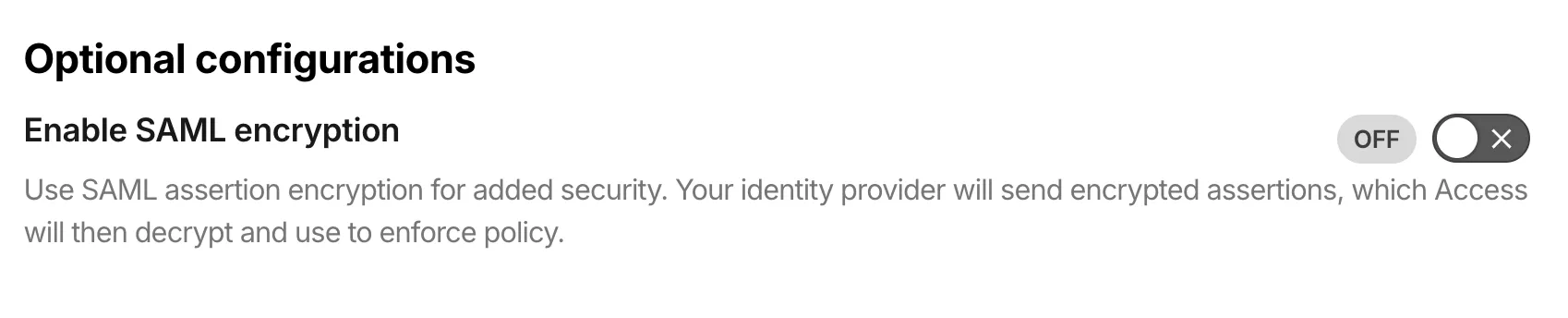
SAML 加密包括内置的证书生命周期管理:
- 自动生成证书:当您为身份提供商开启 SAML 加密时,Access 会生成一个加密证书。
- 证书轮换:无停机轮换证书。之前的证书在过期前保持有效,为您留出时间来更新 IdP。
- PEM 导出:复制 PEM 格式的证书以便手动上传到您的 IdP,或者将您的 IdP 指向 SAML 元数据端点以进行自动检索。
要开始使用,请参阅加密 SAML 断言。
Cisco IOS XE
用于 Cloudflare WAN 的 Cisco IOS XE 第三方集成指南已更新,包含以下内容:
- 后量子密码学 (PQC)
- 策略路由 (PBR)
- IP 服务水平协议 (IP SLA)
此链接将直接带您进入已更新的 Cisco IOS XE 指南。
Cloudflare One Client for macOS (version 2026.5.1155.1)
A new Beta release for the macOS Cloudflare One Client is now available on the beta releases downloads page.
This release introduces the new Cloudflare One Client UI for macOS! You can expect a cleaner and more intuitive design as well as easier access to common actions and information. Here are some of the many things we have found our users appreciate:
- Right click context menu to access the most common client actions quickly
- Built-in captive portal login experience
Additional Changes and improvements
- The client now applies DNS search suffixes configured in your device profile / network policy. Administrators can push a list of DNS search domains that the client appends to single-label queries, alongside any system-configured suffixes. See DNS search suffixes for details.
- Administrators can now control which virtual networks (VNETs) are available to which users via WARP device profile settings in the Zero Trust dashboard. Previously, every VNET in the organization was visible to every device; you can now scope the VNET picker per profile so users only see the networks relevant to them. See VNET availability for details.
- Added a local-file signal source for Emergency Disconnect. In addition to the existing HTTPS polling mechanism, administrators can now configure WARP to monitor for a file on disk; the presence of the file triggers an emergency disconnect even if both Cloudflare and your own infrastructure are unreachable. Either signal being asserted triggers disconnect; both must be cleared for normal operation to resume.
- Added new warp-cli debug commands for interactive connection diagnosis. See Extra debug logging for details.
- The local DNS proxy now supports DNSSEC passthrough. DNSSEC-signed responses are forwarded to the application intact (including DO/AD bits and RRSIG records), so applications that validate DNSSEC locally — including resolvers and the dig/drill tooling — work correctly through the client.
- Added a new MDM format for organization-wide settings, including a cleaner way to configure the compliance environment (e.g. FedRAMP). The previous per-configuration approach still works, but the new format is now recommended. See the updated Cloudflare One MDM documentation for details.
- Client Certificate device-posture checks now support template variables (e.g.
${serial_number},${device_uuid}) in the Subject Alternative Name field, matching what the documentation has always claimed. Previously only the Common Name field accepted variables, which broke posture rules that pinned identity to a SAN entry. - Fixed the in-client captive-portal browser rendering a blank "Success" page on some airline Wi-Fi networks (United inflight Wi-Fi was the reported case). The browser now reliably loads the airline's real portal page so users can complete sign-in from inside the client instead of having to open a separate browser.
- Fixed an issue in proxy mode where hostnames containing underscores (e.g. ai_app.com) were rejected, breaking apps that depend on such hostnames (notably ChatGPT sandbox apps). The local proxy now accepts underscore-containing hostnames in CONNECT requests.
Known issues
- Registration may hang at "Checking your organization configuration" due to IPC errors. A system reboot should resolve the error, allowing registration to proceed.
- Split tunnel list configuration is not available in the new UI. Management of split tunnel entries is currently only possible via
warp-cli tunnel ipandwarp-cli tunnel host. UI support will be added in a future release.
Cloudflare One Client for Windows (version 2026.5.1155.1)
A new Beta release for the Windows Cloudflare One Client is now available on the beta releases downloads page.
This release introduces the new Cloudflare One Client UI for Windows! You can expect a cleaner and more intuitive design as well as easier access to common actions and information. Here are some of the many things we have found our users appreciate:
- Right click context menu to access the most common client actions quickly
- Built-in captive portal login experience
Additional Changes and improvements
- The client now applies DNS search suffixes configured in your device profile / network policy. Administrators can push a list of DNS search domains that the client appends to single-label queries, alongside any system-configured suffixes. See DNS search suffixes for details.
- Administrators can now control which virtual networks (VNETs) are available to which users via WARP device profile settings in the Zero Trust dashboard. Previously, every VNET in the organization was visible to every device; you can now scope the VNET picker per profile so users only see the networks relevant to them. See VNET availability for details.
- Added mandatory authentication. When enabled via MDM, the Cloudflare One Client blocks all Internet traffic from the moment the machine boots until the user authenticates, closing the visibility gap on newly deployed devices and during re-authentication. See the announcement blog and documentation for details.
- Added a local-file signal source for Emergency Disconnect. In addition to the existing HTTPS polling mechanism, administrators can now configure WARP to monitor for a file on disk; the presence of the file triggers an emergency disconnect even if both Cloudflare and your own infrastructure are unreachable. Either signal being asserted triggers disconnect; both must be cleared for normal operation to resume.
- Added new warp-cli debug commands for interactive connection diagnosis. See Extra debug logging for details.
- The local DNS proxy now supports DNSSEC passthrough. DNSSEC-signed responses are forwarded to the application intact (including DO/AD bits and RRSIG records), so applications that validate DNSSEC locally — including resolvers and the dig/drill tooling — work correctly through the client.
- Added a new MDM format for organization-wide settings, including a cleaner way to configure the compliance environment (e.g. FedRAMP). The previous per-configuration approach still works, but the new format is now recommended. See the updated Cloudflare One MDM documentation for details.
- Client Certificate device-posture checks now support template variables (e.g.
${serial_number},${device_uuid}) in the Subject Alternative Name field, matching what the documentation has always claimed. Previously only the Common Name field accepted variables, which broke posture rules that pinned identity to a SAN entry. - The UseWebView2 registry value (HKLM\SOFTWARE\Cloudflare\CloudflareWARP\UseWebView2 = y) is once again honored by the new GUI for authentication, so administrators who prefer the embedded WebView2 browser for sign-in can opt back in. This setting was effectively ignored in the previous release; the default browser was always used. This key is now also honored for re-authentications.
- Fixed a crash in the authentication browser when navigating to a site that prompts for browser permissions (microphone, camera, notifications, etc.). The same fix had previously landed for the captive-portal browser; this extends it to the auth browser.
- Fixed an issue in proxy mode where hostnames containing underscores (e.g. ai_app.com) were rejected, breaking apps that depend on such hostnames (notably ChatGPT sandbox apps). The local proxy now accepts underscore-containing hostnames in CONNECT requests.
Known issues
- An error indicating that Microsoft Edge can't read and write to its data directory may be displayed during captive portal login; this error is benign and can be dismissed.
- Registration may hang at "Checking your organization configuration" due to IPC errors. A system reboot should resolve the error, allowing registration to proceed.
- Split tunnel list configuration is not available in the new UI. Management of Split Tunnel entries is currently only possible via
warp-cli tunnel ipandwarp-cli tunnel host. UI support will be added in a future release. - Windows ARM may prompt the user to close running applications while trying to install this version. Simply click “Ok” with the default highlighted option.
- DNS resolution may be broken when the following conditions are all true:
- The client is in Secure Web Gateway without DNS filtering (tunnel-only) mode.
- A custom DNS server address is configured on the primary network adapter.
- The custom DNS server address on the primary network adapter is changed while the client is connected.
To work around this issue, please reconnect the client by selecting "disconnect" and then "connect" in the client user interface.
用于 MCP 服务器门户的工具和提示词别名
当您通过 MCP 服务器门户连接第三方 MCP 服务器时,您无法控制服务器作者如何命名工具或编写描述。不明确的名称使 AI 代理更难选择正确的工具,也使用户更难理解可用内容。
您现在可以直接在门户上重命名工具和提示词并重写其描述,而无需修改上游服务器。例如,名为 super_cool_tool 的工具可以变成 search_customer_records,并配有专门针对您组织定制的描述。
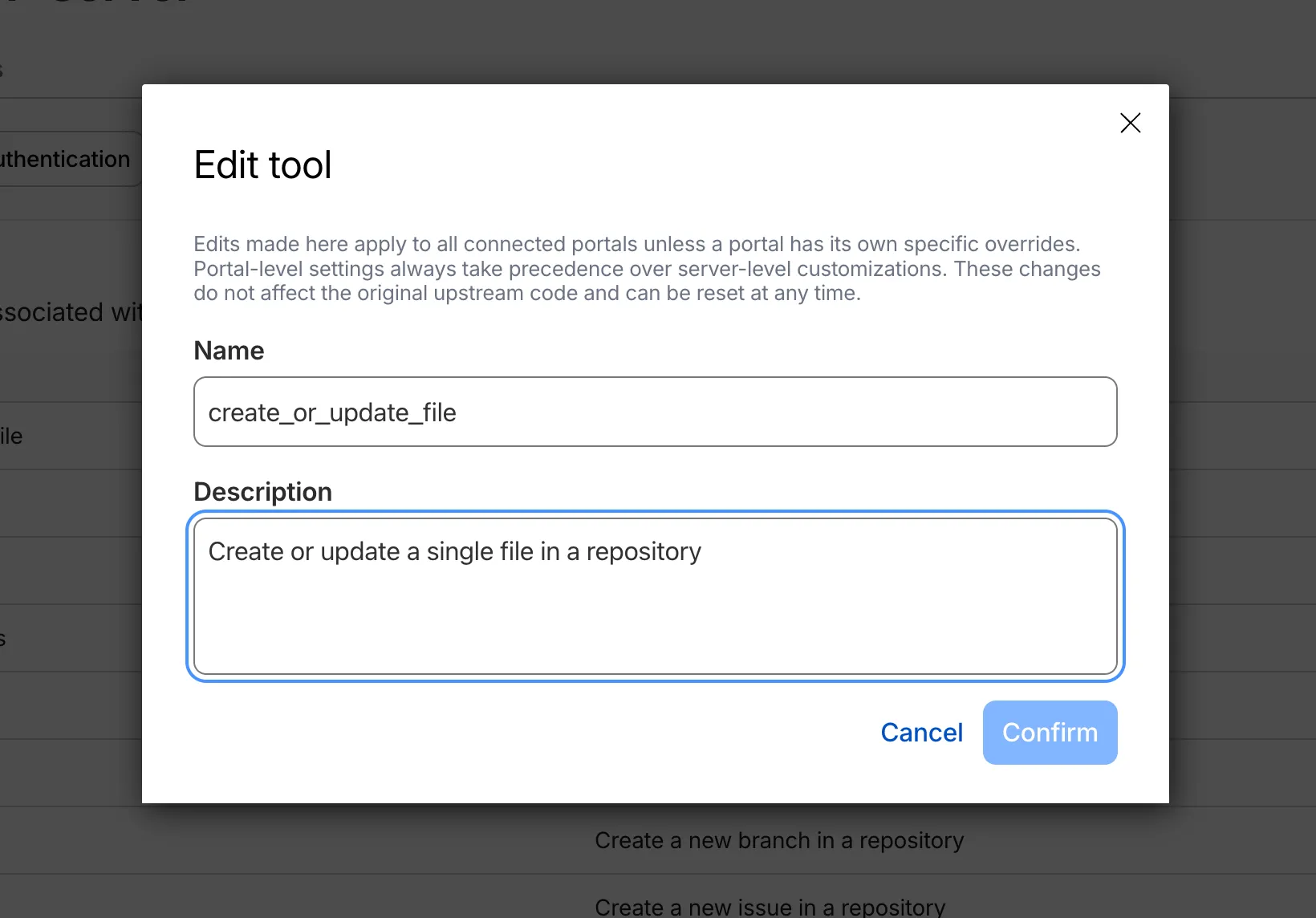
修改后的工具会在工具列表中显示 **Modified(已修改)**标签,以便管理员一眼就能看出哪些工具被自定义过。
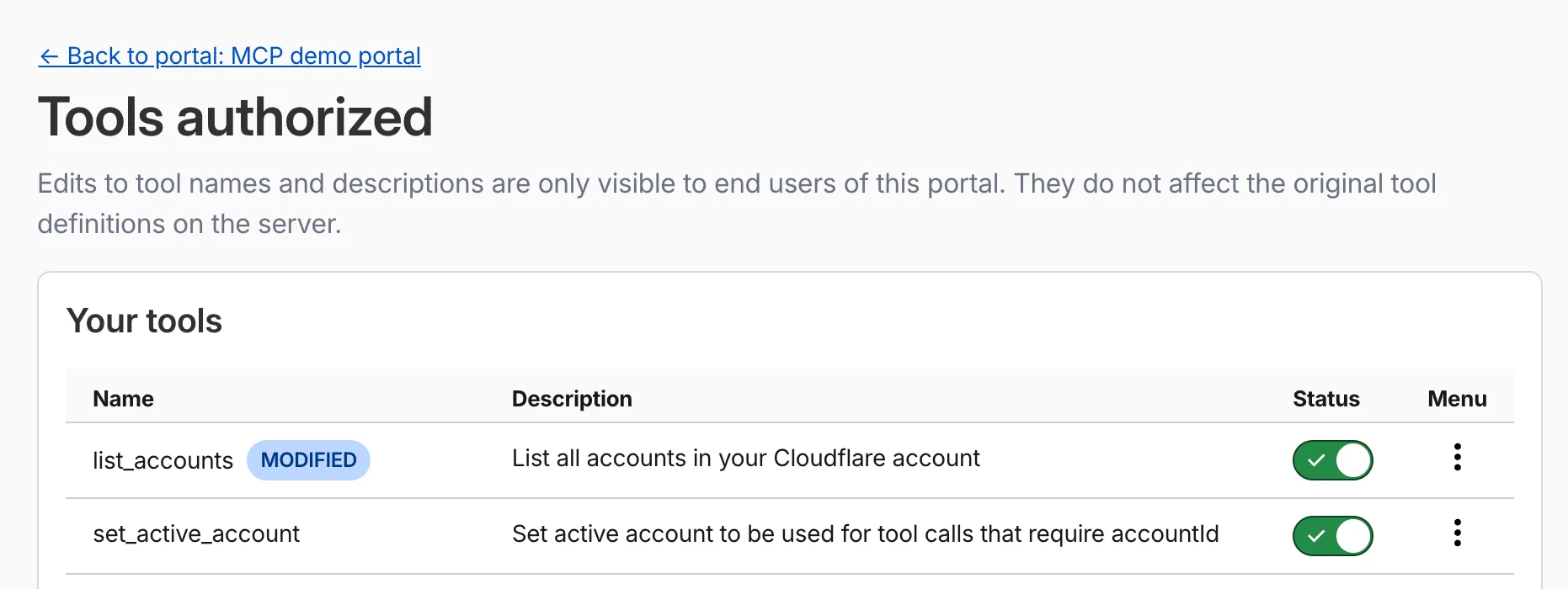
别名会覆盖 MCP 客户端接收到的元数据。您可以在两个层级设置它们:
- 针对每个门户:仅在特定门户内适用。优先级高于服务器级别的别名。
- 针对每个服务器:适用于所有使用该服务器的门户。
您可以随时重置别名以恢复原始的上游名称。
欲了解更多信息,请参阅工具和提示词别名。
Cloudflare Mesh 高可用性副本管理
Cloudflare Mesh 仪表板现在显示高可用性节点的单副本详情。您可以查看哪个副本是活动状态,查看每个副本的 Mesh IP 和连接详情,并手动触发故障转移——这一切都可以从节点详情页面完成。

- 节点详情页面上的副本选项卡——在副本之间切换以查看每个副本的 Mesh IP、边缘数据中心、源站 IP、平台、版本和运行时间。
- 活动/备用(Active/passive)徽章,用于识别当前正在路由流量的副本。
- 手动故障转移——只需单击一下即可将备用副本提升为活动状态。先前的活动副本将切换为备用(standby)状态。
- 概览表中的 HA 徽章,用于识别运行多个副本的节点。
- 概览表中显示的活动副本 IP——仪表板现在会解析出哪个副本处于活动状态并显示正确的 Mesh IP。
要手动提升备用副本:
- 在 Cloudflare 仪表板 ↗中,前往 Networking(网络) > Mesh。
- 选择启用了 HA 的节点。
- 选择备用副本选项卡。
- 选择 Promote to active(提升为活动) 并确认。
流量会立即重定向到提升后的副本。有关故障转移行为的详情,请参阅高可用性。
在 Cloudflare One 中使用自然语言编写正则表达式 (regex)
支持正则表达式的 Cloudflare Gateway 策略选择器现在可以在仪表板中使用自然语言编写。当使用基于正则表达式的选择器(例如 matches regex)构建策略时,您可以用简明英语描述您想要匹配的内容,Cloudflare Agent 将生成并验证相应的正则表达式。
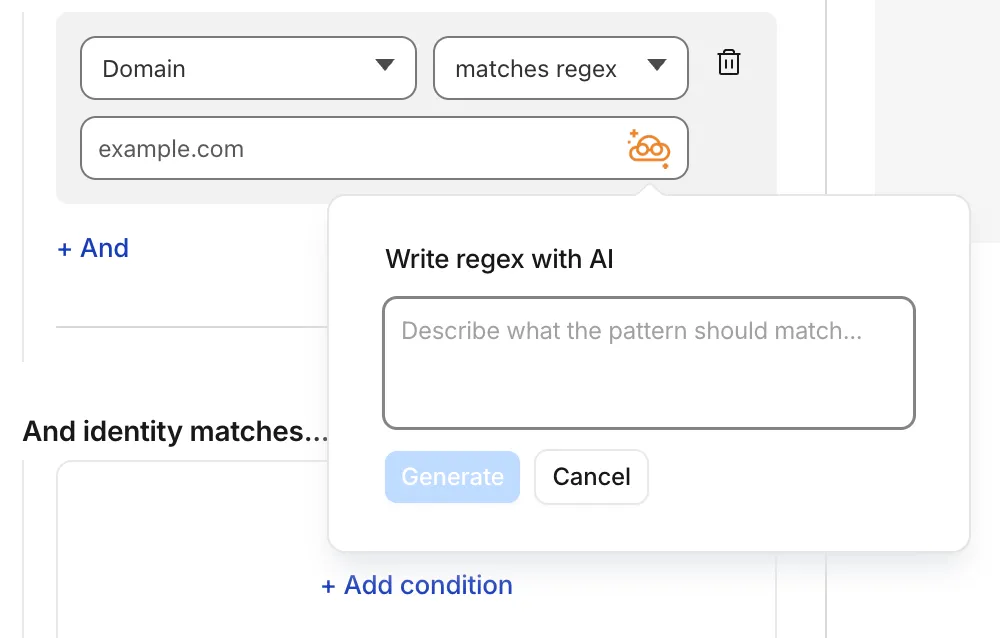
要开始使用,请在 Gateway 策略构建器中选择兼容正则表达式的选择器,然后选择该图标。您将看到一个用于输入自然语言的字段,例如“以 /api/v1 开头的任何 URL”或“主机中包含 gooogle 的 .com、.net 和 .app 主机”。
您还可以使用该工具来解释现有的正则表达式。如果策略中已包含正则表达式模式,您可以立即生成通俗易懂的语言描述。
内置的反馈机制允许您对每次交互进行评分,以帮助随着时间推移提高输出质量。
有关更多信息,请参阅 Cloudflare One 防火墙策略,并期待很快在数据防泄露(DLP)配置文件中支持相同的功能。
Cloudflare Tunnel 现在在启动时运行连接性预检查
从 cloudflared 版本 2026.5.2 ↗ 开始,Cloudflare Tunnel 直接在二进制文件内部自动执行整个连接性预检查工作流程。以前,客户必须安装 dig 和 netcat 并手动运行这些命令来验证其环境。现在 cloudflared 在启动时以原生方式执行此操作 — 并在某些内容被阻止时提供可操作的修正提示。

在每次运行 cloudflared tunnel run(以及 cloudflared tunnel diag)时,二进制文件现在都会原生检查:
- DNS 解析 —
region1.v2.argotunnel.com和region2.v2.argotunnel.com解析为有效的 Cloudflare IP。 - 传输连接性 — 端口
7844上的出站UDP (QUIC)和TCP (HTTP/2)。 - Management API — 发往
api.cloudflare.com的出站TCP/443,用于软件更新。
结果将以可扫描的 CLI 表格形式打印,包含以下三种状态:
- ✅ 通过 — 检查成功。
- ⚠️ 警告 — 非阻塞问题,例如 Management API 无法访问,因此自动更新将无法工作,但 Tunnel 仍会启动。
- ❌ 失败 — 阻塞问题,并附有具体的修正提示(例如
Allow outbound UDP on port 7844)。
如果 DNS 无法解析,或者端口 7844 上的 UDP 和 TCP 双双失败,cloudflared 将提前退出并报告失败,而不是在不透明的 failed to dial 错误中循环。
现在每次启动都会自动运行预检查,这还能捕获诸如通宵防火墙策略变更之类的问题退化 — 无需记得重新运行故障排除指南。
要获取这一新行为,请将 cloudflared 升级到版本 2026.5.2 或更高版本。欲了解更多细节,请参阅连接性预检查文档。
Cloudflare One Client for macOS (version 2026.4.1390.0)
A new GA release for the macOS Cloudflare One Client is now available on the stable releases downloads page.
This release introduces the new Cloudflare One Client UI for macOS! You can expect a cleaner and more intuitive design as well as easier access to common actions and information. Here are some of the many things we have found our users appreciate:
- Right click context menu to access the most common client actions quickly
- Built-in captive portal login experience
Additional Changes and improvements
- Added a new CLI command: warp-cli mdm refresh. This command executes an immediate refresh of the Mobile Device Management (MDM) configuration file.
- Fixed a proxy mode connection stall issue.
Known issues
- Registration may hang at "Checking your organization configuration" due to IPC errors. A system reboot should resolve the error, allowing registration to proceed.
- Split tunnel list configuration is not available in the new UI. Management of split tunnel entries is currently only possible via
warp-cli tunnel ipandwarp-cli tunnel host. UI support will be added in a future release.
Cloudflare One Client for Windows (version 2026.4.1390.0)
A new GA release for the Windows Cloudflare One Client is now available on the stable releases downloads page.
This release introduces the new Cloudflare One Client UI for Windows! You can expect a cleaner and more intuitive design as well as easier access to common actions and information. Here are some of the many things we have found our users appreciate:
- Right click context menu to access the most common client actions quickly
- Built-in captive portal login experience
Additional Changes and improvements
- Added a new CLI command: warp-cli mdm refresh. This command executes an immediate refresh of the Mobile Device Management (MDM) configuration file.
- Fixed a proxy mode connection stall issue.
Known issues
- Registration authentication for devices via the integrated WebView2 browser is unavailable in this version as a temporary measure. As a result, the client will utilize the default browser on the device to complete the authentication process.
- An error indicating that Microsoft Edge can't read and write to its data directory may be displayed during captive portal login; this error is benign and can be dismissed.
- Registration may hang at "Checking your organization configuration" due to IPC errors. A system reboot should resolve the error, allowing registration to proceed.
- Split tunnel list configuration is not available in the new UI. Management of Split Tunnel entries is currently only possible via
warp-cli tunnel ipandwarp-cli tunnel host. UI support will be added in a future release. - Windows ARM may prompt the user to close running applications while trying to install this version. Simply click “Ok” with the default highlighted option.
- DNS resolution may be broken when the following conditions are all true:
- The client is in Secure Web Gateway without DNS filtering (tunnel-only) mode.
- A custom DNS server address is configured on the primary network adapter.
- The custom DNS server address on the primary network adapter is changed while the client is connected.
To work around this issue, please reconnect the client by selecting "disconnect" and then "connect" in the client user interface.
Cloudflare One Client for Linux (version 2026.4.1390.0)
A new GA release for the Linux Cloudflare One Client is now available on the stable releases downloads page.
This release introduces the new Cloudflare One Client UI for Linux! You can expect a cleaner and more intuitive design as well as easier access to common actions and information. Here are some of the many things we have found our users appreciate:
- Right click context menu to access the most common client actions quickly
- Built-in captive portal login experience
Changes and improvements
- Added a new CLI command: warp-cli mdm refresh. This command executes an immediate refresh of the Mobile Device Management (MDM) configuration file.
- Official support for RHEL 9 has been added for Cloudflare Mesh nodes. To install the RHEL 9 package, the Extra Packages for Enterprise Linux (EPEL) repository must be active, as it contains dependencies required for the tray icon and captive portal webview.
- Fixed a proxy mode connection stall issue.
Known issues
- Registration may hang at "Checking your organization configuration" due to IPC errors. A system reboot should resolve the error, allowing registration to proceed.
- Split tunnel list configuration is not available in the new UI. Management of split tunnel entries is currently only possible via
warp-cli tunnel ipandwarp-cli tunnel host. UI support will be added in a future release.
Cloudflare Tunnel 和 Cloudflare Mesh 的细粒度权限
您现在可以将 Cloudflare 权限范围限定为单个 Cloudflare Tunnel 实例和 Cloudflare Mesh 节点。管理员可以委派对特定 Tunnel 或 Mesh 节点的访问权限,而无需授予对整个账户中私有网络的控制权。
当您添加成员或创建权限策略时,资源选择器现在将 Cloudflare Tunnel 实例和 Cloudflare Mesh 节点列为可限定范围的资源类型。您可以:
- 向支持操作人员授予对单个 Cloudflare Tunnel 实例的只读角色,以进行日志流传输和诊断,而不会暴露其他 Tunnel 或允许破坏性操作。
- 向应用程序团队授予对特定 Cloudflare Mesh 节点的写入角色,而无需让他们访问私有网络的其余部分。
- 将单个策略的范围同时限定为一个或多个 Tunnel 以及 Mesh 节点。
细粒度权限是与现有账户级别角色平行的层,它们不会取代后者。
- 现现的账户级别角色继续有效。 拥有
Cloudflare Access或Cloudflare Zero Trust的成员将保留对账户中每个 Tunnel 和 Mesh 节点的写入访问权限。这确保了与现有自动化和令牌的向后兼容性。 - 细粒度权限是累加的。 对于针对特定 Tunnel 或 Mesh 节点的任何 API 请求,如果主体具有账户级别角色或该资源的细粒度权限,则将授予访问权限。
- 资源枚举是感知授权的。 列表端点(
GET /accounts/{id}/cfd_tunnel,GET /accounts/{id}/warp_connector)仅返回主体至少具有只读访问权限的资源。
- 配置 Cloudflare Tunnel 的细粒度权限。
- 配置 Cloudflare One 中 Cloudflare Tunnel 和 Cloudflare Mesh 的细粒度权限。
- 查看 Cloudflare 角色参考上的资源范围角色。
Cloudflare 作为身份提供商和账户成员资格选择器
Cloudflare Access 现在支持将 Cloudflare 本身用作身份提供商。如果您发布了 Access 应用程序并选择 Cloudflare 作为登录方法,用户可以使用其现有的 Cloudflare 账户登录——无需一次性 PIN,无需第三方 IdP 配置,也无需共享电子邮件收件箱。身份验证由 Cloudflare 自身的账户安全性(包括多因素身份验证)提供支持,因此在大多数用例中,它比基于 OTP 的登录更易于设置且更安全。
Cloudflare 现在是所有新创建的 Zero Trust 账户的默认身份提供商,取代了一次性 PIN(One-time PIN)。
这还启用了两个新功能:
- Cloudflare 账户成员选择器(Cloudflare Account Member selector) — 一种新的策略选择器,根据用户在 Cloudflare 账户中的成员资格来进行匹配。您可以针对当前账户,也可以为跨账户访问场景指定不同的账户 ID。
- Restrict to account members(限制为账户成员) — 一种身份提供商配置选项,将身份验证限制为属于您 Cloudflare 账户成员的用户。
要开始使用,请在您的 Zero Trust 设置中将 Cloudflare 添加为身份提供商。
CASB 新增对 Claude Compliance API 的支持
Cloudflare CASB 现已与 Claude Compliance API ↗ 集成。此增强功能为安全团队提供了对其组织内 Claude 使用模式、管理员活动和合规相关事件的可见性。
Claude Compliance API 提供对 Claude Enterprise 和 Claude Platform 内审计日志及管理操作的结构化访问。Cloudflare CASB 摄取这些数据,以呈现帮助组织增强安全态势并执行 AI 治理的安全发现结果。
从今日起,安全团队可以扫描以下资产的安全发现结果:
- 公开项目 — 设置为公开可见性的项目
- 项目附件 — 添加到项目中违反 DLP 策略的文件和文档
- 聊天文件 — 违反 DLP 策略的用户上传和提供商生成的文件
- 聊天消息 — 违反 DLP 策略的用户提示和提供商响应
- Artifacts — 违反 DLP 策略的提供商生成的文档和文件
此集成向所有 Cloudflare One 客户开放。新 Cloudflare 客户可以注册并免费开始使用前两个集成。现有客户可直接在仪表板中启用集成。集成在启用后立即开始扫描,并在几分钟内在仪表板中呈现发现结果。
Unified Routing 支持 Network Analytics
使用 Unified Routing 模式的账户现在已完全支持 Network Analytics。通过 Unified Routing onramp 和 offramp 的流量现在可以在 Network Analytics 中可见,其维度和过滤器与标准数据平面上的流量相同。
这弥补了已将隧道迁移到 Unified Routing 但在 Network Analytics 仪表板中失去对其数据平面流量可视性的客户的功能差距。无需更改配置——所有启用了 Unified Routing 的账户都会自动收集分析数据。
有关其余的 Beta 限制,请参阅流量引导 Beta 限制。
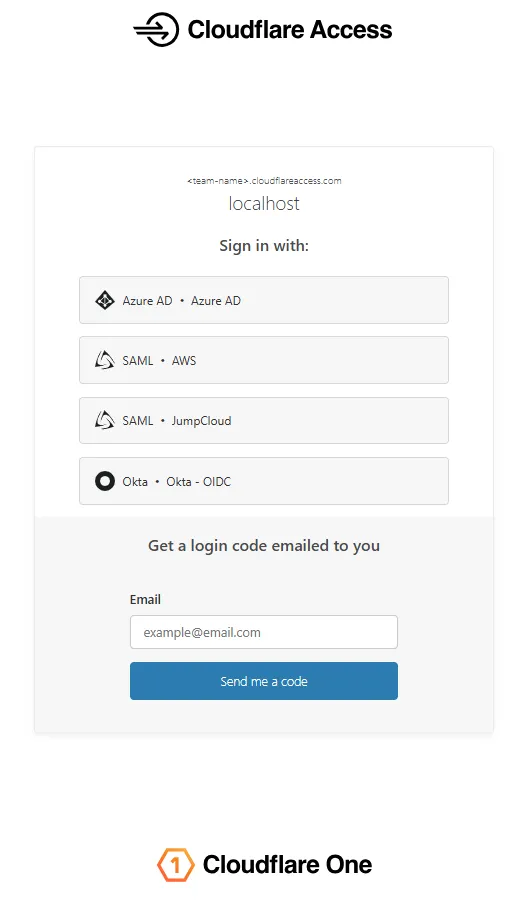
Access 登录页面更新
Access 登录页面和一次性密码 (OTP) 页面现在采用全新设计,提高了视觉一致性、用户信任度和移动端自适应性。
更新前:
更新后:
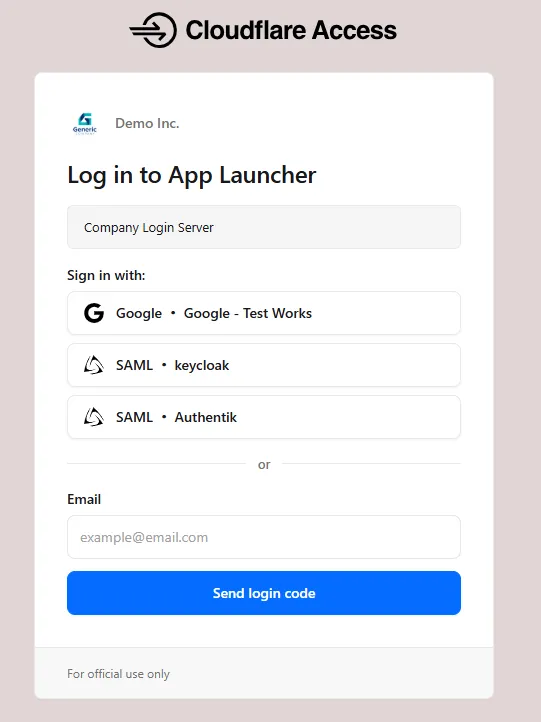
更新后的登录体验包括:
- 统一的身份验证卡 - 所有登录选项(身份提供商按钮、电子邮件输入、OTP)现在都显示在具有一致样式的单个卡片中,取代了先前的多部分布局。
- 一致的按钮样式 - 身份提供商按钮使用统一的大小和布局,以便于快速浏览和选择。
- 更好的移动端体验 - 自适应布局的改进确保登录页面在手机和平板电脑上正确渲染。
- 支持深色模式 - 登录页面现在支持深色模式。
新账户分配单个 IPv4 Anycast 地址
默认情况下,现在为新的 Magic Transit 和 Cloudflare WAN 账户分配单个 IPv4 Anycast 地址。
Cloudflare 会通过从全球许多分布式数据中心内的多个节点广播您的端点 IP,从而自动处理其网络上的故障。要处理您网络上的故障,请从不同的路由器配置两个隧道。
如需为您的账户申请额外的 Anycast IP 地址,请联系您的账户团队。
有关隧道配置指南,请参阅 Cloudflare WAN 的配置隧道端点或 Magic Transit 的配置隧道端点。
使用自然语言创建 Gateway 防火墙策略
Cloudflare Gateway 现在支持针对 DNS、HTTP 和 网络防火墙策略使用自然语言创建策略。管理员可以用纯文本描述他们想要的结果,Cloudflare 将生成一个完整的策略规则来填充策略生成器表单。
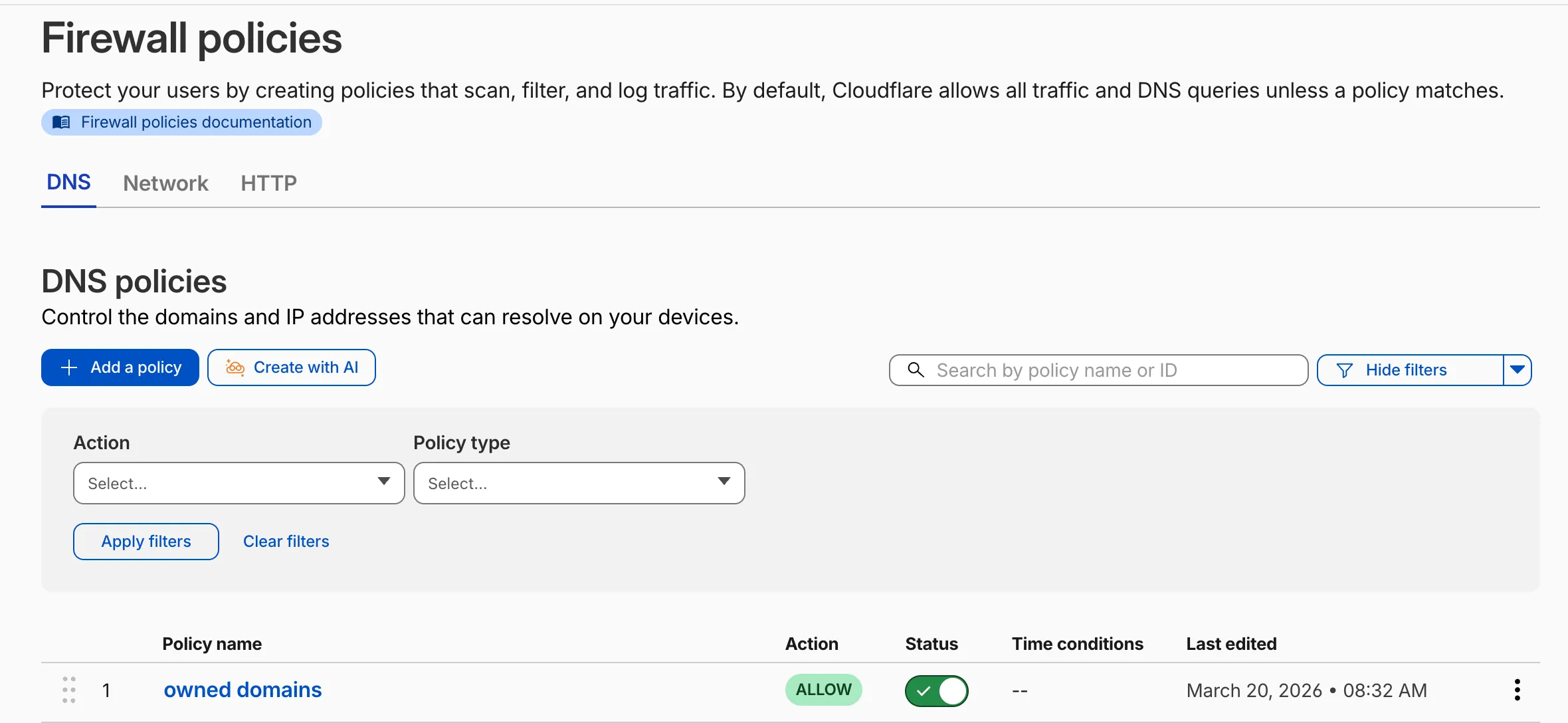
要使用自然语言创建策略,请在任何 Gateway 防火墙策略选项卡上选择 Create with AI(使用 AI 创建)。选择策略类型,描述该策略应执行的操作,随后一个完整配置的规则将显示在策略生成器中以供审查。您可以在保存之前编辑任何字段,或使用不同的提示词重新生成。
生成的策略结合了您的账户上下文(包括列表、DLP 配置文件、应用和设备状态检查),从而自动解析对现有资源的引用。
内置的反馈机制允许您对每个生成的策略进行评分并提供可选评论,Cloudflare 会使用这些评论来不断改进输出质量。
有关更多信息,请参阅 Gateway 防火墙策略。
Cloudflare One Client for Windows (version 2026.4.1350.0)
A new GA release for the Windows Cloudflare One Client is now available on the stable releases downloads page.
This release introduces the new Cloudflare One Client UI for Windows! You can expect a cleaner and more intuitive design as well as easier access to common actions and information. Here are some of the many things we have found our users appreciate:
- Right click context menu to access the most common client actions quickly
- Built-in captive portal login experience
Additional Changes and improvements
- Added a new CLI command: warp-cli mdm refresh. This command executes an immediate refresh of the Mobile Device Management (MDM) configuration file.
Known issues
- Registration authentication for devices via the integrated WebView2 browser is unavailable in this version as a temporary measure. As a result, the client will utilize the default browser on the device to complete the authentication process.
- An error indicating that Microsoft Edge can't read and write to its data directory may be displayed during captive portal login; this error is benign and can be dismissed.
- Registration may hang at "Checking your organization configuration" due to IPC errors. A system reboot should resolve the error, allowing registration to proceed.
- Split tunnel list configuration is not available in the new UI. Management of Split Tunnel entries is currently only possible via
warp-cli tunnel ipandwarp-cli tunnel host. UI support will be added in a future release. - Windows ARM may prompt the user to close running applications while trying to install this version. Simply click “Ok” with the default highlighted option.
- DNS resolution may be broken when the following conditions are all true:
- The client is in Secure Web Gateway without DNS filtering (tunnel-only) mode.
- A custom DNS server address is configured on the primary network adapter.
- The custom DNS server address on the primary network adapter is changed while the client is connected.
To work around this issue, please reconnect the client by selecting "disconnect" and then "connect" in the client user interface.
Cloudflare One Client for macOS (version 2026.4.1350.0)
A new GA release for the macOS Cloudflare One Client is now available on the stable releases downloads page.
This release introduces the new Cloudflare One Client UI for macOS! You can expect a cleaner and more intuitive design as well as easier access to common actions and information. Here are some of the many things we have found our users appreciate:
- Right click context menu to access the most common client actions quickly
- Built-in captive portal login experience
Additional Changes and improvements
- Added a new CLI command: warp-cli mdm refresh. This command executes an immediate refresh of the Mobile Device Management (MDM) configuration file.
Known issues
- Registration may hang at "Checking your organization configuration" due to IPC errors. A system reboot should resolve the error, allowing registration to proceed.
- Split tunnel list configuration is not available in the new UI. Management of split tunnel entries is currently only possible via
warp-cli tunnel ipandwarp-cli tunnel host. UI support will be added in a future release.
Cloudflare One Client for Linux (version 2026.4.1350.0)
A new GA release for the Linux Cloudflare One Client is now available on the stable releases downloads page.
This release introduces the new Cloudflare One Client UI for Linux! You can expect a cleaner and more intuitive design as well as easier access to common actions and information. Here are some of the many things we have found our users appreciate:
- Right click context menu to access the most common client actions quickly
- Built-in captive portal login experience
Changes and improvements
- Added a new CLI command: warp-cli mdm refresh. This command executes an immediate refresh of the Mobile Device Management (MDM) configuration file.
- Official support for RHEL 9 has been added for Cloudflare Mesh nodes. To install the RHEL 9 package, the Extra Packages for Enterprise Linux (EPEL) repository must be active, as it contains dependencies required for the tray icon and captive portal webview.
Known issues
- Registration may hang at "Checking your organization configuration" due to IPC errors. A system reboot should resolve the error, allowing registration to proceed.
- Split tunnel list configuration is not available in the new UI. Management of split tunnel entries is currently only possible via
warp-cli tunnel ipandwarp-cli tunnel host. UI support will be added in a future release.
UDP 端口 500 上的 IKE 支持 NAT-T
Cloudflare IPsec 现在支持标准 NAT 穿透(NAT-T,NAT traversal)流程,其中 IKE 在 UDP 端口 500 上启动,并在检测到 NAT 后切换到 UDP 端口 4500。
以前,必须将 NAT 后面的设备配置为直接在 UDP 端口 4500 上发起 IKE。当路径中存在 NAT 时,在 UDP 端口 500 上启动的设备无法完成 IKE 握手。这需要在 VeloCloud SD-WAN 边缘、Cisco IOS-XE 路由器和 Juniper SRX 防火墙等设备上进行自定义配置,而且并非在所有平台上都可行。
已发生的变化:
- NAT 后面的设备现在可以在 UDP 端口
500或 UDP 端口4500上发起 IKE。 - 在 UDP 端口
500上启动 IKE 并在检测到 NAT 后切换到 UDP 端口4500的设备现在可以成功完成握手。 - Cloudflare 上不需要更改配置。此更改适用于 Cloudflare WAN 和 Magic Transit 上的所有 IPsec 隧道。
此更改不影响现有隧道:
- 未检测到 NAT 且使用 UDP 端口
500的隧道继续像以前一样运行。 - 配置为在 UDP 端口
4500上启动 IKE 的隧道继续像以前一样运行。 - NAT 检测逻辑未发生变化。
有关配置详细信息,请参阅GRE 和 IPsec 隧道。