
Kandji 将 Cloudflare One Client(前身为 WARP)部署为自定义应用。有关 Kandji 如何部署自定义应用的概述,请参阅其知识库文章 ↗。
为了实现最简单的部署,Kandji 创建了一个可下载的配置文件,该文件允许 Cloudflare One Client 的用户通知,并配置其隐私首选项策略控制(PPPC ↗)以具有完全磁盘访问权限。
-
下载自定义配置文件 ↗。
-
添加自定义配置文件:
- 转到 Library(资源库) > Add New(添加新项) > Add Library Item(添加资源库项目) > Custom Profile(自定义描述文件)。
- 选择 Add & Configure(添加并配置)。
-
配置自定义配置文件:
- 输入自定义配置文件的 Name(名称)。
- 将您的自定义配置文件分配给测试 Blueprint。
- 将 Device Families(设备系列) 设置为 Mac。
- 上传您之前下载的
cloudflare_warp.mobileconfig文件。 - 保存自定义配置文件。
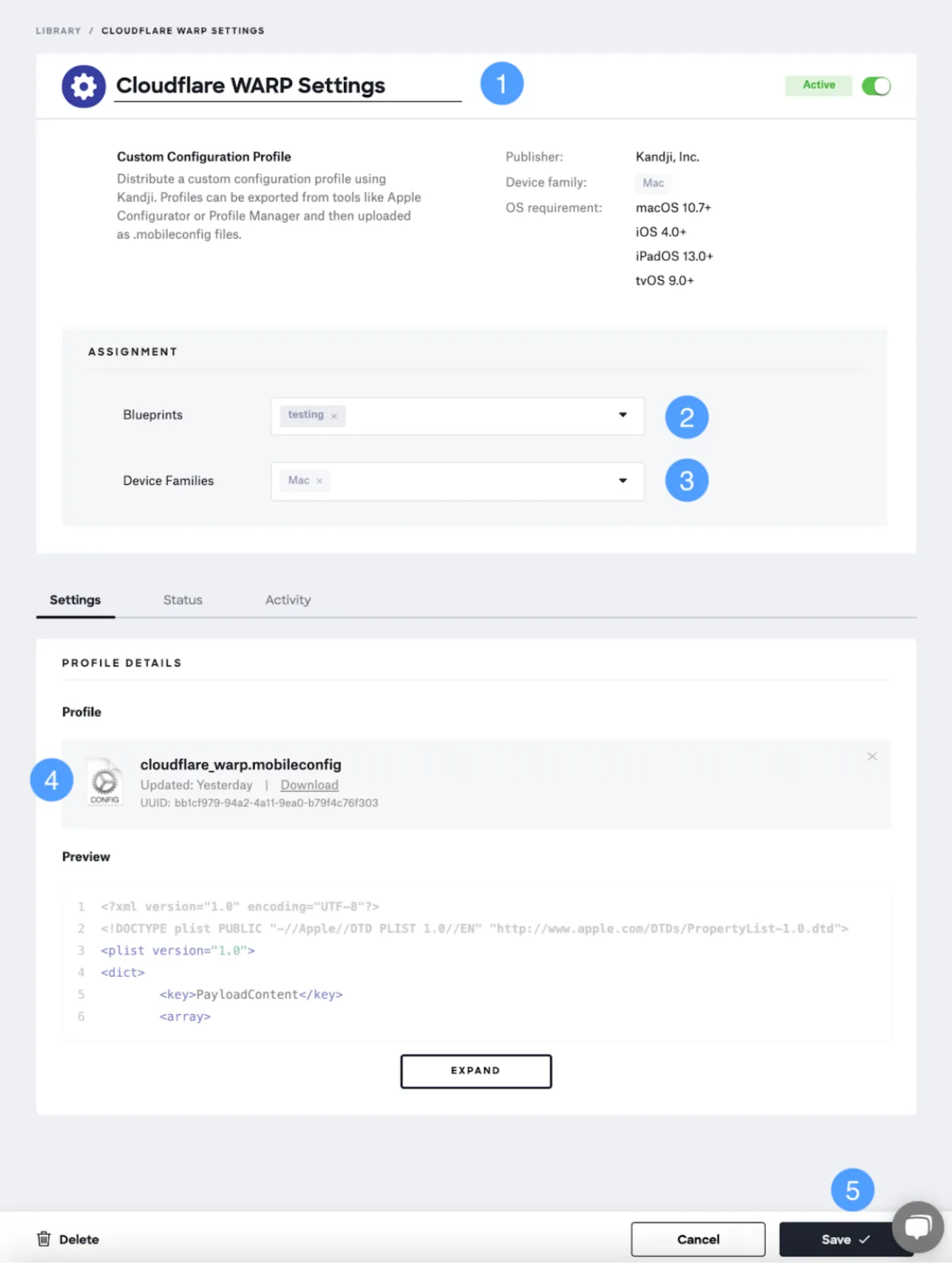
注意:此图片中的标签可能反映了以前的产品名称。
-
添加自定义应用:
- 转到 Library(资源库) > Add New(添加新项) > Add Library Item(添加资源库项目) > Custom App(自定义应用)。
- 选择 Add & Configure(添加并配置)。
-
配置自定义应用:
-
命名自定义应用。
-
将自定义应用分配给用于配置文件的同一个测试 Blueprint。
-
选择 Audit and Enforce(审核并强制执行) 作为安装类型。
-
复制下方的 **Audit and Enforce Script(审核和强制执行脚本)**并将其粘贴到 Audit Script 文本字段中。
-
要强制执行最低应用版本,请使用审核脚本应强制执行的版本号(例如
1.5.207.0)更新审核脚本中的 ENFORCED_VERSION 变量。如果 ENFORCED_VERSION 留空(
""),审核脚本将不检查版本,仅检查 Applications 文件夹或其子文件夹中是否存在 Cloudflare WARP.app。更多详情请参阅脚本注释。 -
在 Install Details(安装详情) 部分中,选择 Installer Package(安装程序包)。
-
在 Installer Package(安装程序包) 下,上传
Cloudflare_WARP_<VERSION>.pkg文件。如果您还没有安装程序包,请在此处下载。 -
选择 Save(保存)。
-
要验证 Cloudflare One Client 是否已安装,请在 Custom App(自定义应用) 库中选择该应用并查看其 Status(状态) 选项卡。
部署 Cloudflare One 客户端后,您可以使用 Cloudflare One 客户端 GUI 中显示的连接状态消息来检查其连接进度。
以下审核脚本检查是否安装了 Cloudflare One Client,并可选地强制执行最低版本号。
#!/bin/zsh

###################################################################################################
# Created by Matt Wilson | [email protected] | Kandji, Inc. | Solutions Engineering
###################################################################################################
# Created on 07/30/2021
###################################################################################################
# Software Information
###################################################################################################
# This script is designed to check if an application is present. If the app is present, the
# script will check to see if a minimum version is being enforced. If a minimum app version is not
# being enforced, the script will only check to see if the app is installed or not.
###################################################################################################
# License Information
###################################################################################################
# Copyright 2021 Kandji, Inc.
#
# Permission is hereby granted, free of charge, to any person obtaining a copy of this
# software and associated documentation files (the "Software"), to deal in the Software
# without restriction, including without limitation the rights to use, copy, modify, merge,
# publish, distribute, sublicense, and/or sell copies of the Software, and to permit persons
# to whom the Software is furnished to do so, subject to the following conditions:
#
# The above copyright notice and this permission notice shall be included in all copies or
# substantial portions of the Software.
#
# THE SOFTWARE IS PROVIDED "AS IS", WITHOUT WARRANTY OF ANY KIND, EXPRESS OR IMPLIED,
# INCLUDING BUT NOT LIMITED TO THE WARRANTIES OF MERCHANTABILITY, FITNESS FOR A PARTICULAR
# PURPOSE AND NONINFRINGEMENT. IN NO EVENT SHALL THE AUTHORS OR COPYRIGHT HOLDERS BE LIABLE
# FOR ANY CLAIM, DAMAGES OR OTHER LIABILITY, WHETHER IN AN ACTION OF CONTRACT, TORT OR
# OTHERWISE, ARISING FROM, OUT OF OR IN CONNECTION WITH THE SOFTWARE OR THE USE OR OTHER
# DEALINGS IN THE SOFTWARE.
###################################################################################################

# Script version
_VERSION="1.0.0"

###################################################################################################
###################################### VARIABLES ##################################################
###################################################################################################
# If you would like to enforce a minimum version, be sure to update the ENFORCED_VERSION variable
# with the version number that the audit script should enforce. (Example version number
# 1.5.207.0). If ENFORCED_VERSION is left blank, the audit script will not check for a version and
# will only check for the presence of the Cloudflare WARP app at the defined APP_PATH.
ENFORCED_VERSION="1.5.207.0"

###################################################################################################

# Make sure that the application matches the name of the app that will be installed.
# This script will dynamically search for the application in the Applications folder. So
# there is no need to define an application path. The app must either install in the
# Applications folder or up to 3 sub-directories deep.
#   For example Applications/<app_folder_name>/<app_name.app>
APP_NAME="Cloudflare WARP.app"

# Change the PROFILE_PAYLOAD_ID_PREFIX variable to the profile prefix you want to wait on before
# running the installer. If the profile is not found, this audit and enforce script will exit 00
# and do nothing until the next kandji agent check-in.
PROFILE_PAYLOAD_ID_PREFIX="io.kandji.cloudflare.C59FD67"

###################################################################################################
###################################### FUNCTIONS ##################################################
###################################################################################################

return_installed_app_version() {
    # Return the currently installed application version
    #
    # $1 - Is the name of the application.
    local app_name="$1"
    local installed_version="" # Initialize local variable

    # Uses the find binary to look for the app inside of the Applications directory and
    # any subdirectories up to 3 levels deep.
    local find_app="$(/usr/bin/find /Applications -maxdepth 3 -name $app_name)"
    local ret="$?"

    # Check to see if the app is installed.
    if [[ "$ret" -eq 0 ]] && [[ -d "$find_app" ]] &&
        [[ "$app_name" == "$(/usr/bin/basename $find_app)" ]]; then
        # If the previous command returns true and the returned object is a directory
        # and the app name that we are looking for is exactly equal to the app name
        # found by the find command.

        # Gets the installed app version and replaces any "-" with "."
        installed_version=$(/usr/bin/defaults read \
            "$find_app/Contents/Info.plist" CFBundleShortVersionString |
            /usr/bin/sed "s/-/./g")

    else
        installed_version="None"
    fi

    echo "$installed_version"
}

###################################################################################################
###################################### MAIN LOGIC #################################################
###################################################################################################

# All of the main logic be here ... modify at your own risk.

# The profiles variable will be set to an array of profiles that match the prefix in
# the PROFILE_PAYLOAD_ID_PREFIX variable
profiles=$(/usr/bin/profiles show | grep "$PROFILE_PAYLOAD_ID_PREFIX" | sed 's/.*\ //')

# If the PROFILE_PAYLOAD_ID_PREFIX is not found, exit 0 to wait for the next agent run.
if [[ ${#profiles[@]} -eq 0 ]]; then
    echo "no profiles with ID $PROFILE_PAYLOAD_ID_PREFIX were found ..."
    echo "Waiting until the profile is installed before proceeding ..."
    echo "Will check again at the next Kandji agent check-in ..."
    exit 0

else
    echo "Profile prefix $PROFILE_PAYLOAD_ID_PREFIX present ..."

    # Uses the find binary to look for the app inside of the Applications directory and
    # any subdirectories up to 3 levels deep.
    find_app="$(/usr/bin/find /Applications -maxdepth 3 -name $APP_NAME)"
    ret="$?"

    # Check to see if the app is installed.
    if [[ "$ret" -eq 0 ]] && [[ -d "$find_app" ]] &&
        [[ "$APP_NAME" == "$(/usr/bin/basename $find_app)" ]]; then
        # If the previous command returns true and the returned object is a directory
        # and the app name that we are looking for is exactly equal to the app name
        # found by the find command.
        echo "$find_app was found ..."

        # Check to see if an ENFORCED_VERSION is set. If not, exit 0.
        if [[ "$ENFORCED_VERSION" == "" ]]; then
            echo "A minimum enforced version is not set ..."
            exit 0
        fi

        # Get the currently install version
        # Pass the APP_NAME variable from above to the return_installed_app_version function
        # Removing the periods from the version number so that we can make a comparison.
        installed_version="$(return_installed_app_version $APP_NAME | /usr/bin/sed 's/\.//g')"

        # Removing the periods from the version number so that we can make a comparison.
        enforced_version="$(echo $ENFORCED_VERSION | /usr/bin/sed 's/\.//g')"

        # Check to see if the installed_version is less than the enforced_version. If it is then
        # exit 1 to initiate the installation process.
        if [[ "$installed_version" -lt "$enforced_version" ]]; then
            echo "Installed app version $installed_version less than enforced version $ENFORCED_VERSION"
            echo "Starting the app install process ..."
            exit 1

        else
            echo "Enforced vers: $enforced_version"
            echo "Installed app version: $installed_version"
            echo "Minimum app version enforcement met ..."
            echo "No need to run the installer ..."
            exit 0
        fi

    else
        echo "$APP_NAME was not found in the Applications folder ..."
        echo "Need to install $APP_NAME ..."
        exit 1

    fi

fi

exit 0Kandji macOS 代理使用证书固定,这与 Gateway TLS 解密不兼容。如果开启了 Gateway TLS 解密,您必须创建一个不检测策略来免除 Kandji 的 SSL/TLS 检测。有关更多信息,请参阅 Kandji 文档 ↗。