
Cloudflare 持续改进其平台,以提供更强大、可扩展的配置管理工具。为充分利用这些改进,建议在新实现中使用现代 Rules 功能。这些产品解决了 Page Rules 的限制,同时提供更高的灵活性、可扩展性与易用性。
如需快速开始,可在 Cloudflare 仪表板的 Rules(规则) > Overview(概览) 中浏览一键模板。这些模板可简化重定向、重写和标头修改等常见配置,使设置更快、更轻松。
为使过渡尽可能顺畅,Cloudflare 将自动处理现有 Page Rules 的迁移。该流程计划于 2025 年底或之后进行,您无需采取任何操作。在进行任何更改之前,您将提前收到通知。
如果您希望更早体验现代 Rules 功能的优势,可立即开始采用。这样做可让您:
- 更早利用现代功能与能力。
- 根据不断变化的需求自定义并优化规则。
为协助此过程,本指南提供了 Page Rules 设置与现代 Rules 产品之间的完整对应关系。
Cloudflare Page Rules 存在若干根本性限制,例如仅能基于 URL 模式触发,且出于性能原因每个 zone 最多 125 条规则。当多条 Page Rules 应用于同一传入请求时,调试也较为复杂。
2022 年,我们在博客文章 The future of Page Rules ↗ 中宣布,Page Rules 将由一套专用产品替代,每款产品都力求做到同类最佳,并将更多能力交到用户手中。新的 Rules 产品——Configuration Rules、Compression Rules、Origin Rules、Redirects 和 Transform Rules——现已正式发布(GA),并已被数万 Cloudflare 客户采用。
现代 Rules 功能的改进包括:
- 新引擎:新的 Rules 功能由 Ruleset Engine 驱动,提供灵活的配置能力与强大的语言,支持众多 HTTP 请求与响应字段。
- 更高可扩展性:得益于可扩展性提升,Cloudflare 各方案的配额已增加。
- 更易排查:规则执行更可预测,因为每条规则独立运行,简化了故障排查。此外,Cloudflare Trace 有助于理解规则之间的交互。
- 更一致的体验:新的 Rules 功能还确保一致性,各产品共享通用字段与能力,带来流畅体验与可预期的 Terraform 配置。
Rules 功能的评估与执行顺序与 Page Rules 不同:
- 规则匹配逻辑:Page Rules 应用首个匹配的规则(首个匹配生效)。相比之下,现代 Rules 可叠加,即多条匹配规则可组合并应用于同一请求(最后匹配生效)。例如,若多条缓存规则匹配同一 URL,这些规则中的功能将按顺序全部应用。
- 操作分离:一条 Page Rule 可包含针对不同产品的多个操作,并由客户在该 Page Rule 内选择应用顺序。现代 Rules 功能按固定顺序评估,客户在产品阶段(phase)内定义规则顺序。
- 优先级:现代 Rules 功能优先于 Page Rules。例如,若两者为同一路径定义了缓存设置,Cache Rules 将覆盖 Page Rules。
- 缓存行为:在 Cache Rules 中,选择 Eligible for cache(符合缓存条件) 会默认自动启用 Cache Everything(缓存全部内容)。若要保持与 Page Rules 完全一致的行为,您可能需要调整配置。
- 与 Workers 的交互:由 Workers 处理的请求会抑制 Page Rules 操作,但不会抑制现代 Rules 功能的操作。
现代 Rules 使用过滤表达式而非 URL 模式。这些表达式基于 Rules 语言构建,可通过 字段、函数 和 运算符 实现更高精度。
以下示例演示了如何使用 http.request.full_uri 字段和 wildcard 运算符进行通配符匹配:
Page Rules URL(Page Rules URL) 例如:
example.com/*/downloads/*.txt
会变为如下 过滤表达式:
http.request.full_uri wildcard "http*://example.com/*/downloads/*.txt*"
Single Redirects 和 URL Rewrite Rules 还提供名为 Wildcard pattern(通配符模式) 的简化视图,使您可以指定 URL 模式(http*://example.com/*/downloads/*.txt*),而无需编写完整过滤表达式(http.request.full_uri wildcard "http*://example.com/*/downloads/*.txt*")。
- 协议方案:Page Rules 的 URL 匹配默认不包含 URI scheme(例如
http://或https://),除非规则中显式包含。而使用http.request.full_uri字段的过滤表达式需要匹配完整 URI(含协议方案)。若要使过滤表达式与协议无关,请使用http*://作为http://与https://的通配符。 - 查询字符串:除非查询字符串是规则 URL 的一部分,否则 Page Rules 会忽略查询字符串。过滤表达式会自动包含查询字符串,因为它是
http.request.full_uri字段的一部分。为确保查询字符串不影响匹配,请在过滤表达式末尾追加*通配符,例如.txt*。
为帮助您将现有 Page Rules 映射到现代 Rules 产品,下表概述了 Page Rules 设置如何转换为现代 Rules,并为常见配置提供示例。
此外,为简化常见配置,Cloudflare 仪表板现已在 Rules(规则) > Overview(概览) 中提供数十个一键模板。这些模板可让您即时部署常用功能(例如重定向、重写和标头修改),并预填过滤表达式与操作。请在仪表板中浏览这些模板,以加快设置速度。
| Page Rules 设置 | 新实现使用... | 迁移/替代说明 |
|---|---|---|
| Always Use HTTPS | Redirect Rules (Single Redirects) | 迁移 Always Use HTTPS |
| Browser Cache TTL | Cache Rules | 迁移 Browser Cache TTL |
| Browser Integrity Check | Configuration Rules | 迁移 Browser Integrity Check |
| Bypass Cache on Cookie | Cache Rules | 迁移 Bypass Cache on Cookie |
| Cache By Device Type | Cache Rules | 迁移 Cache By Device Type |
| Cache Deception Armor | Cache Rules | 迁移 Cache Deception Armor |
| Cache Level | Cache Rules | 迁移 Cache Level |
| Cache on Cookie | Cache Rules | 迁移 Cache on Cookie |
| Cache TTL by status code | Cache Rules | 迁移 Cache TTL by status code |
| Custom Cache Key | Cache Rules | 迁移 Custom Cache Key |
| Disable Apps | Configuration Rules | 迁移 Disable Apps |
| Disable Performance | 不适用(已弃用) | 替代 Disable Performance |
| Disable Railgun | 不适用(已弃用) | 不适用 |
| Disable Security | 不适用(已弃用) | 替代 Disable Security |
| Disable Zaraz | Configuration Rules | 迁移 Disable Zaraz |
| Edge Cache TTL | Cache Rules | 迁移 Edge Cache TTL |
| Email Obfuscation | Configuration Rules | 迁移 Email Obfuscation |
| Forwarding URL | Redirect Rules (Single Redirects) | 迁移 Forwarding URL |
| Host Header Override | Origin Rules | 迁移 Host Header Override |
| IP Geolocation Header | Transform Rules (Managed Transforms) | 迁移 IP Geolocation Header |
| Opportunistic Encryption | Configuration Rules | 迁移 Opportunistic Encryption |
| Origin Cache Control | Cache Rules | 迁移 Origin Cache Control |
| Origin Error Page Pass-thru | Cache Rules | 迁移 Origin Error Page Pass-thru |
| Polish | Configuration Rules | 迁移 Polish |
| Query String Sort | Cache Rules | 迁移 Query String Sort |
| Resolve Override | Origin Rules | 迁移 Resolve Override |
| Respect Strong ETags | Cache Rules | 迁移 Respect Strong ETags |
| Response Buffering | 不适用(已弃用) | 不适用 |
| Rocket Loader | Configuration Rules | 迁移 Rocket Loader |
| Security Level | Configuration Rules | 迁移 Security Level |
| True Client IP Header | Transform Rules (Managed Transforms) | 迁移 True Client IP Header |
| SSL | Configuration Rules | 迁移 SSL |
| Web Application Firewall | 不适用(已弃用) | 不适用 |
背景:
您配置了一条 Page Rule,对 example.com 的所有子域以及 example.com 域名本身,将 HTTP 自动重定向到 HTTPS:
- URL(网址)
*example.com/* - Setting(设置):Always Use HTTPS
如何迁移:
-
创建一条单条重定向(single redirect),始终将 HTTP 请求重定向到 HTTPS。您可以选择 Redirect from HTTP to HTTPS(从 HTTP 重定向到 HTTPS) 规则模板,或输入以下规则配置:
- If incoming requests match(如果传入请求匹配):Wildcard pattern(通配符模式)
- Request URL(请求 URL):
http://*
- Request URL(请求 URL):
- Then(然后):
- Target URL(目标 URL):
https://${1} - Status code(状态码):301
- Preserve query string(保留查询字符串):已启用
- Target URL(目标 URL):
- If incoming requests match(如果传入请求匹配):Wildcard pattern(通配符模式)
-
关闭现有 Page Rule,并验证所创建重定向的行为。
-
若测试成功,删除现有 Page Rule。
| Page Rules 配置 | 迁移为单条重定向 |
|---|---|
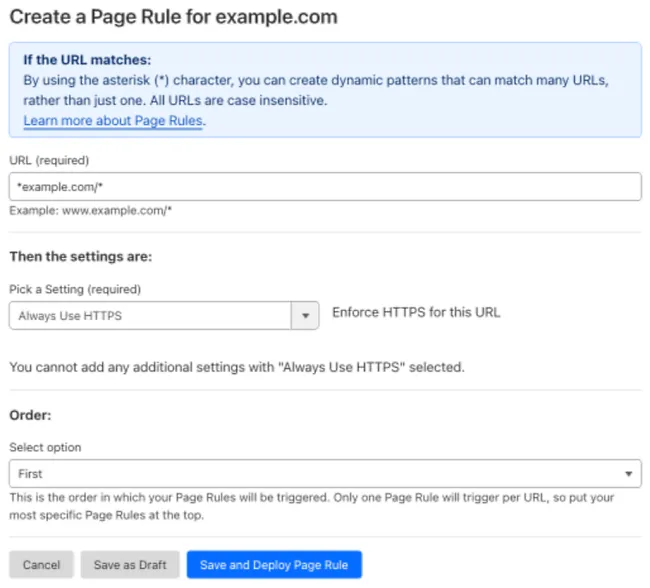 | 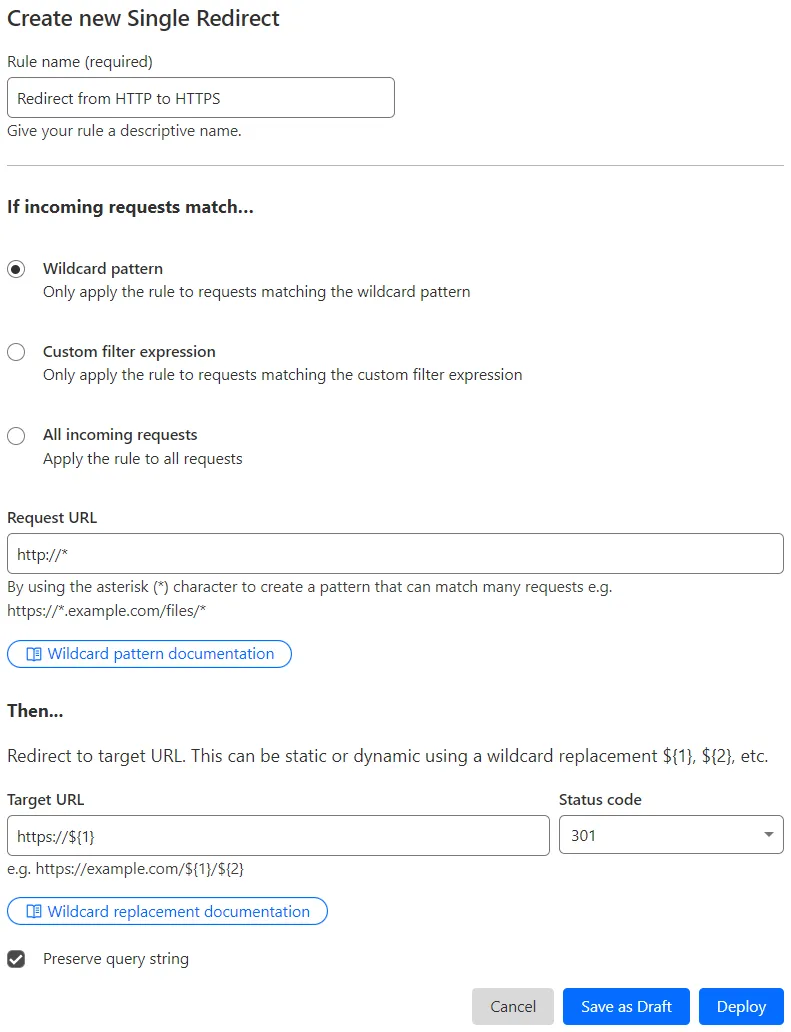 |
背景:
您配置了一条 Page Rule,对 example.com 的所有子域以及 example.com 域名本身开启 Automatic HTTPS Rewrites:
- URL(网址):
*example.com/* - Setting(设置):Automatic HTTPS Rewrites
- Value(值):On
如何迁移:
-
创建一条配置规则,对任何包含
example.com的主机名始终将 HTTP 链接重写为 HTTPS:- When incoming requests match(当传入请求匹配时):Custom filter expression(自定义过滤表达式)
- 使用 Expression Builder:
Hostname contains "example.com" - 使用 Expression Editor:
(http.host contains "example.com")
- 使用 Expression Builder:
- Then the settings are(则设置为):
- Setting(设置):Automatic HTTPS Rewrites
- Value(值):On
- When incoming requests match(当传入请求匹配时):Custom filter expression(自定义过滤表达式)
-
关闭现有 Page Rule,并验证所创建配置规则的行为。
-
若测试成功,删除现有 Page Rule。
| Page Rules 配置 | 迁移为配置规则 |
|---|---|
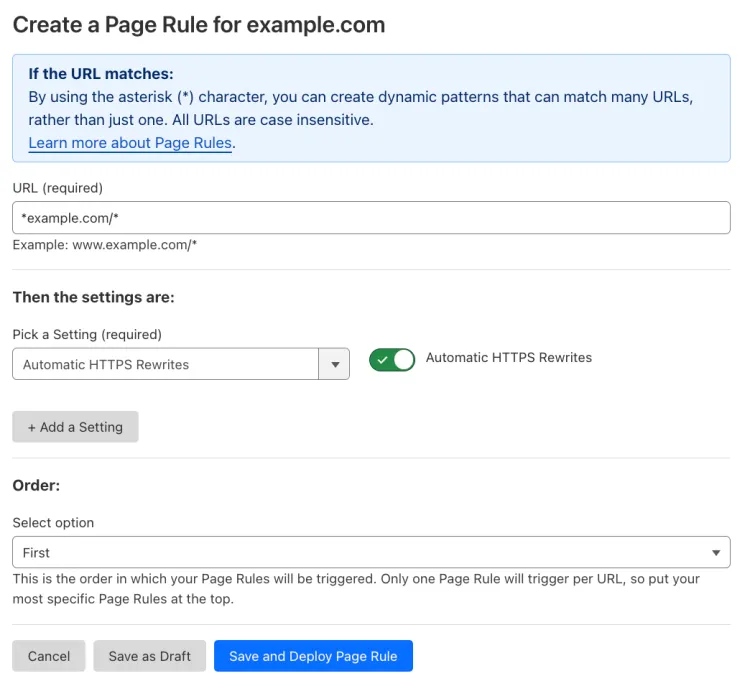 | 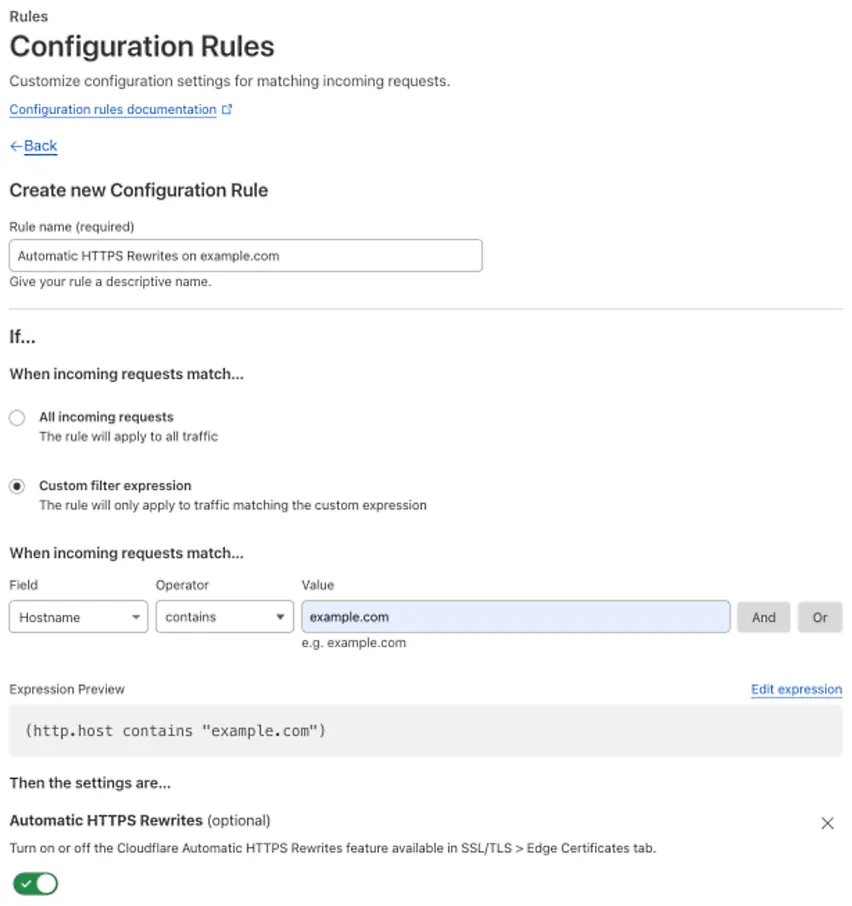 |
背景:
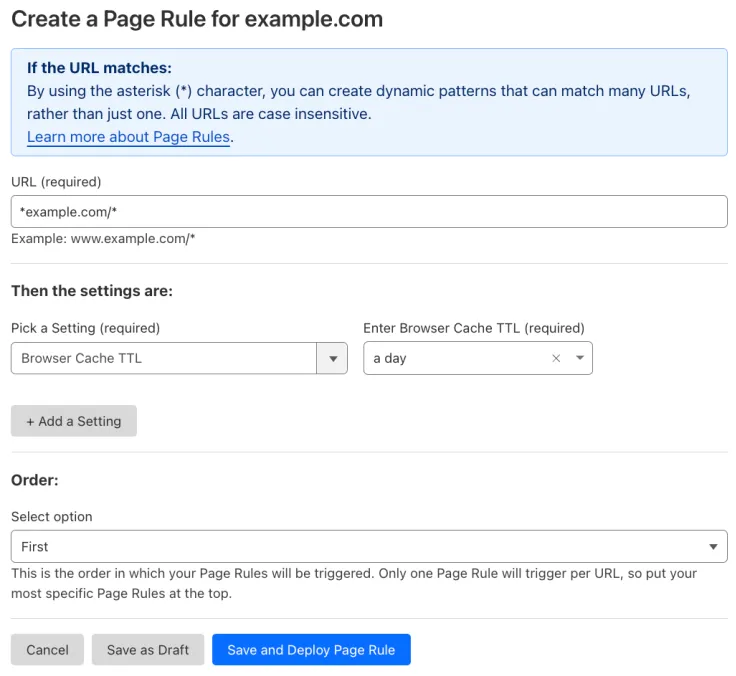
您配置了一条 Page Rule,将 example.com 的所有子域以及 example.com 域名本身的浏览器缓存 TTL 调整为一天:
- URL(网址):
*example.com/* - Setting(设置):Browser Cache TTL
- Enter Browser Cache TTL(输入浏览器缓存 TTL):a day
如何迁移:
-
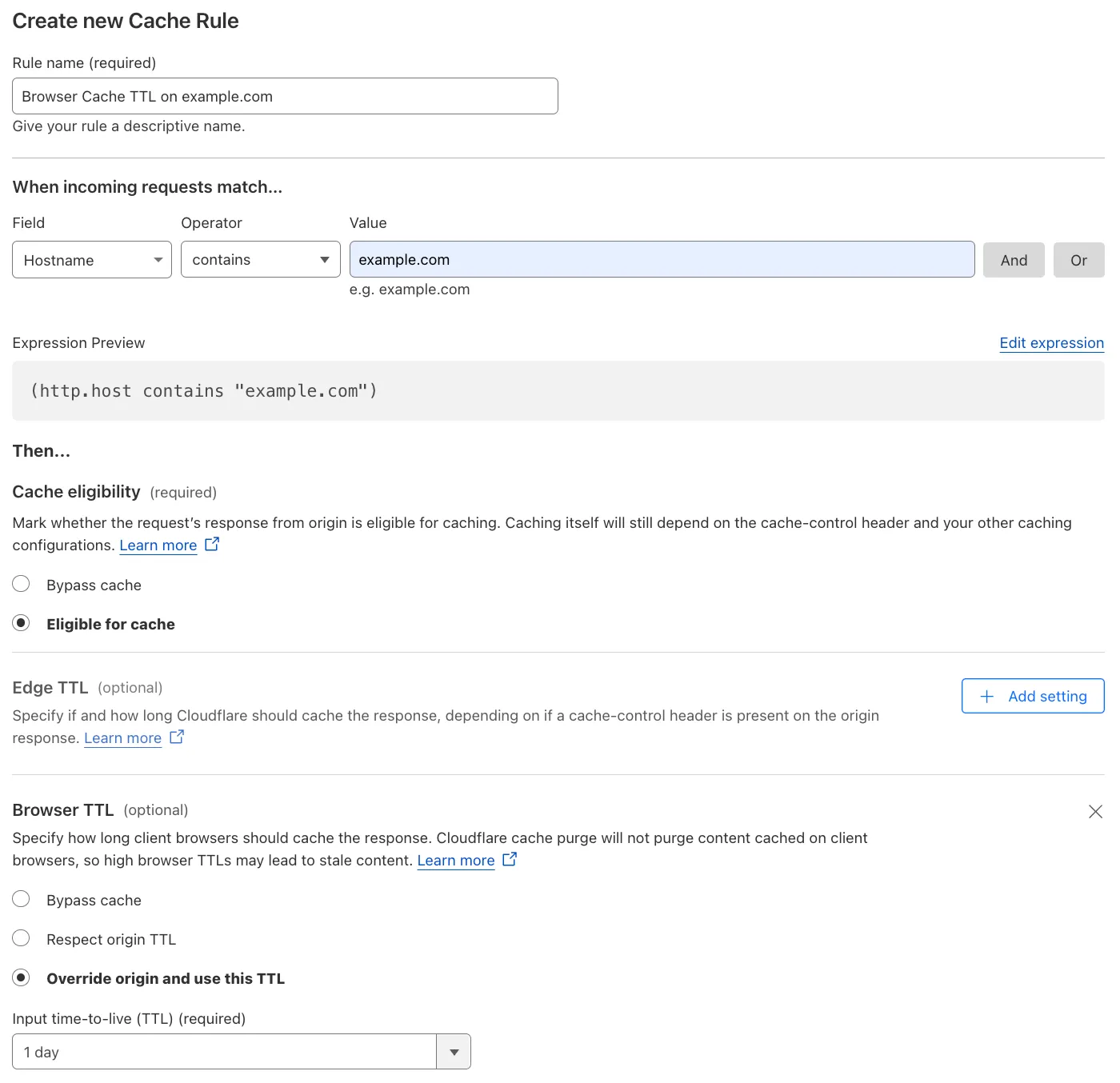
创建一条缓存规则,对任何包含
example.com的主机名,将浏览器中缓存资源的 TTL 调整为一天:- When incoming requests match(当传入请求匹配时):Custom filter expression(自定义过滤表达式)
- 使用 Expression Builder:
Hostname contains "example.com" - 使用 Expression Editor:
(http.host contains "example.com")
- 使用 Expression Builder:
- Then(然后):
- Cache eligibility(缓存资格):Eligible for cache(符合缓存条件)
- Browser TTL(浏览器 TTL):覆盖源站并使用此 TTL
- Input time-to-live (TTL)(输入生存时间 (TTL)):1 day
- When incoming requests match(当传入请求匹配时):Custom filter expression(自定义过滤表达式)
-
关闭现有 Page Rule,并验证所创建缓存规则的行为。
-
若测试成功,删除现有 Page Rule。
| Page Rules 配置 | 迁移为缓存规则 |
|---|---|
 |  |
背景:
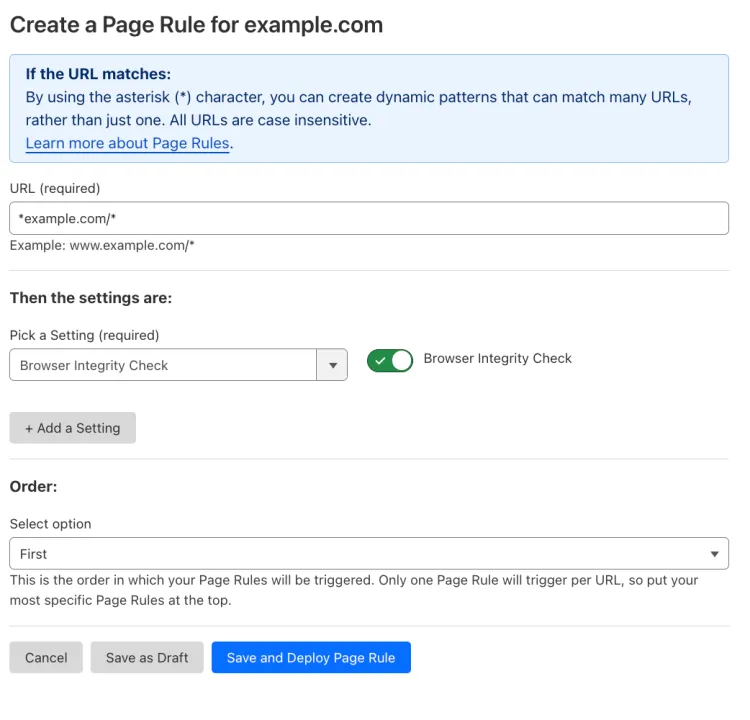
您配置了一条 Page Rule,对 example.com 的所有子域以及 example.com 域名本身开启 Browser Integrity Check:
- URL(网址):
*example.com/* - Setting(设置):Browser Integrity Check
- Value(值):On
如何迁移:
-
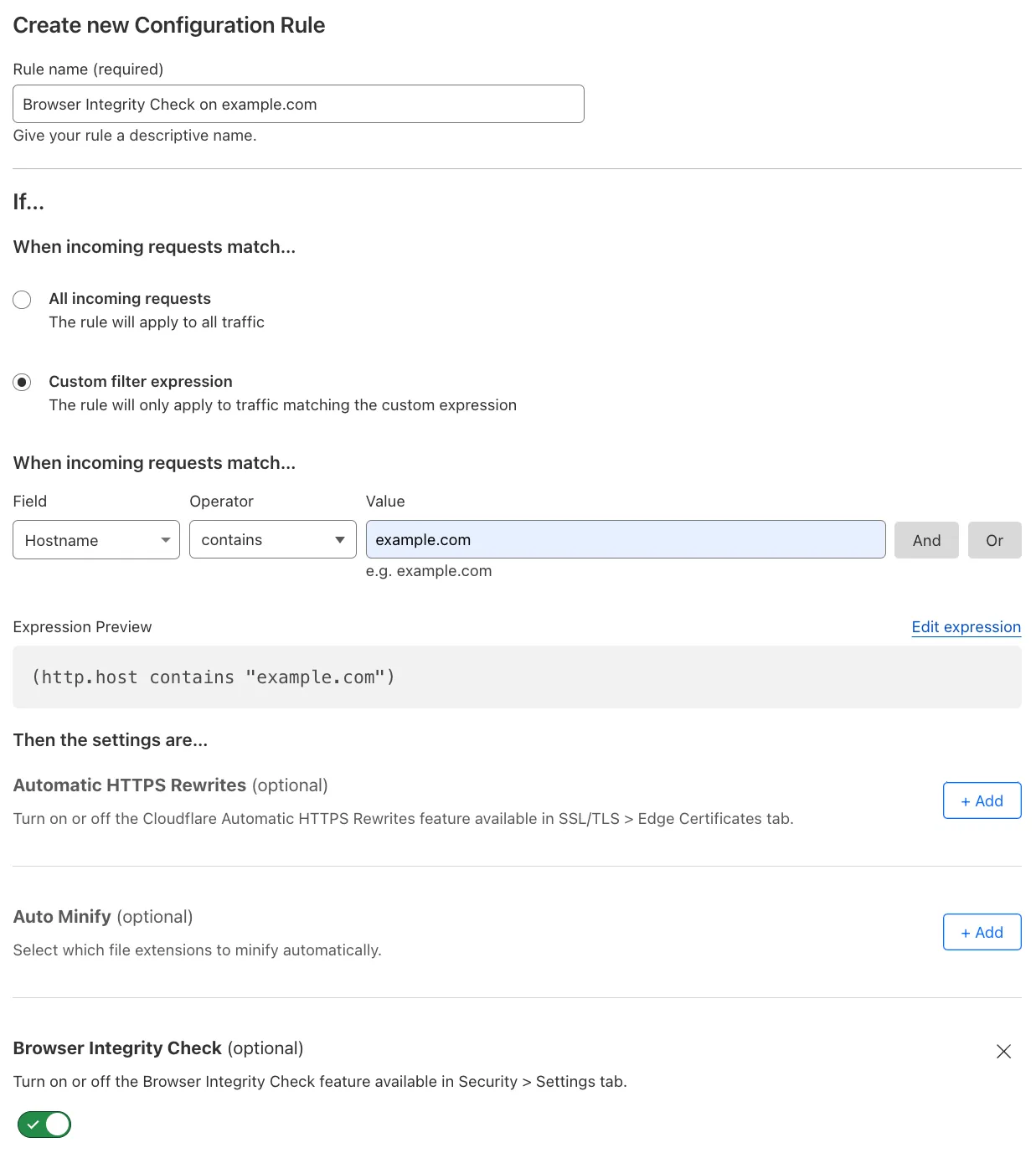
创建一条配置规则,对任何包含
example.com的主机名开启 Browser Integrity Check,以防护机器人与威胁:- When incoming requests match(当传入请求匹配时):Custom filter expression(自定义过滤表达式)
- 使用 Expression Builder:
Hostname contains "example.com" - 使用 Expression Editor:
(http.host contains "example.com")
- 使用 Expression Builder:
- Then the settings are(则设置为):
- Setting(设置):Browser Integrity Check
- Value(值):On
- When incoming requests match(当传入请求匹配时):Custom filter expression(自定义过滤表达式)
-
关闭现有 Page Rule,并验证所创建配置规则的行为。
-
若测试成功,删除现有 Page Rule。
| Page Rules 配置 | 迁移为配置规则 |
|---|---|
 |  |
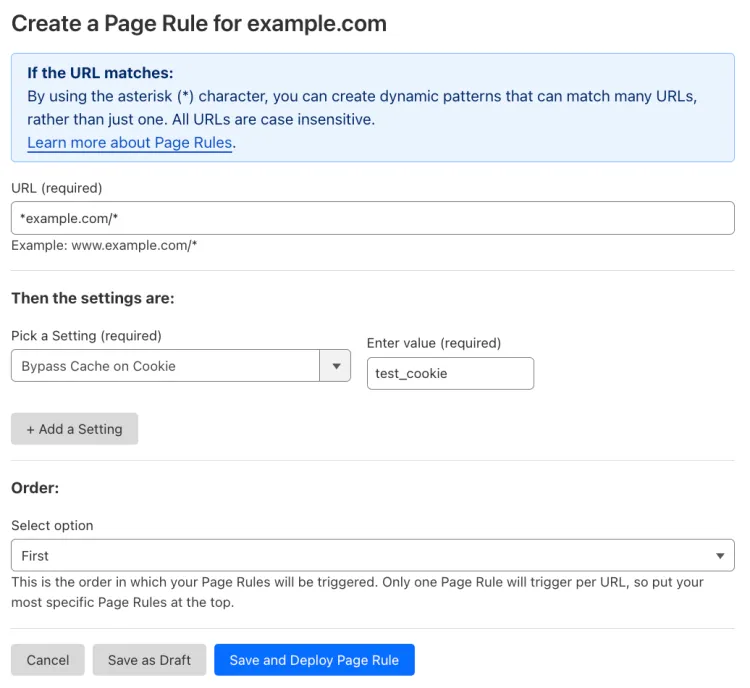
背景:
您配置了一条 Page Rule,对 example.com 的所有子域以及 example.com 域名本身开启 Bypass Cache on Cookie:
- URL(网址):
*example.com/* - Setting(设置):Bypass Cache on Cookie
- Enter value(输入值):
test_cookie
如何迁移:
-
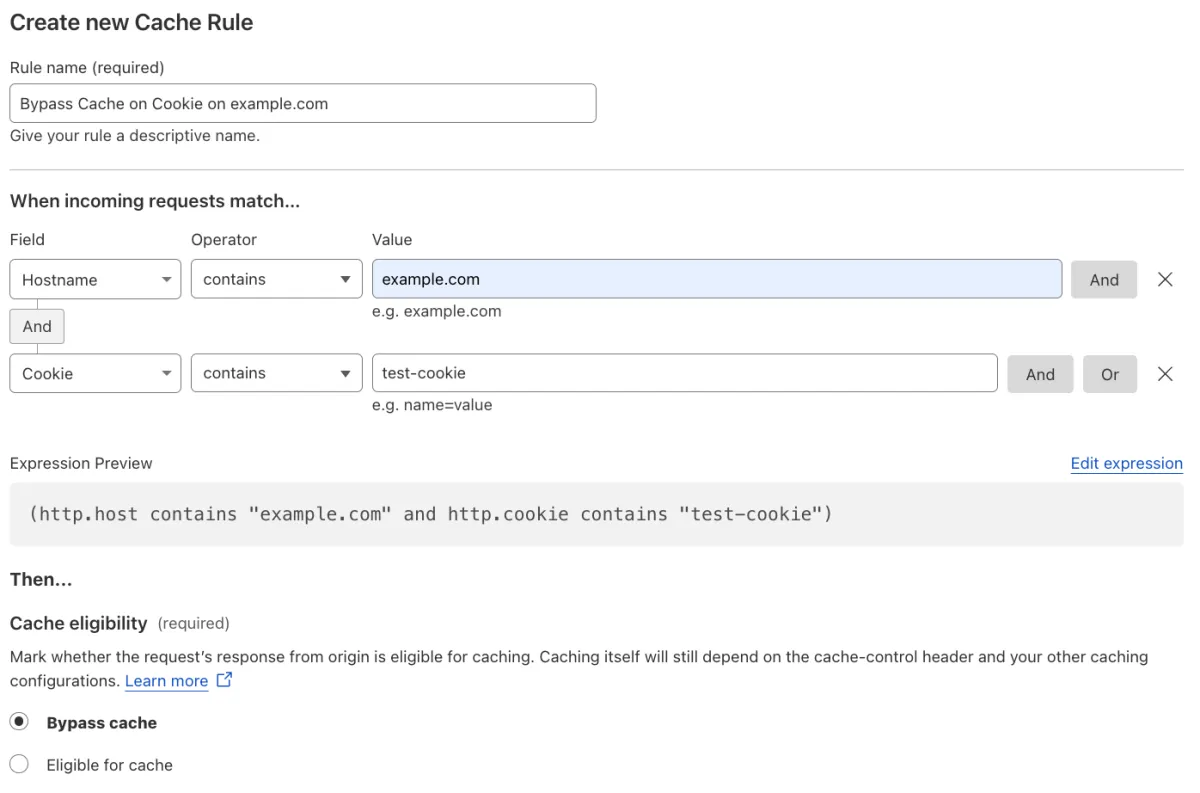
创建一条缓存规则,对任何包含
example.com的主机名,在请求包含 cookietest_cookie时绕过缓存:- When incoming requests match(当传入请求匹配时):Custom filter expression(自定义过滤表达式)
- 使用 Expression Builder:
Hostname contains "example.com" AND Cookie contains "test-cookie" - 使用 Expression Editor:
(http.host contains "example.com" and http.cookie contains "test-cookie")
- 使用 Expression Builder:
- Then(然后):
- Cache eligibility(缓存资格):Bypass cache(绕过缓存)
- When incoming requests match(当传入请求匹配时):Custom filter expression(自定义过滤表达式)
-
关闭现有 Page Rule,并验证所创建缓存规则的行为。
-
若测试成功,删除现有 Page Rule。
| Page Rules 配置 | 迁移为缓存规则 |
|---|---|
 |  |
背景:
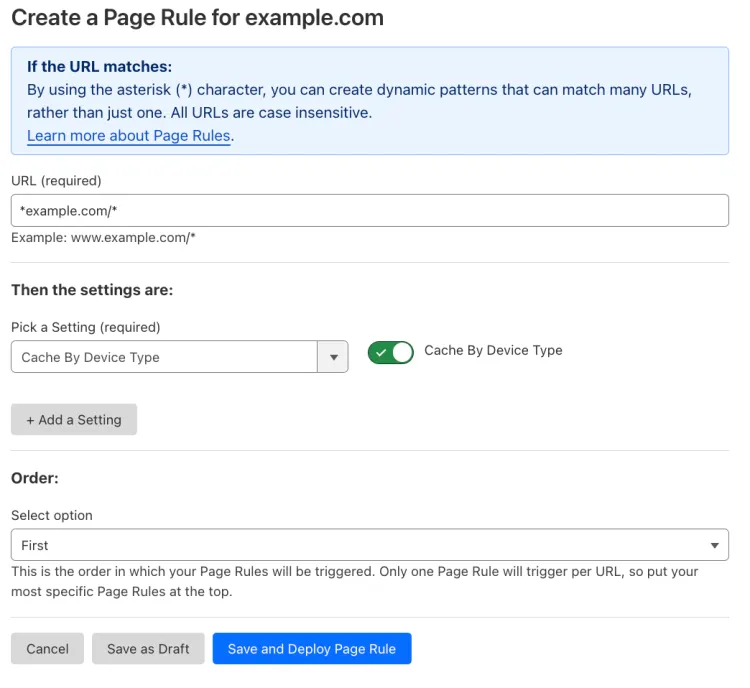
您配置了一条 Page Rule,对 example.com 的所有子域以及 example.com 域名本身开启 Cache By Device Type:
- URL(网址):
*example.com/* - Setting(设置):Cache By Device Type
- Value(值):On
如何迁移:
-
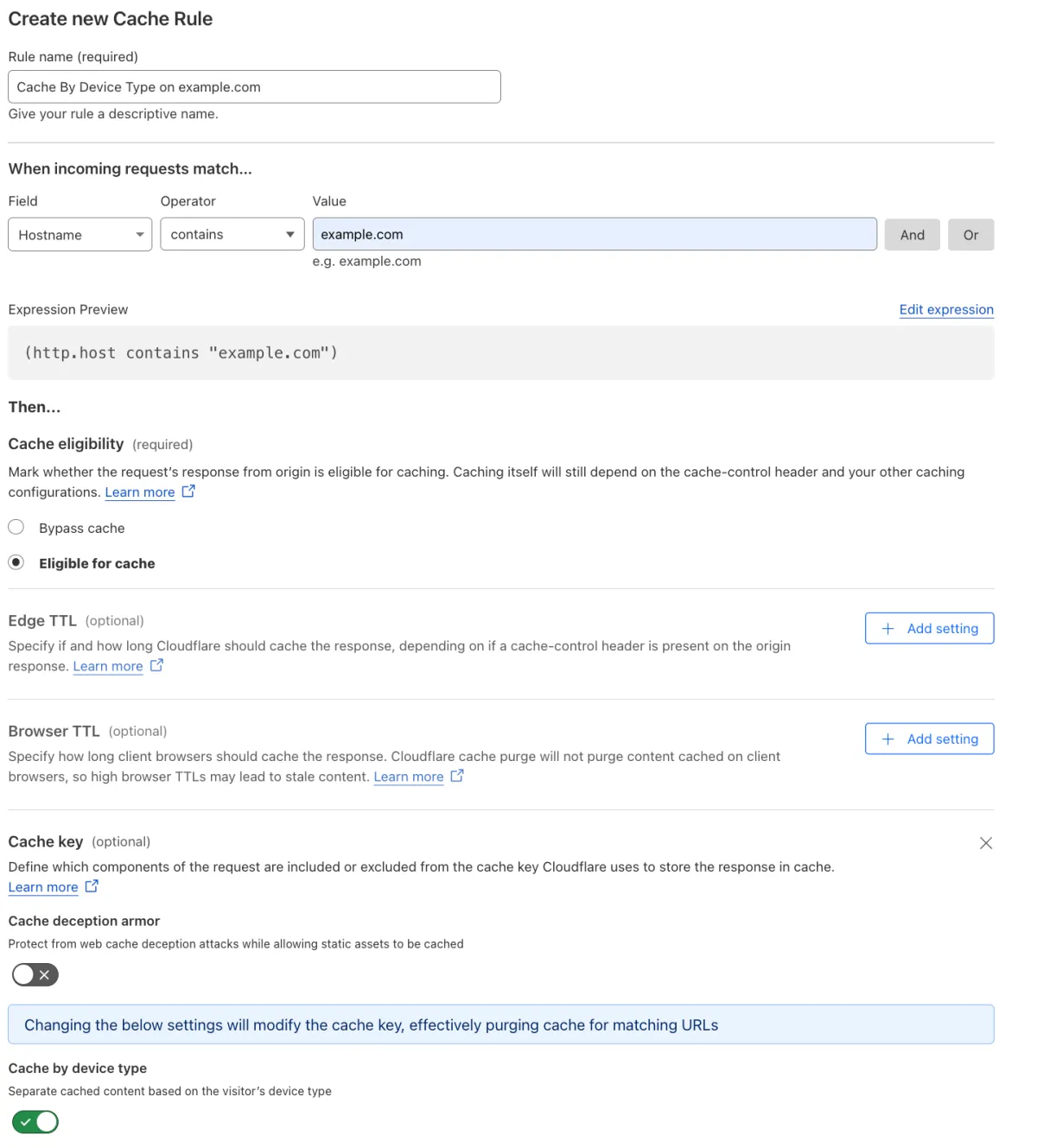
创建一条缓存规则,对任何包含
example.com的主机名,按用户代理或设备类型缓存内容:- When incoming requests match(当传入请求匹配时):Custom filter expression(自定义过滤表达式)
- 使用 Expression Builder:
Hostname contains "example.com" - 使用 Expression Editor:
(http.host contains "example.com")
- 使用 Expression Builder:
- Then(然后):
- Cache eligibility(缓存资格):Eligible for cache(符合缓存条件)
- Setting(设置):Cache key
- Cache by device type(按设备类型缓存):On
- When incoming requests match(当传入请求匹配时):Custom filter expression(自定义过滤表达式)
-
关闭现有 Page Rule,并验证所创建缓存规则的行为。
-
若测试成功,删除现有 Page Rule。
| Page Rules 配置 | 迁移为缓存规则 |
|---|---|
 |  |
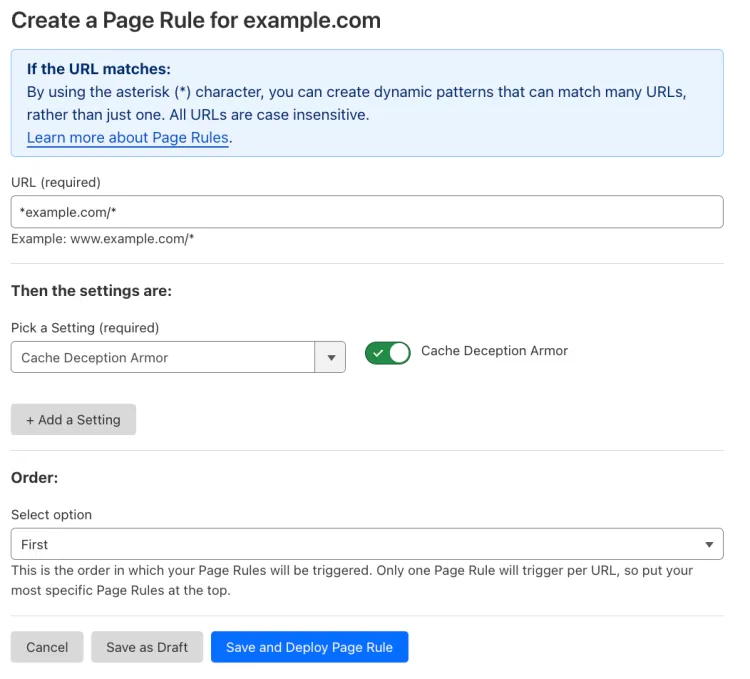
背景:
您配置了一条 Page Rule,对 example.com 的所有子域以及 example.com 域名本身开启 Cache Deception Armor:
- URL(网址):
*example.com/* - Setting(设置):Cache Deception Armor
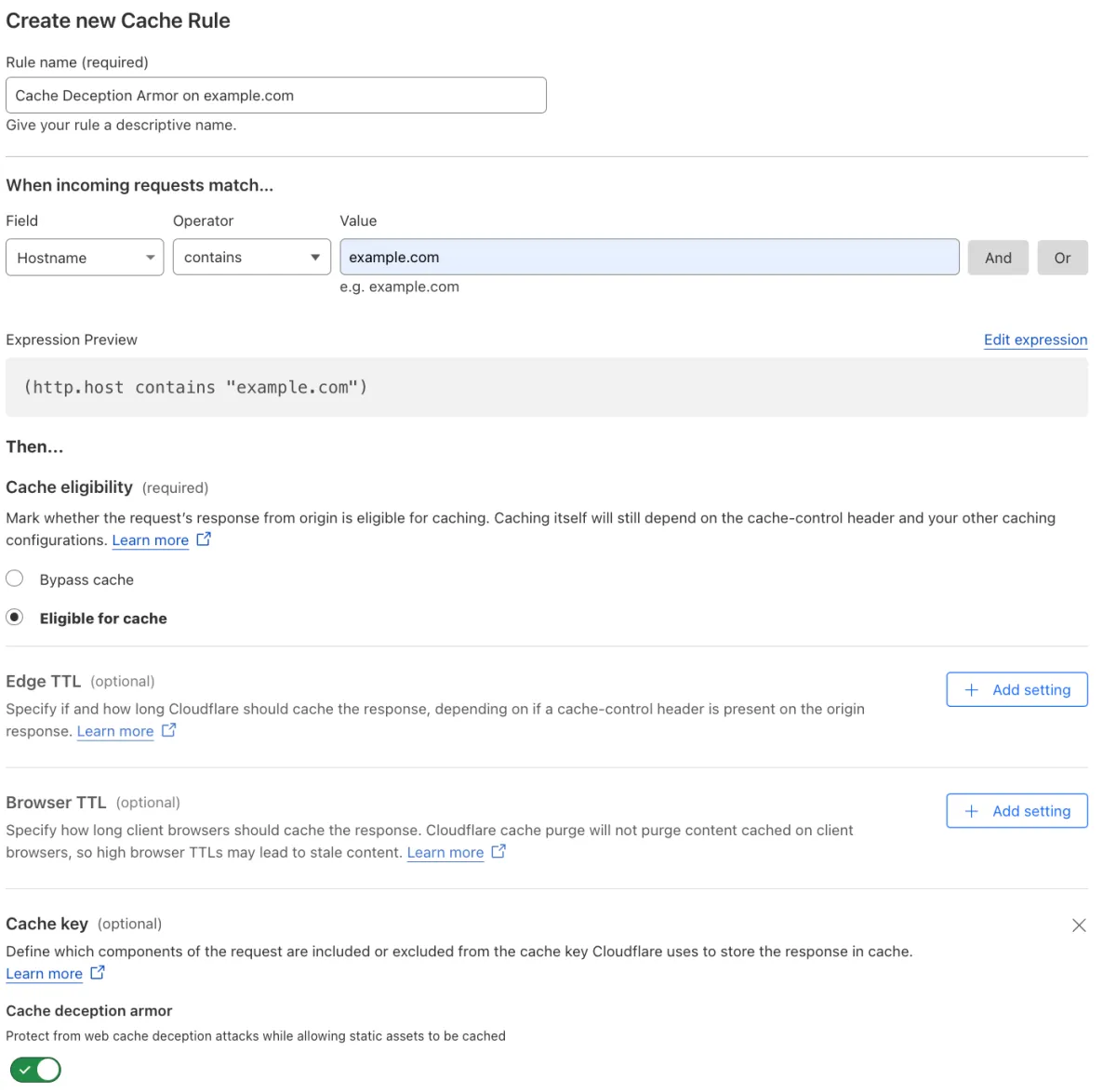
如何迁移:
-
创建一条缓存规则,对任何包含
example.com的主机名提供缓存欺骗攻击防护:- When incoming requests match(当传入请求匹配时):Custom filter expression(自定义过滤表达式)
- 使用 Expression Builder:
Hostname contains "example.com" - 使用 Expression Editor:
(http.host contains "example.com")
- 使用 Expression Builder:
- Then(然后):
- Cache eligibility(缓存资格):Eligible for cache(符合缓存条件)
- Setting(设置):Cache key
- Cache deception armor(缓存欺骗防护):On
- When incoming requests match(当传入请求匹配时):Custom filter expression(自定义过滤表达式)
-
关闭现有 Page Rule,并验证所创建缓存规则的行为。
-
若测试成功,删除现有 Page Rule。
| Page Rules 配置 | 迁移为缓存规则 |
|---|---|
 |  |
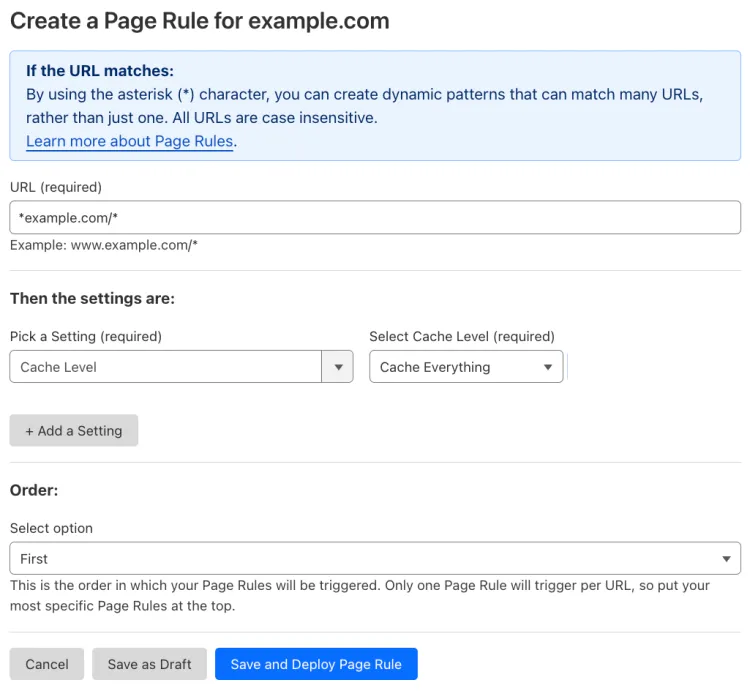
背景:
您配置了一条 Page Rule,对 example.com 的所有子域以及 example.com 域名本身开启所有资产的缓存:
- URL(网址):
*example.com/* - Setting(设置):Cache Level
- Select Cache Level(选择缓存级别):Cache Everything
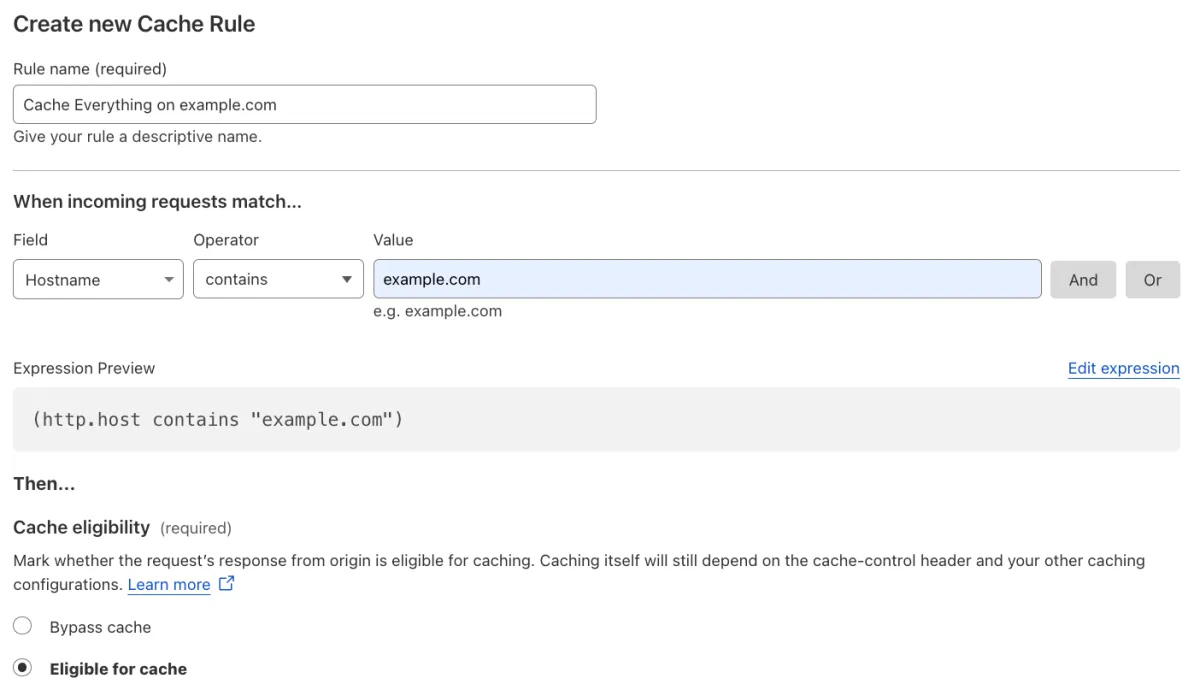
如何迁移:
-
创建一条缓存规则,对任何包含
example.com的主机名调整缓存级别:- When incoming requests match(当传入请求匹配时):Custom filter expression(自定义过滤表达式)
- 使用 Expression Builder:
Hostname contains "example.com" - 使用 Expression Editor:
(http.host contains "example.com")
- 使用 Expression Builder:
- Then(然后):
- Cache eligibility(缓存资格):Eligible for cache(符合缓存条件)
- When incoming requests match(当传入请求匹配时):Custom filter expression(自定义过滤表达式)
-
关闭现有 Page Rule,并验证所创建缓存规则的行为。
-
若测试成功,删除现有 Page Rule。
| Page Rules 配置 | 迁移为缓存规则 |
|---|---|
 |  |
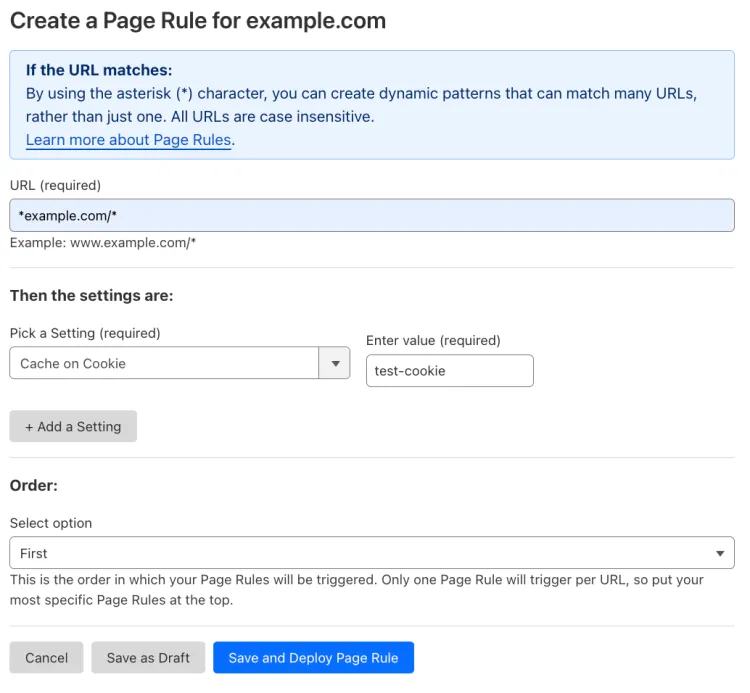
背景:
您配置了一条 Page Rule,对 example.com 的所有子域以及 example.com 域名本身,在响应包含 cookie test-cookie 时开启缓存:
- URL(网址):
*example.com/* - Setting(设置):Cache on Cookie
- Enter value(输入值):
test-cookie
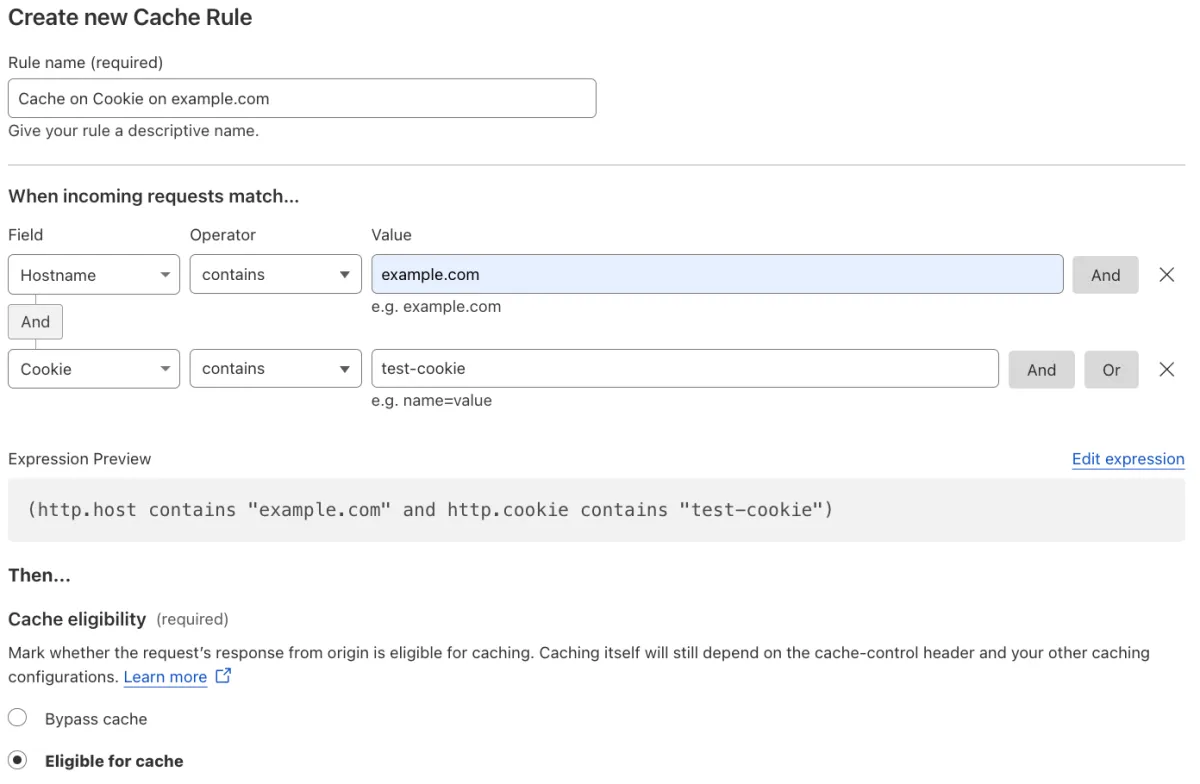
如何迁移:
-
创建一条缓存规则,对任何包含
example.com的主机名,缓存包含 cookietest_cookie的响应:- When incoming requests match(当传入请求匹配时):Custom filter expression(自定义过滤表达式)
- 使用 Expression Builder:
Hostname contains "example.com" AND Cookie contains "test-cookie" - 使用 Expression Editor:
(http.host contains "example.com" and http.cookie contains "test-cookie")
- 使用 Expression Builder:
- Then(然后):
- Cache eligibility(缓存资格):Eligible for cache(符合缓存条件)
- When incoming requests match(当传入请求匹配时):Custom filter expression(自定义过滤表达式)
-
关闭现有 Page Rule,并验证所创建缓存规则的行为。
-
若测试成功,删除现有 Page Rule。
| Page Rules 配置 | 迁移为缓存规则 |
|---|---|
 |  |
背景:
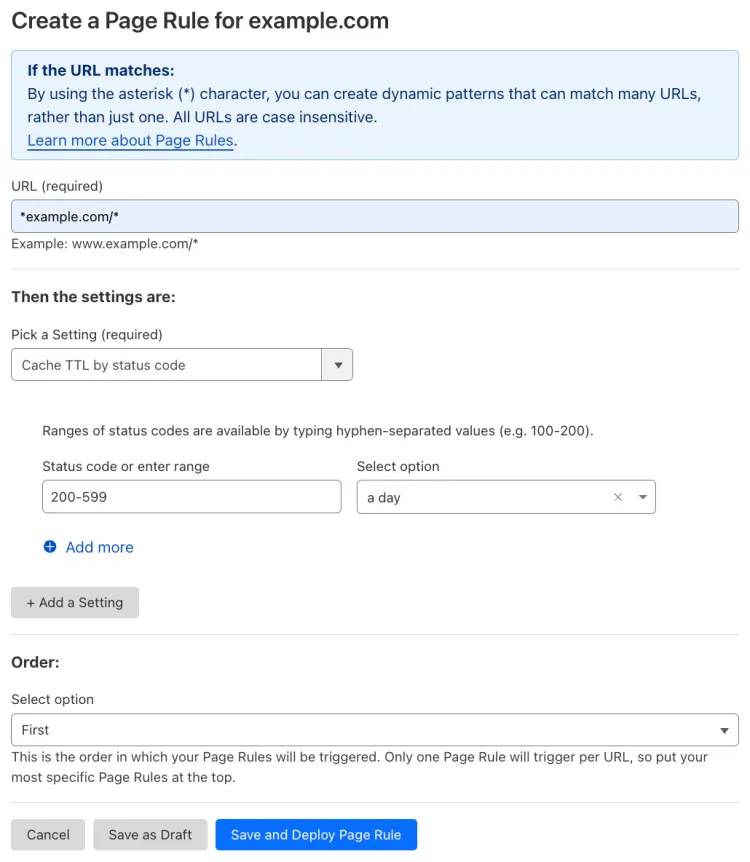
您配置了一条 Page Rule,对 example.com 的所有子域以及 example.com 域名本身,将状态码介于 200 与 599 之间的每个响应缓存一天:
- URL(网址):
*example.com/* - Setting(设置):Cache TTL by status code
- Status code or enter range(状态码或输入范围):
200-599 - Select option(选择选项):a day
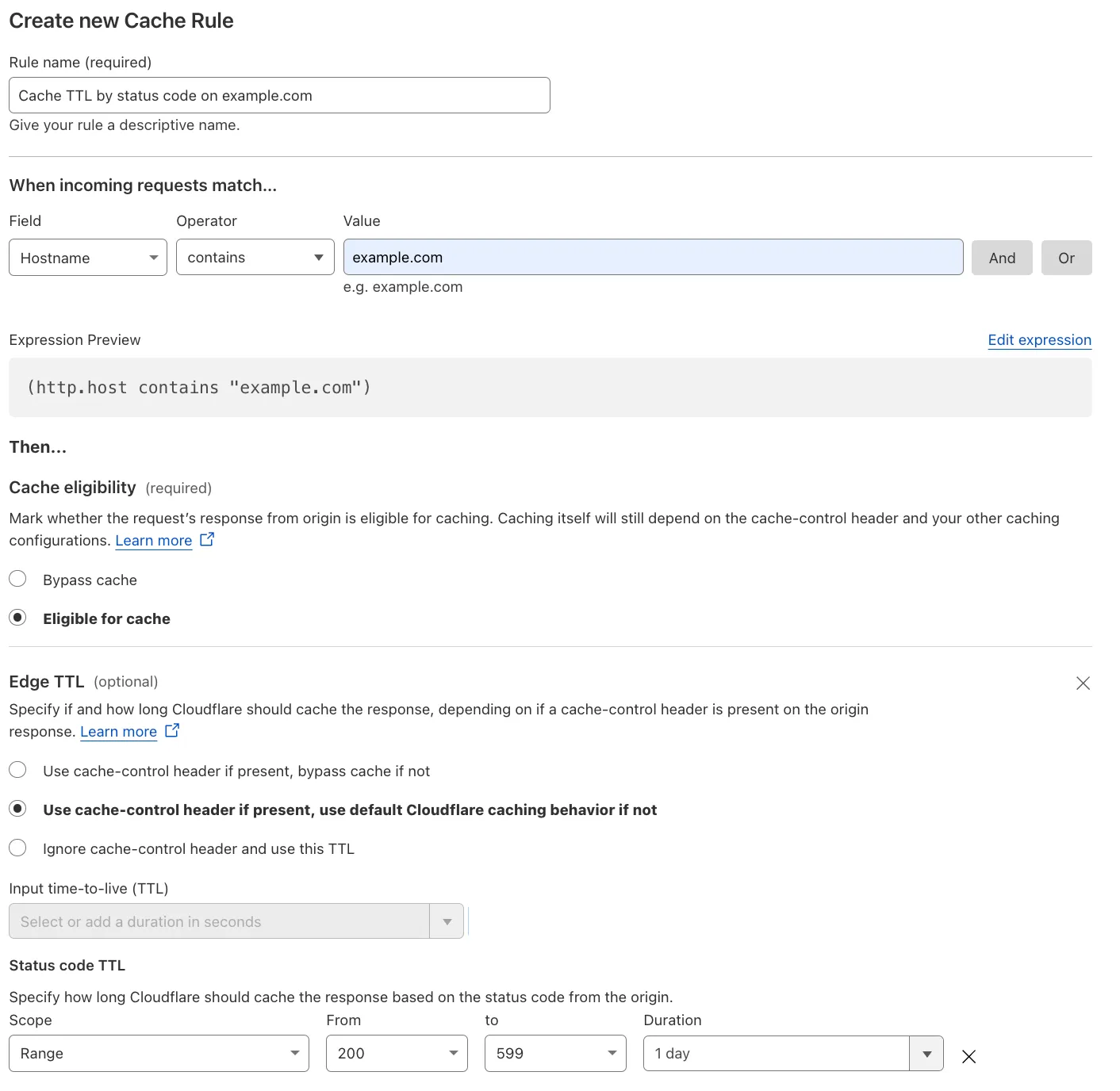
如何迁移:
-
创建一条缓存规则,对任何包含
example.com的主机名,将状态码介于200与599之间的响应缓存一天:- When incoming requests match(当传入请求匹配时):Custom filter expression(自定义过滤表达式)
- 使用 Expression Builder:
Hostname contains "example.com" - 使用 Expression Editor:
(http.host contains "example.com") - Then(然后):
- Cache eligibility(缓存资格):Eligible for cache(符合缓存条件)
- Setting(设置):Edge TTL
- 若存在则使用 cache-control 标头,否则使用默认 Cloudflare 缓存行为
- Status code TTL(状态码 TTL):
- Scope(范围):Range
- From(从):200
- To(到):599
- Duration(持续时间):1 day
- 使用 Expression Builder:
- When incoming requests match(当传入请求匹配时):Custom filter expression(自定义过滤表达式)
-
关闭现有 Page Rule,并验证所创建缓存规则的行为。
-
若测试成功,删除现有 Page Rule。
| Page Rules 配置 | 迁移为缓存规则 |
|---|---|
 |  |
背景:
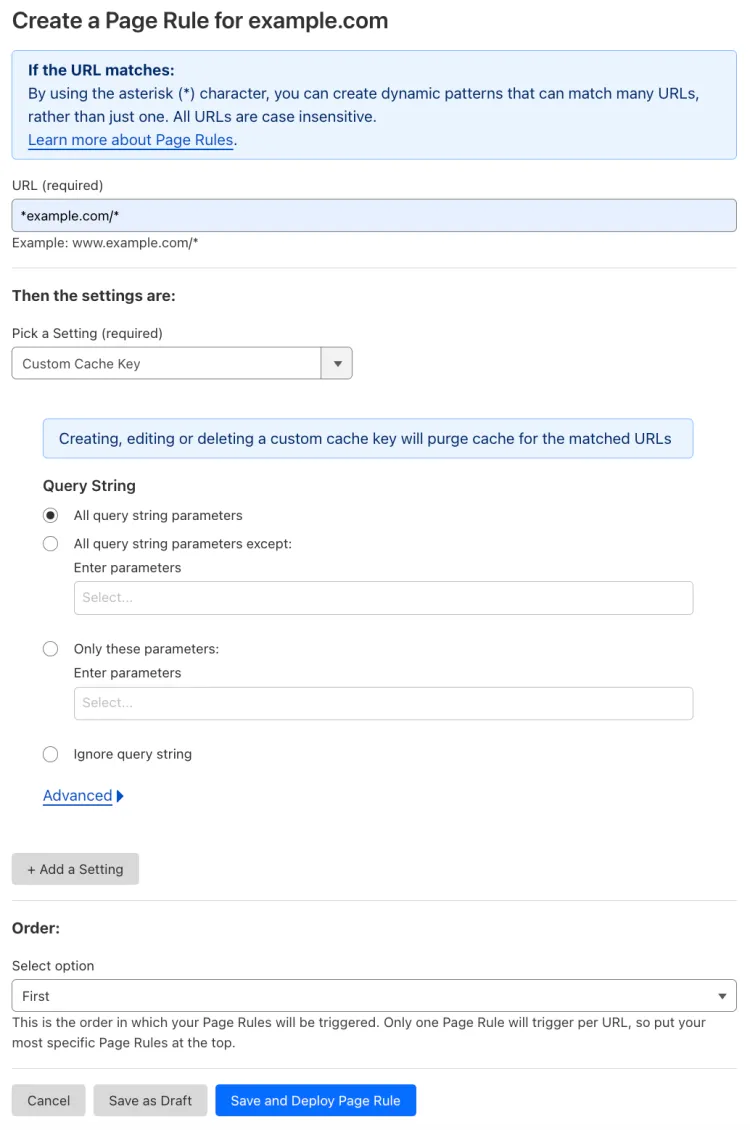
您配置了一条 Page Rule,对 example.com 的所有子域以及 example.com 域名本身,为所有查询字符串参数设置自定义缓存键:
- URL(网址):
*example.com/* - Setting(设置):Custom Cache Key
- Query String(查询字符串):All query string parameters
如何迁移:
-
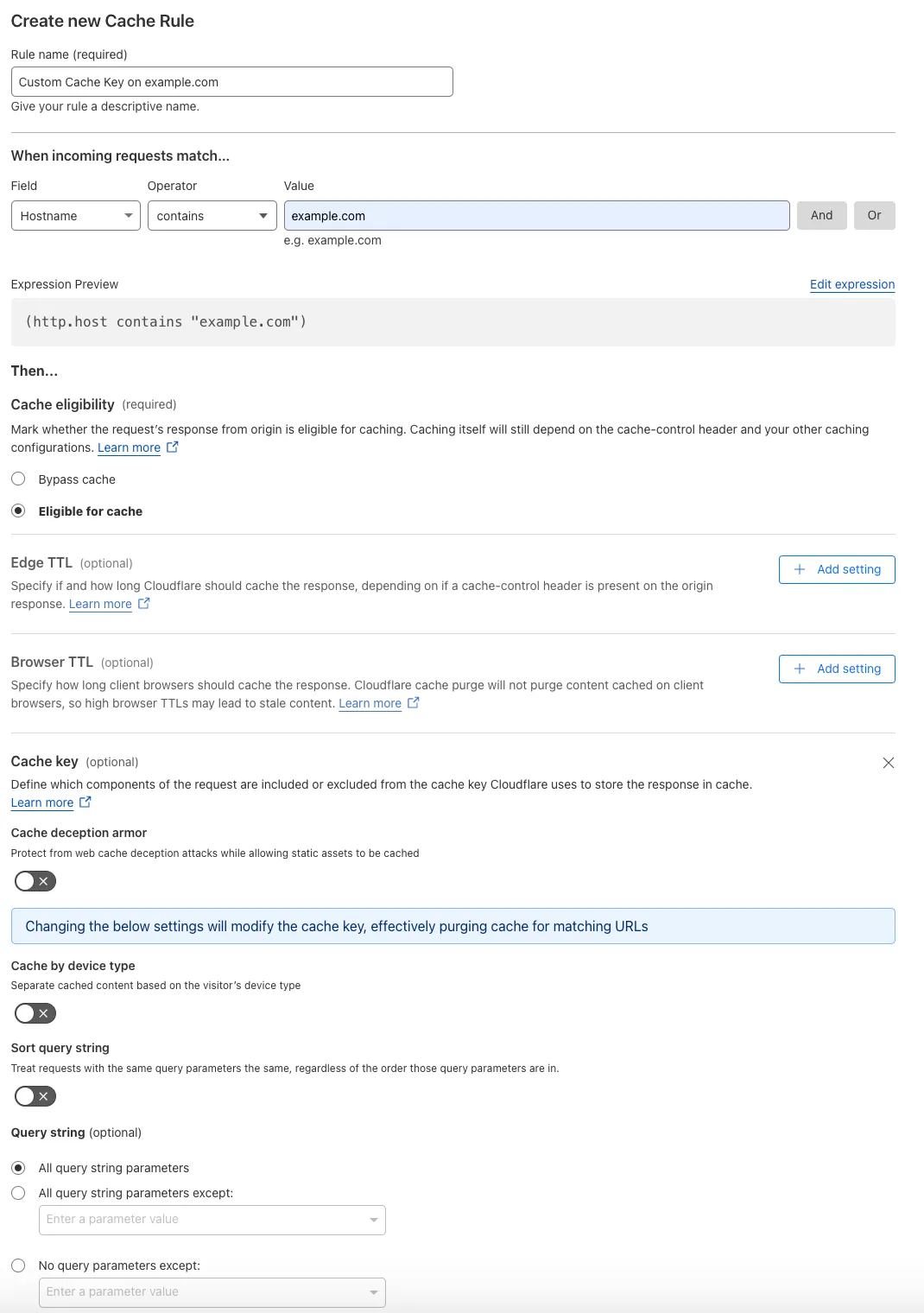
创建一条缓存规则,对任何包含
example.com的主机名,为所有查询字符串参数设置自定义缓存键:- When incoming requests match(当传入请求匹配时):Custom filter expression(自定义过滤表达式)
- 使用 Expression Builder:
Hostname contains "example.com" - 使用 Expression Editor:
(http.host contains "example.com")
- 使用 Expression Builder:
- Then(然后):
- Cache eligibility(缓存资格):Eligible for cache(符合缓存条件)
- Setting(设置):Cache key
- Query string(查询字符串):All query string parameters
- When incoming requests match(当传入请求匹配时):Custom filter expression(自定义过滤表达式)
-
关闭现有 Page Rule,并验证所创建缓存规则的行为。
-
若测试成功,删除现有 Page Rule。
| Page Rules 配置 | 迁移为缓存规则 |
|---|---|
 |  |
背景:
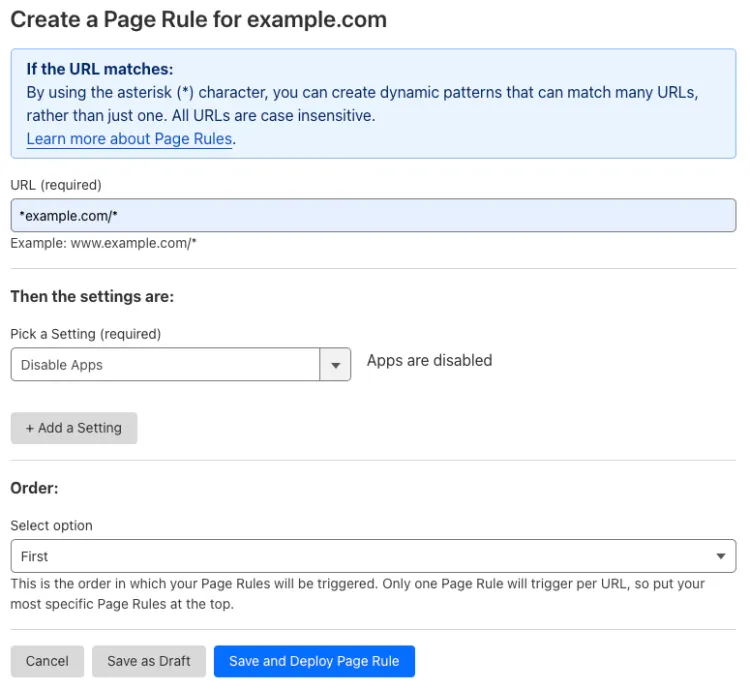
您配置了一条 Page Rule,对 example.com 的所有子域以及 example.com 域名本身关闭 Cloudflare Apps(已弃用):
- URL(网址):
*example.com/* - Setting(设置):Disable Apps
如何迁移:
-
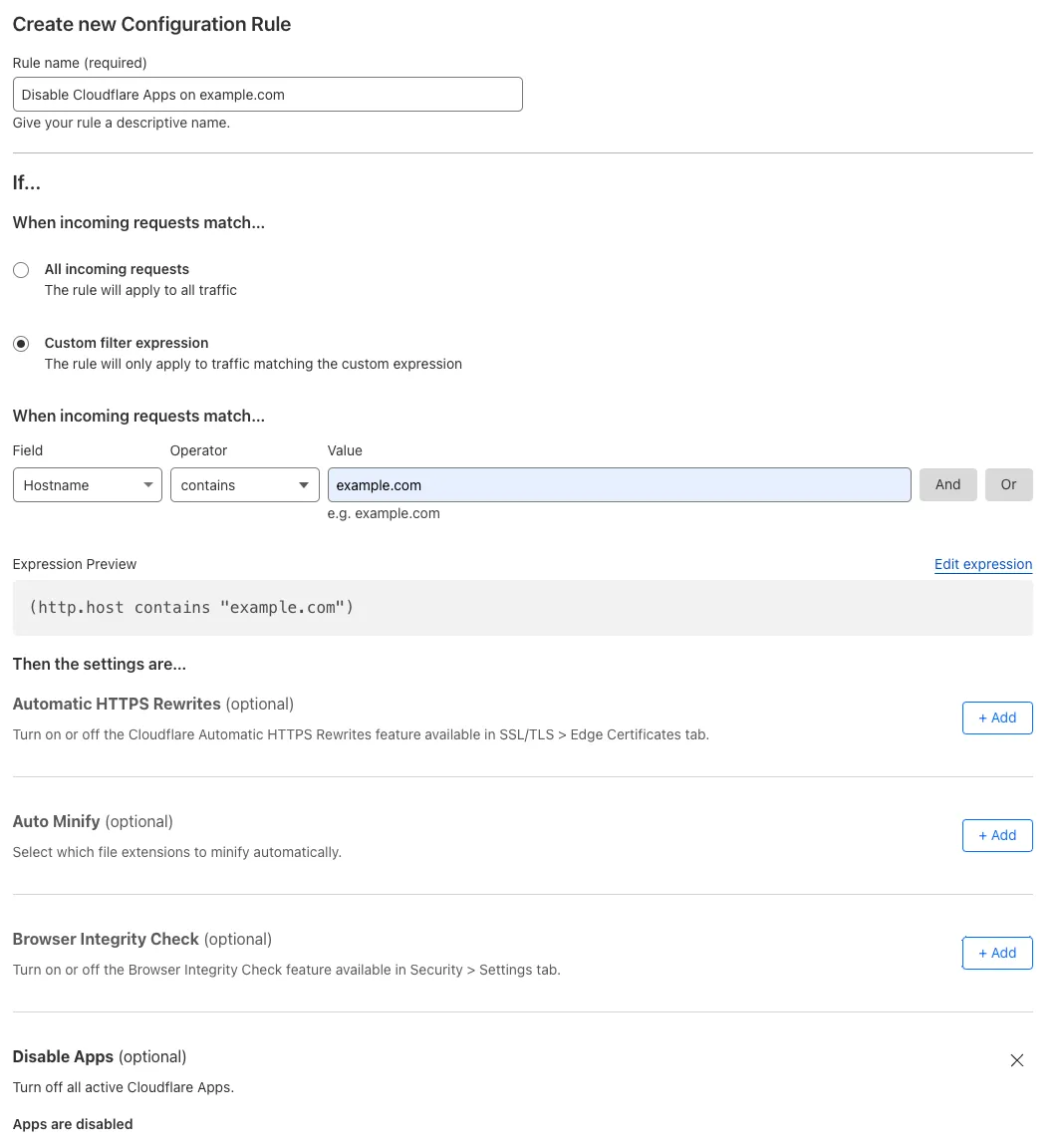
创建一条配置规则,对任何包含
example.com的主机名禁用 Cloudflare Apps(已弃用):- When incoming requests match(当传入请求匹配时):Custom filter expression(自定义过滤表达式)
- 使用 Expression Builder:
Hostname contains "example.com" - 使用 Expression Editor:
(http.host contains "example.com")
- 使用 Expression Builder:
- Then the settings are(则设置为):
- Setting(设置):Disable Apps
- When incoming requests match(当传入请求匹配时):Custom filter expression(自定义过滤表达式)
-
关闭现有 Page Rule,并验证所创建配置规则的行为。
-
若测试成功,删除现有 Page Rule。
| Page Rules 配置 | 迁移为配置规则 |
|---|---|
 |  |
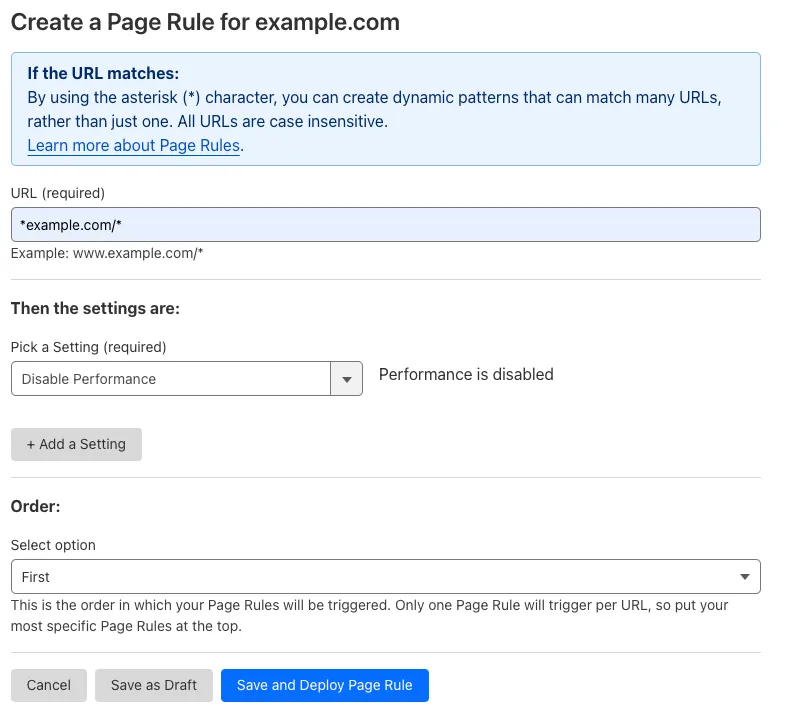
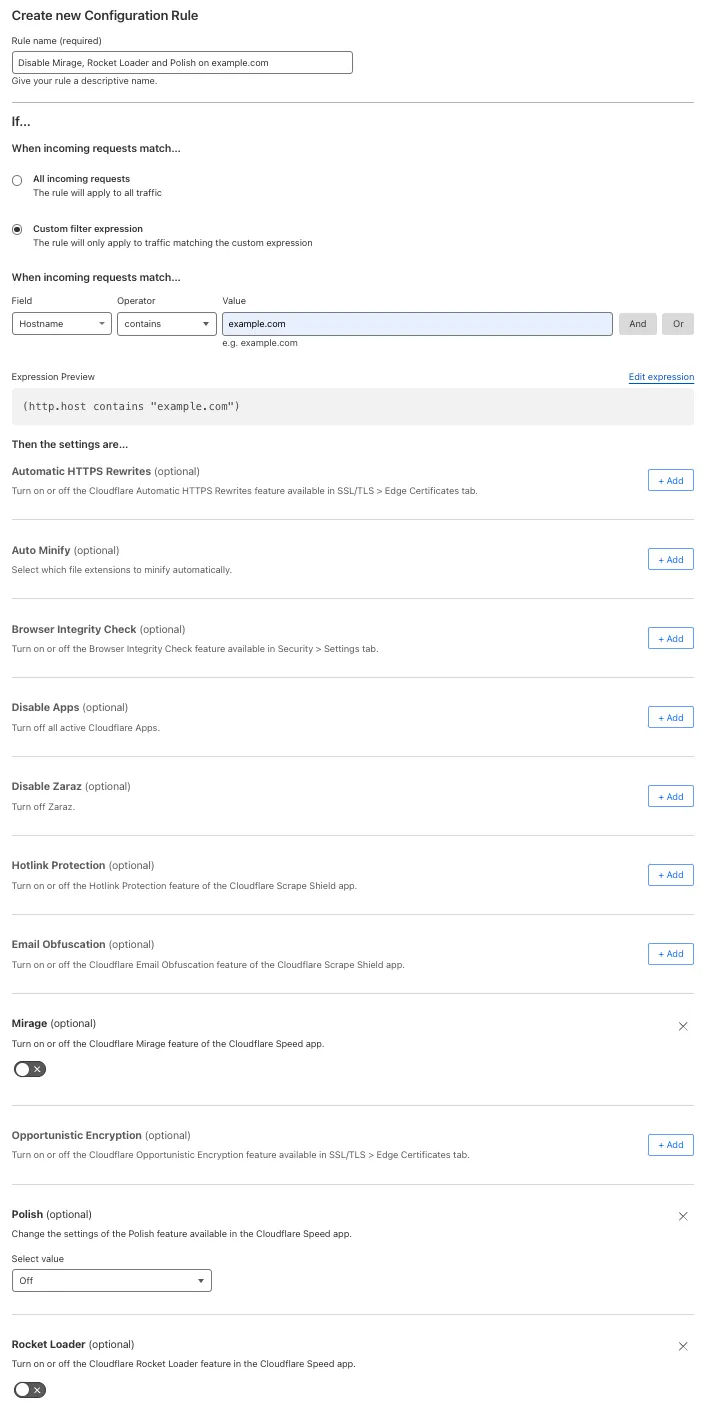
此 Page Rules 设置会关闭 Polish 和 Rocket Loader。您仍可使用 Configuration Rules 逐个开启或关闭相关 Cloudflare 功能。
背景:
您配置了一条带有 **Disable Performance(已弃用)**的 Page Rule,作用于 example.com 的所有子域以及 example.com 域名本身:
- URL(网址):
*example.com/* - Setting(设置):Disable Performance
如何替代:
-
创建一条配置规则,对任何包含
example.com的主机名禁用 Polish 和 Rocket Loader:- When incoming requests match(当传入请求匹配时):Custom filter expression(自定义过滤表达式)
- 使用 Expression Builder:
Hostname contains "example.com" - 使用 Expression Editor:
(http.host contains "example.com")
- 使用 Expression Builder:
- Then the settings are(则设置为):
- Polish:Off(关闭)
- Rocket Loader:Off(关闭)
- When incoming requests match(当传入请求匹配时):Custom filter expression(自定义过滤表达式)
-
关闭现有 Page Rule,并验证所创建配置规则的行为。
-
若测试成功,删除现有 Page Rule。
| Page Rules 配置 | 迁移为配置规则 |
|---|---|
 |  |
此 Page Rules 设置会关闭 Email Obfuscation、Rate Limiting(旧版)、Scrape Shield、URL (Zone) Lockdown 以及 WAF managed rules(旧版)。您仍可使用 Configuration Rules 与 WAF custom rules 逐个开启或关闭相关 Cloudflare 功能。
背景:
您配置了一条带有 **Disable Security(已弃用)**的 Page Rule,作用于 example.com 的所有子域以及 example.com 域名本身:
- URL(网址):
*example.com/* - Setting(设置):Disable Security
此设置会关闭部分 Cloudflare 安全功能:Email Obfuscation、Rate Limiting(旧版)、Scrape Shield、URL (Zone) Lockdown 以及 WAF managed rules(旧版)。
如何替代:
背景:
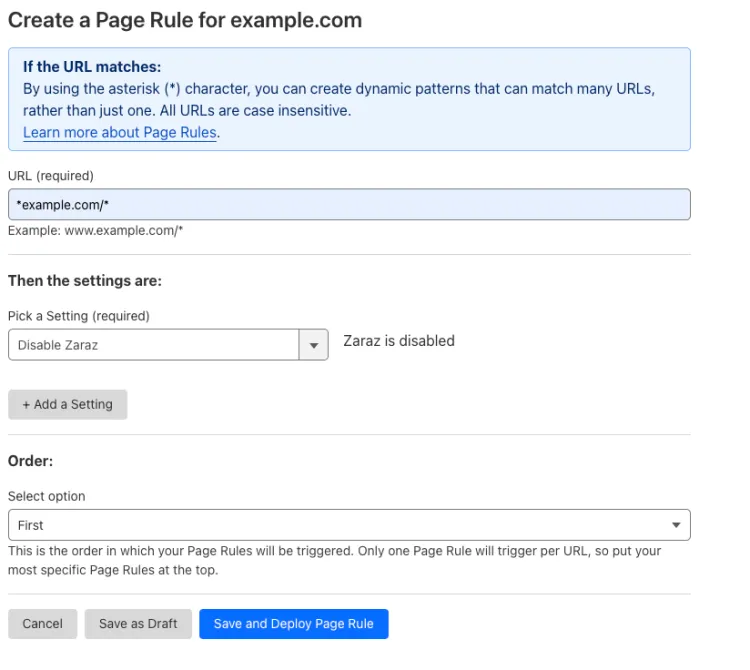
您配置了一条 Page Rule,对 example.com 的所有子域以及 example.com 域名本身关闭 Zaraz:
- URL(网址):
*example.com/* - Setting(设置):Disable Zaraz
如何迁移:
-
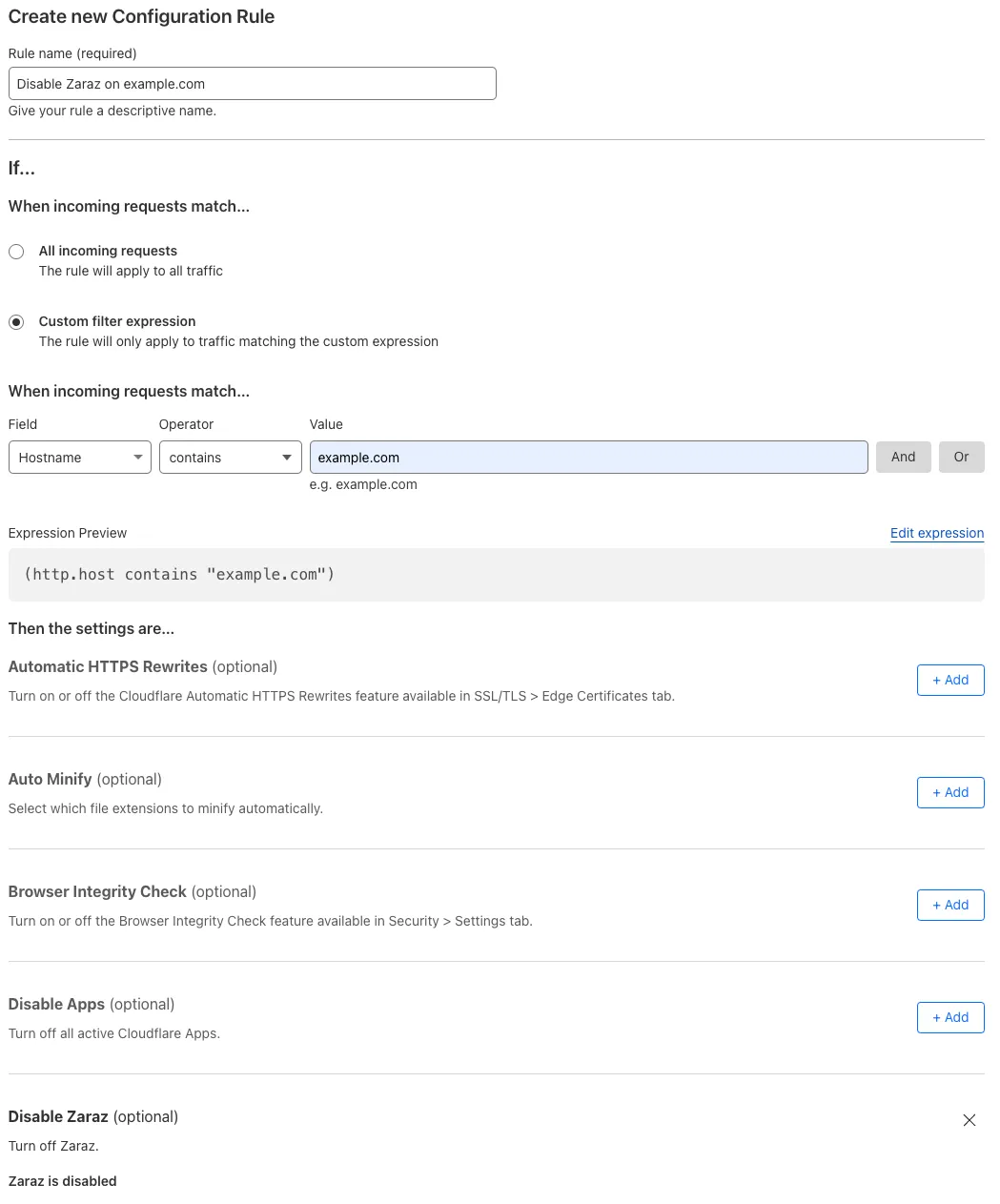
创建一条配置规则,对任何包含
example.com的主机名关闭 Zaraz:- When incoming requests match(当传入请求匹配时):Custom filter expression(自定义过滤表达式)
- 使用 Expression Builder:
Hostname contains "example.com" - 使用 Expression Editor:
(http.host contains "example.com")
- 使用 Expression Builder:
- Then the settings are(则设置为):
- Setting(设置):Disable Zaraz
- When incoming requests match(当传入请求匹配时):Custom filter expression(自定义过滤表达式)
-
关闭现有 Page Rule,并验证所创建配置规则的行为。
-
若测试成功,删除现有 Page Rule。
| Page Rules 配置 | 迁移为配置规则 |
|---|---|
 |  |
背景:
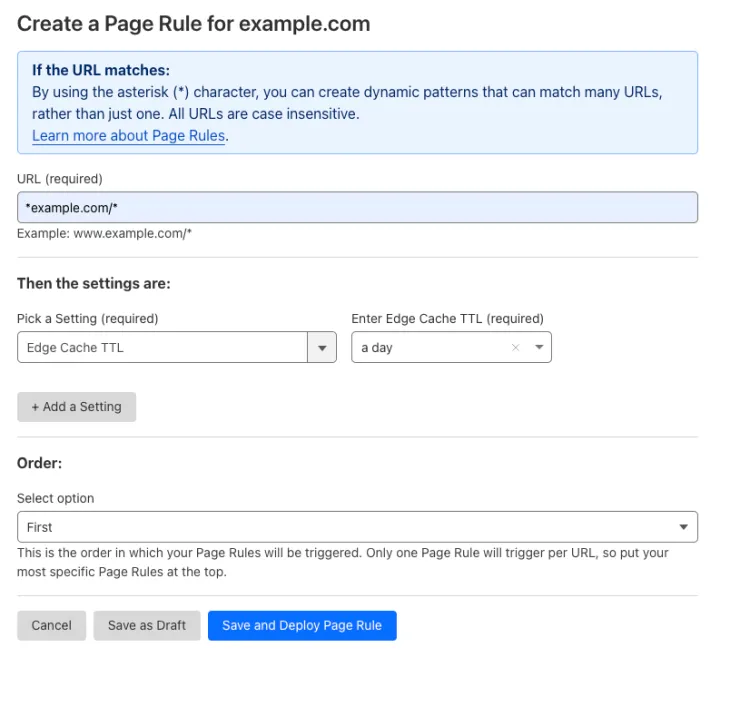
您配置了一条 Page Rule,对 example.com 的所有子域以及 example.com 域名本身调整 Edge Cache TTL:
- URL(网址):
*example.com/* - Setting(设置):Edge Cache TTL
- Enter Edge Cache TTL(输入边缘缓存 TTL):a day
如何迁移:
-
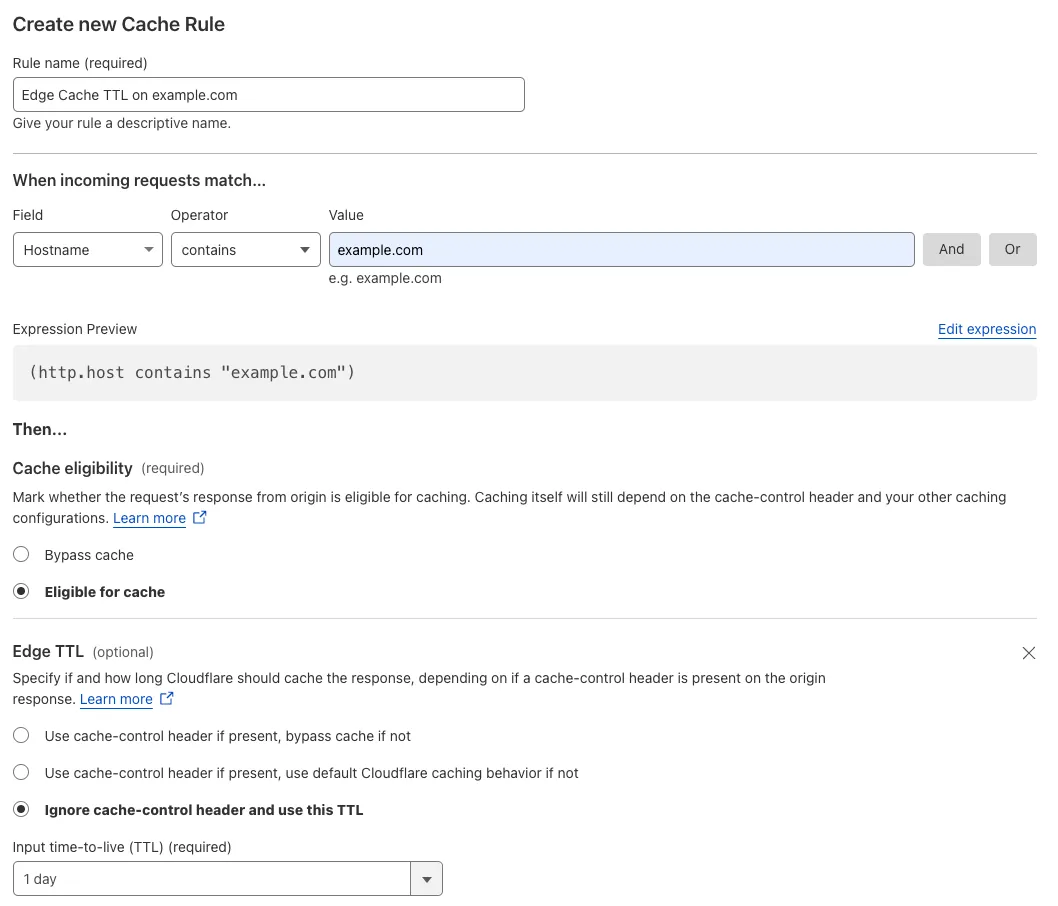
创建一条缓存规则,对任何包含
example.com的主机名,将 Cloudflare 边缘上缓存资源的 edge cache TTL 调整为一天:- When incoming requests match(当传入请求匹配时):Custom filter expression(自定义过滤表达式)
- 使用 Expression Builder:
Hostname contains "example.com" - 使用 Expression Editor:
(http.host contains "example.com")
- 使用 Expression Builder:
- Then(然后):
- Cache eligibility(缓存资格):Eligible for cache(符合缓存条件)
- Setting(设置):Edge TTL
- 忽略 cache-control 标头并使用此 TTL
- Input time-to-live (TTL)(输入生存时间 (TTL)):1 day
- When incoming requests match(当传入请求匹配时):Custom filter expression(自定义过滤表达式)
-
关闭现有 Page Rule,并验证所创建缓存规则的行为。
-
若测试成功,删除现有 Page Rule。
| Page Rules 配置 | 迁移为缓存规则 |
|---|---|
 |  |
背景:
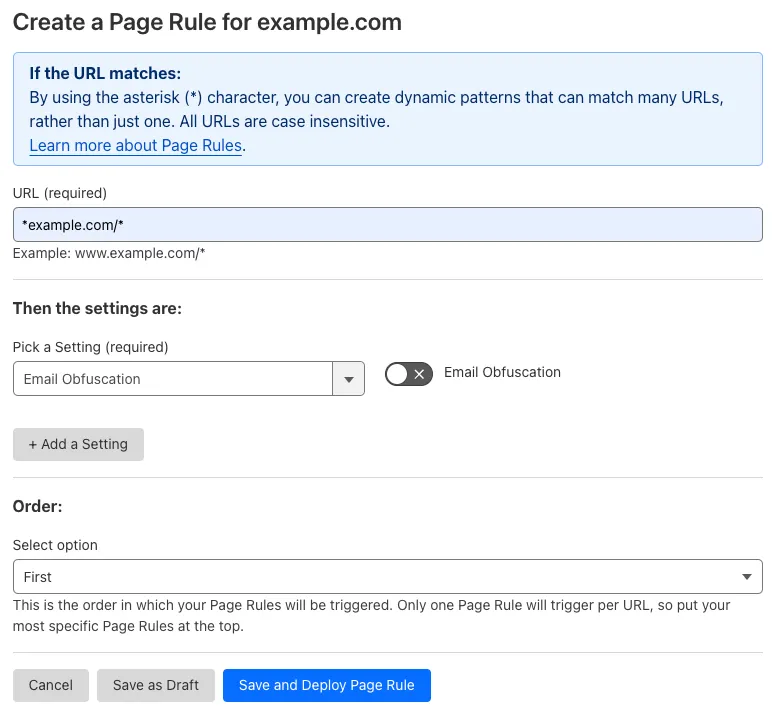
您配置了一条 Page Rule,对 example.com 的所有子域以及 example.com 域名本身关闭 Email Obfuscation:
- URL(网址):
*example.com/* - Setting(设置):Email Obfuscation
- Value(值):Off
如何迁移:
-
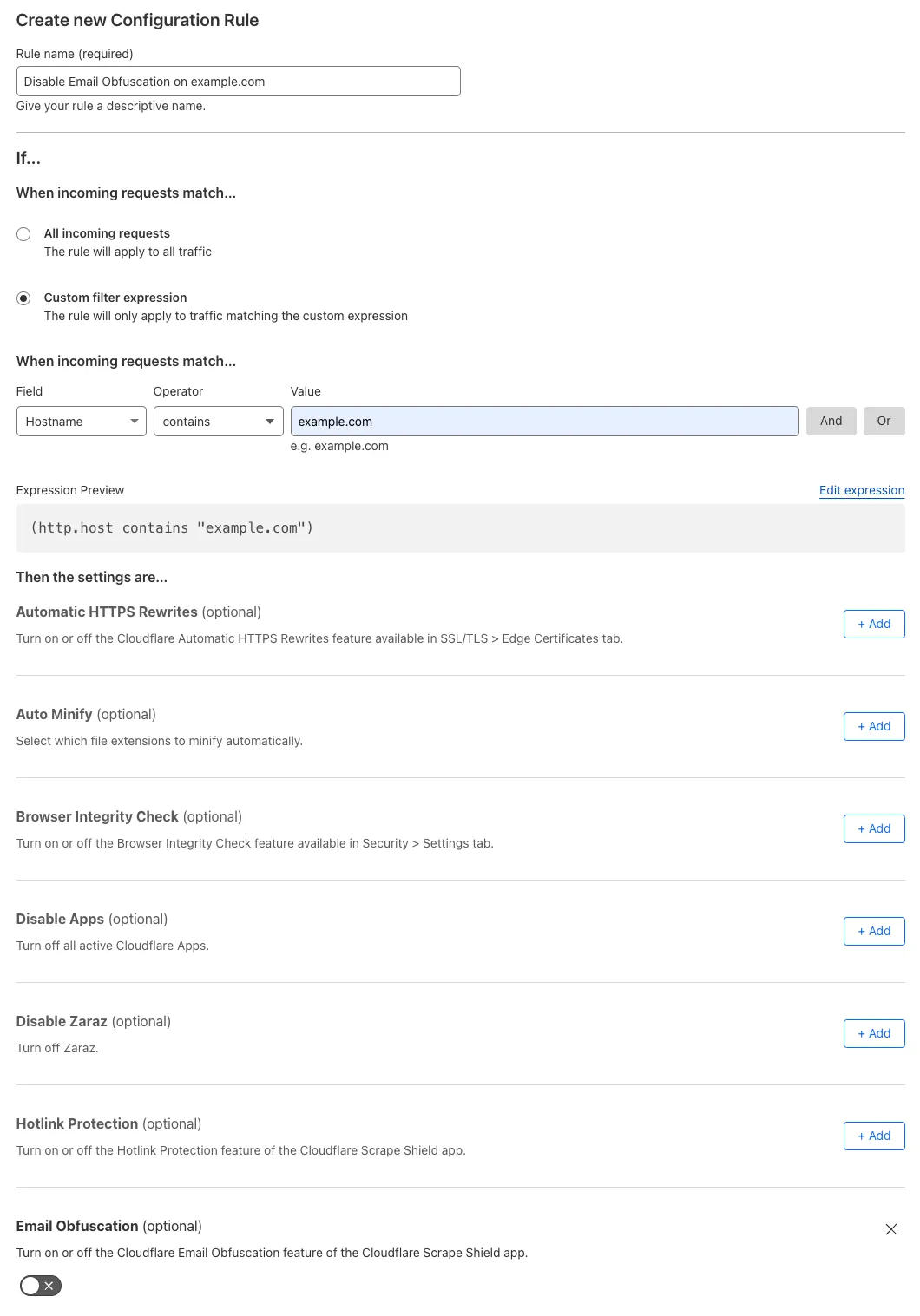
创建一条配置规则,对任何包含
example.com的主机名关闭 Email Obfuscation:- When incoming requests match(当传入请求匹配时):Custom filter expression(自定义过滤表达式)
- 使用 Expression Builder:
Hostname contains "example.com" - 使用 Expression Editor:
(http.host contains "example.com")
- 使用 Expression Builder:
- Then the settings are(则设置为):
- Setting(设置):Email Obfuscation
- Value(值):Off
- Setting(设置):Email Obfuscation
- When incoming requests match(当传入请求匹配时):Custom filter expression(自定义过滤表达式)
-
关闭现有 Page Rule,并验证所创建配置规则的行为。
-
若测试成功,删除现有 Page Rule。
| Page Rules 配置 | 迁移为配置规则 |
|---|---|
 |  |
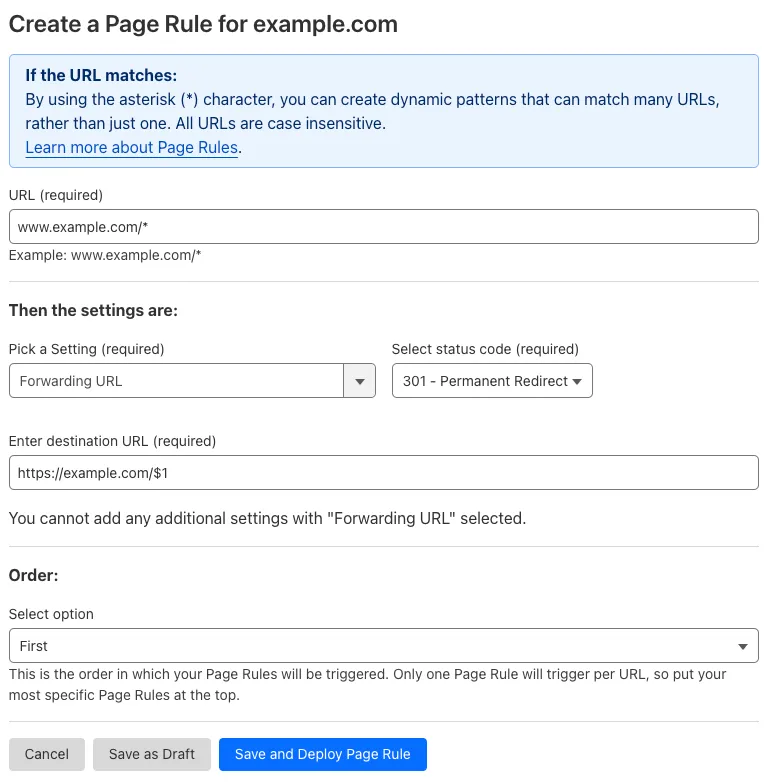
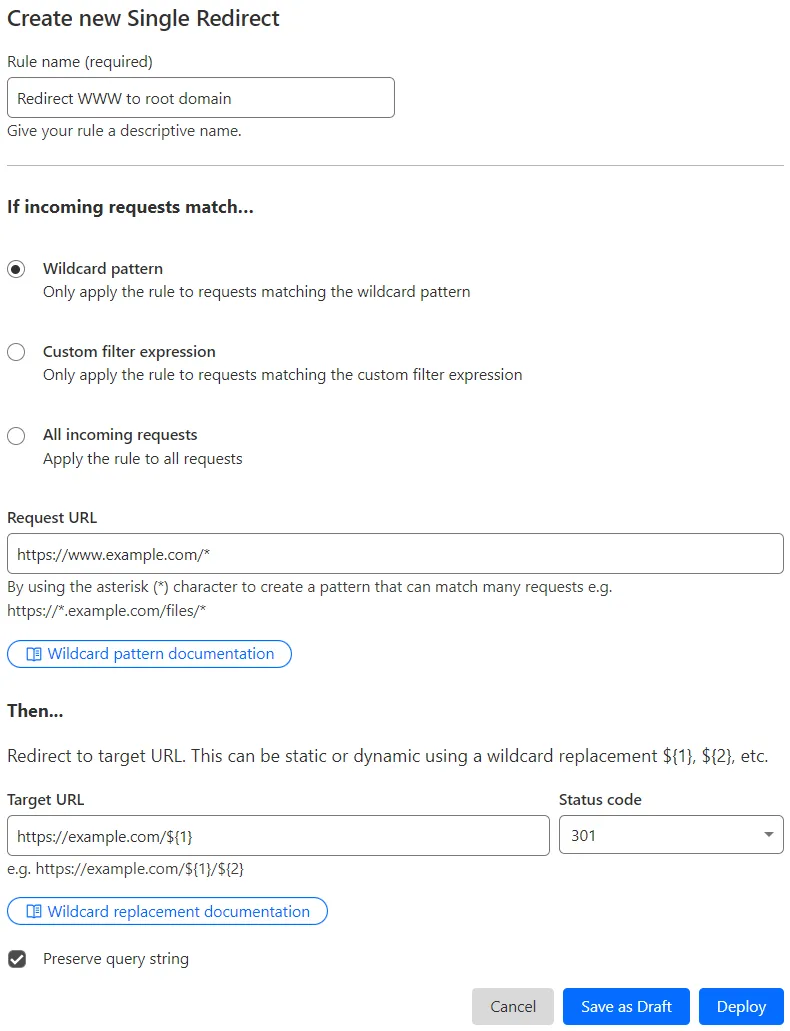
示例 #1:将 www 重定向到根域名
背景:
您配置了一条 Page Rule,将 www.example.com 在所有 URI 路径上永久重定向到 example.com:
- URL(网址):
www.example.com/* - Setting(设置):Forwarding URL
- Select Status code(选择状态码):301 - Permanent Redirect
- Destination URL(目标 URL):
https://example.com/$1
如何迁移:
-
创建一条单条重定向,将
https://www.example.com的请求永久重定向到https://example.com。您可以选择 Redirect from WWW to Root(从 WWW 重定向到根域名) 规则模板,或输入以下规则配置:- If incoming requests match(如果传入请求匹配):Wildcard pattern(通配符模式)
- Request URL(请求 URL):
https://www.example.com/*
- Request URL(请求 URL):
- Then(然后):
- Target URL(目标 URL):
https://example.com/${1} - Status code(状态码):301
- Preserve query string(保留查询字符串):已启用
- Target URL(目标 URL):
- If incoming requests match(如果传入请求匹配):Wildcard pattern(通配符模式)
-
关闭现有 Page Rule,并验证所创建重定向的行为。
-
若测试成功,删除现有 Page Rule。
关于规则等效性的说明
所提供的关于单URL重定向(Single Redirects)的示例与同一示例中之前存在的页面规则(Page Rule)并非完全一致。
确切的等效规则需要同时匹配 HTTP 和 HTTPS 传入请求,您可以使用如下通配符模式来实现这一点(请注意 http 后面多出来的 *):
- 请求 URL:
http*://www.example.com/*
这就需要您同时修改目标 URL,以使用第二个通配符捕获组,而不是第一个捕获组(对应于上述通配符模式中第二个 * 捕获的文本):
- 目标 URL:
https://example.com/${2}
| Page Rules 配置 | 迁移为单条重定向 |
|---|---|
 |  |
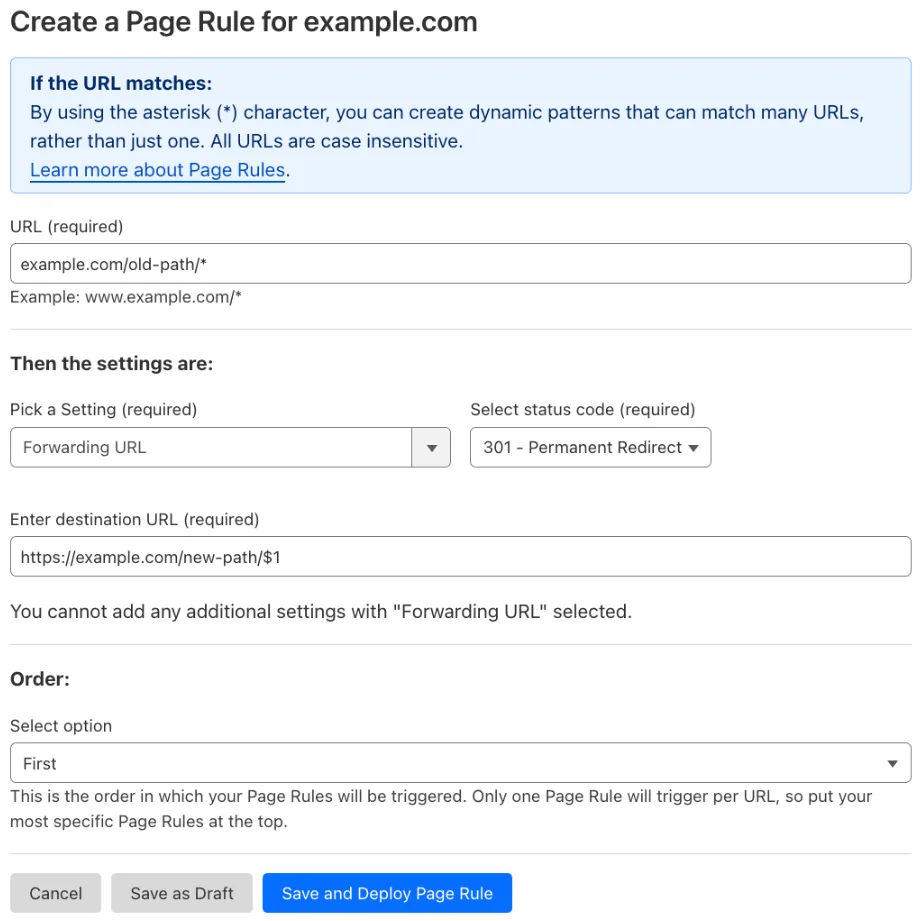
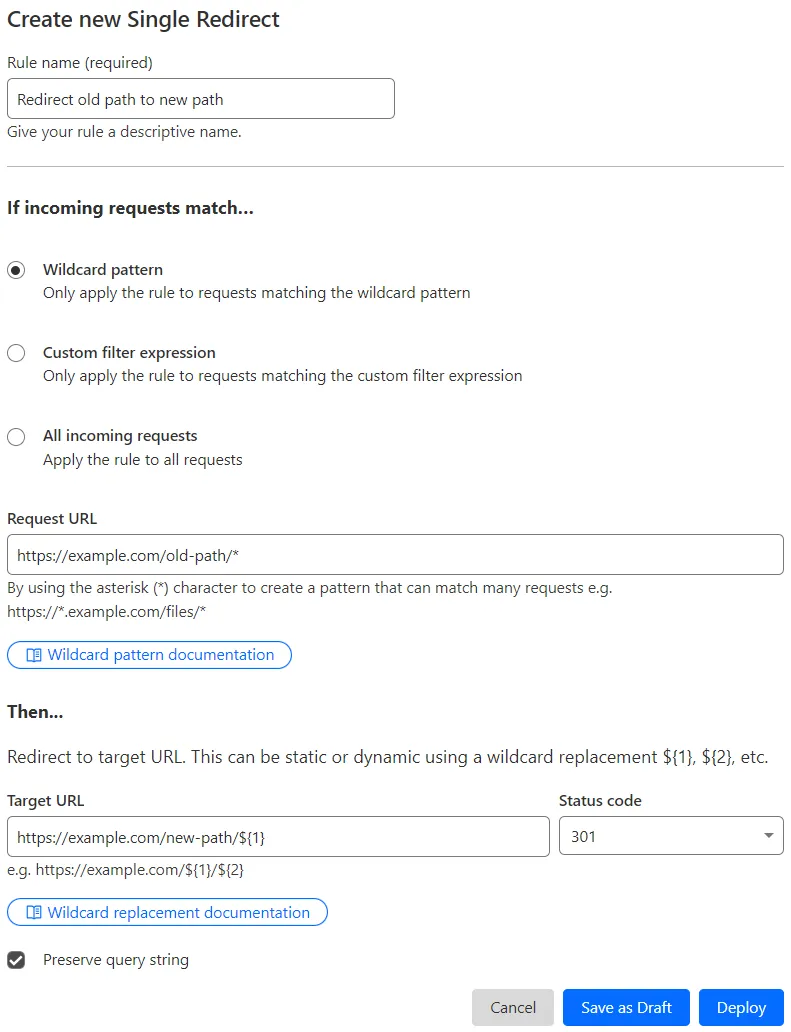
示例 #2:将旧路径下的所有页面重定向到新路径
背景:
您配置了一条 Page Rule,将 example.com/old-path 永久重定向到 example.com/new-path:
- URL(网址):
example.com/old-path/* - Setting(设置):Forwarding URL
- Select Status code(选择状态码):301 - Permanent Redirect
- Destination URL(目标 URL):
https://example.com/new-path/$1
如何迁移:
-
创建一条单条重定向,将
example.com/old-path的请求永久重定向到example.com/new-path:- If incoming requests match(如果传入请求匹配):Wildcard pattern(通配符模式)
- Request URL(请求 URL):
https://example.com/old-path/*
- Request URL(请求 URL):
- Then(然后):
- Target URL(目标 URL):
https://example.com/new-path/${1} - Status code(状态码):301
- Preserve query string(保留查询字符串):已启用
- Target URL(目标 URL):
- If incoming requests match(如果传入请求匹配):Wildcard pattern(通配符模式)
-
关闭现有 Page Rule,并验证所创建重定向的行为。
-
若测试成功,删除现有 Page Rule。
关于规则等效性的说明
所提供的关于单URL重定向(Single Redirects)的示例与同一示例中之前存在的页面规则(Page Rule)并非完全一致。
确切的等效规则需要同时匹配 HTTP 和 HTTPS 传入请求,您可以使用如下通配符模式来实现这一点(请注意 http 后面多出来的 *):
- 请求 URL:
http*://example.com/old-path/*
这就需要您同时修改目标 URL,以使用第二个通配符捕获组,而不是第一个捕获组(对应于上述通配符模式中第二个 * 捕获的文本):
- 目标 URL:
https://example.com/new-path/${2}
| Page Rules 配置 | 迁移为单条重定向 |
|---|---|
 |  |
背景:
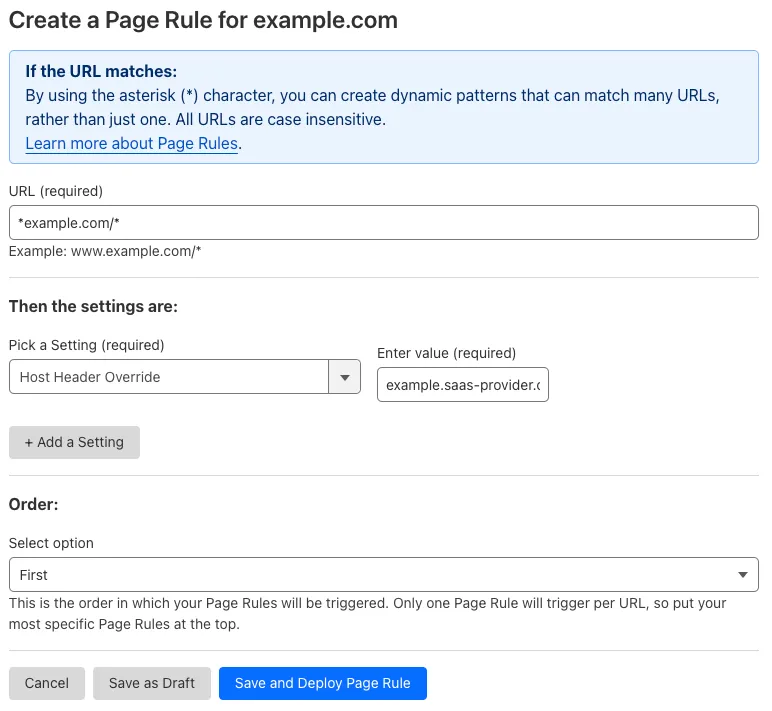
您配置了一条 Page Rule,将发往 example.com 任意子域以及 example.com 域名本身的所有请求的 Host HTTP 标头更改为 example.saas-provider.com:
- URL(网址):
*example.com/* - Setting(设置):Host Header Override
- Enter value(输入值):
example.saas-provider.com
如何迁移:
-
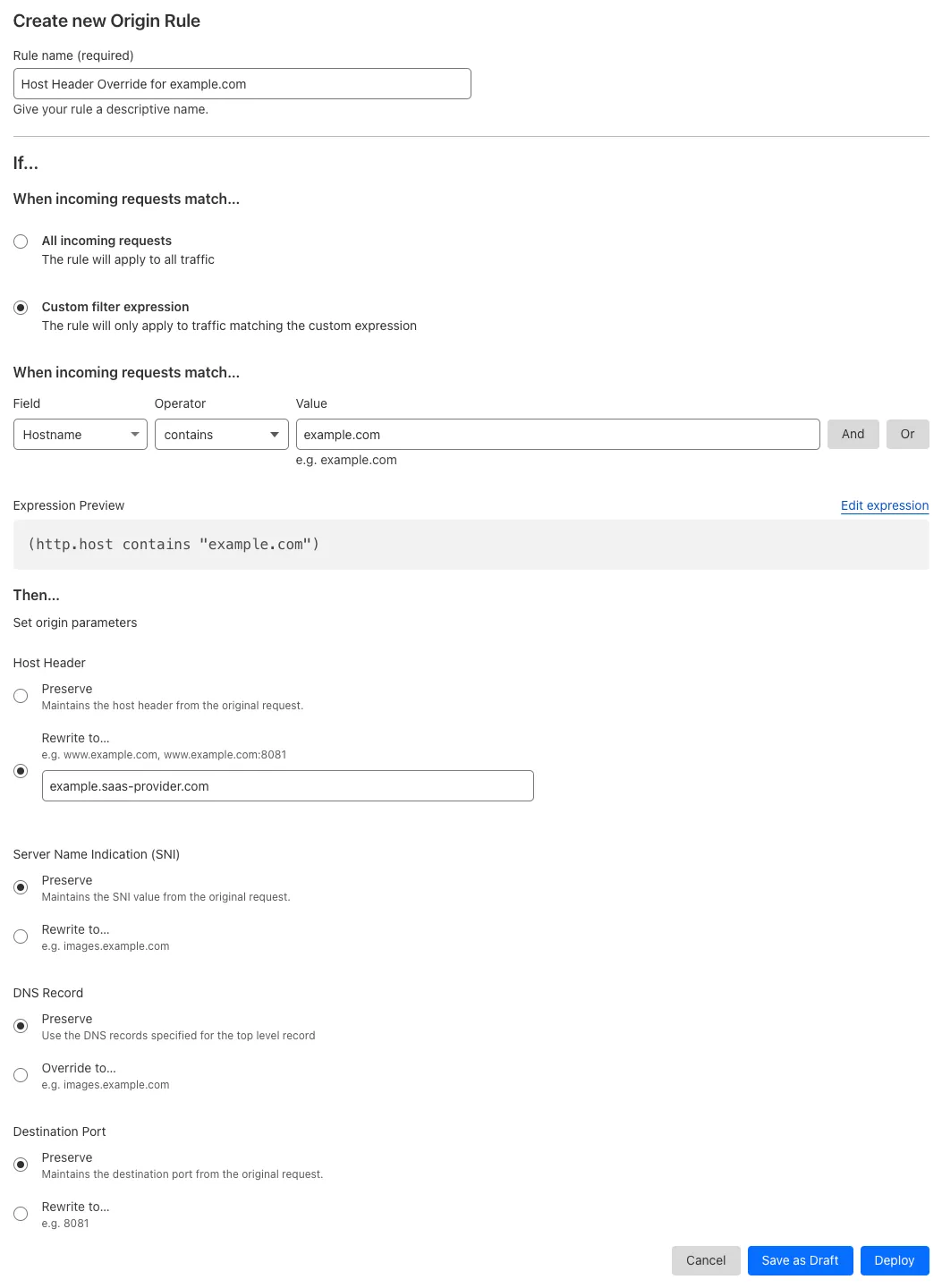
创建一条源站规则,对任何包含
example.com的主机名,将Host标头更改为example.saas-provider.com:- When incoming requests match(当传入请求匹配时):Custom filter expression(自定义过滤表达式)
- 使用 Expression Builder:
Hostname contains "example.com" - 使用 Expression Editor:
(http.host contains "example.com")
- 使用 Expression Builder:
- Then(然后):
- Set origin parameters(设置源站参数):
- Host Header(主机标头) > Rewrite to(重写为):
example.saas-provider.com
- Host Header(主机标头) > Rewrite to(重写为):
- Set origin parameters(设置源站参数):
- When incoming requests match(当传入请求匹配时):Custom filter expression(自定义过滤表达式)
-
关闭现有 Page Rule,并验证所创建源站规则的行为。
-
若测试成功,删除现有 Page Rule。
| Page Rules 配置 | 迁移为源站规则 |
|---|---|
 |  |
背景:
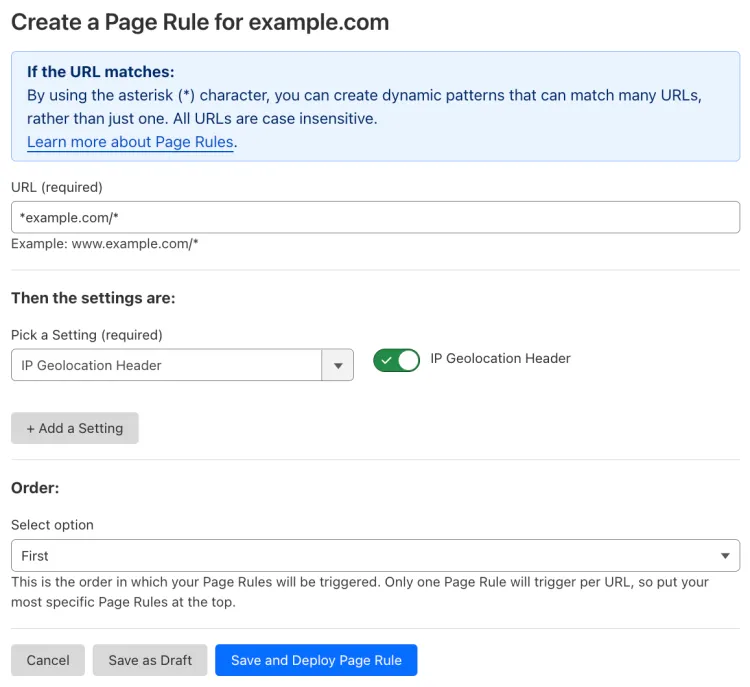
您配置了一条 Page Rule,为发往 example.com 任意子域以及 example.com 域名本身的所有请求添加 CF-IPCountry HTTP 标头:
- URL(网址):
*example.com/* - Setting(设置):IP Geolocation Header
- Value(值):On
如何迁移:
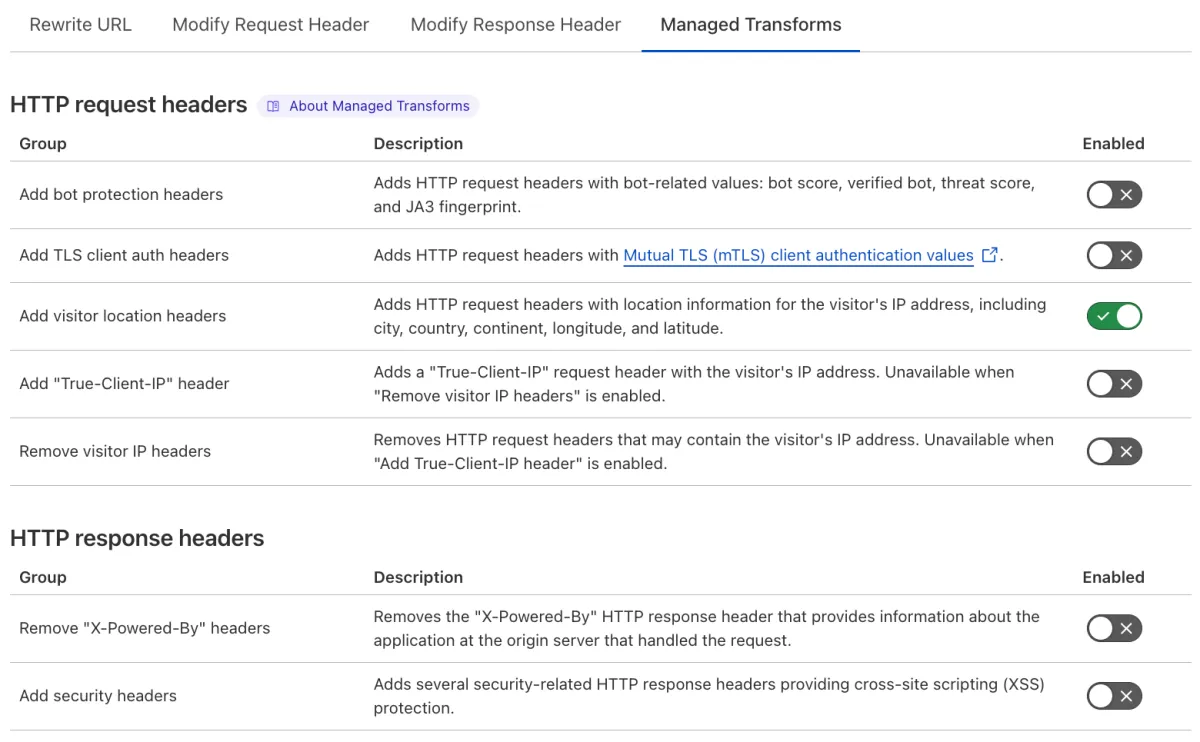
- 开启 Add visitor location headers(添加访问者位置标头) Managed Transform——这是 Transform Rules 的一项功能——以向所有请求添加
CF-IPCountry及其他位置标头。 - 关闭现有 Page Rule,并验证 Managed Transform 的行为。
- 若测试成功,删除现有 Page Rule。
| Page Rules 配置 | 迁移为 Managed Transform |
|---|---|
 |  |
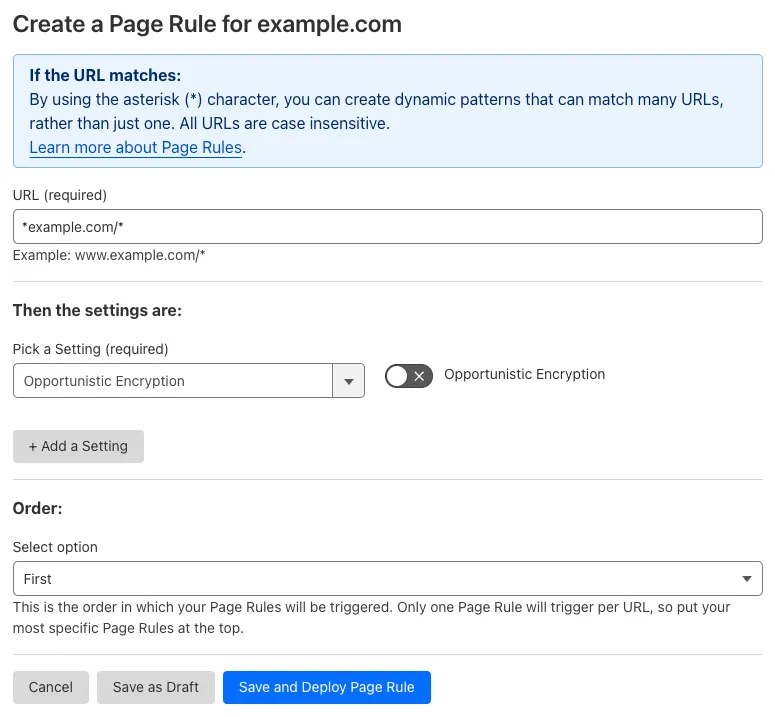
背景:
您配置了一条 Page Rule,对 example.com 的所有子域以及 example.com 域名本身关闭 Opportunistic Encryption:
- URL(网址):
*example.com/* - Setting(设置):Opportunistic Encryption
- Value(值):Off
如何迁移:
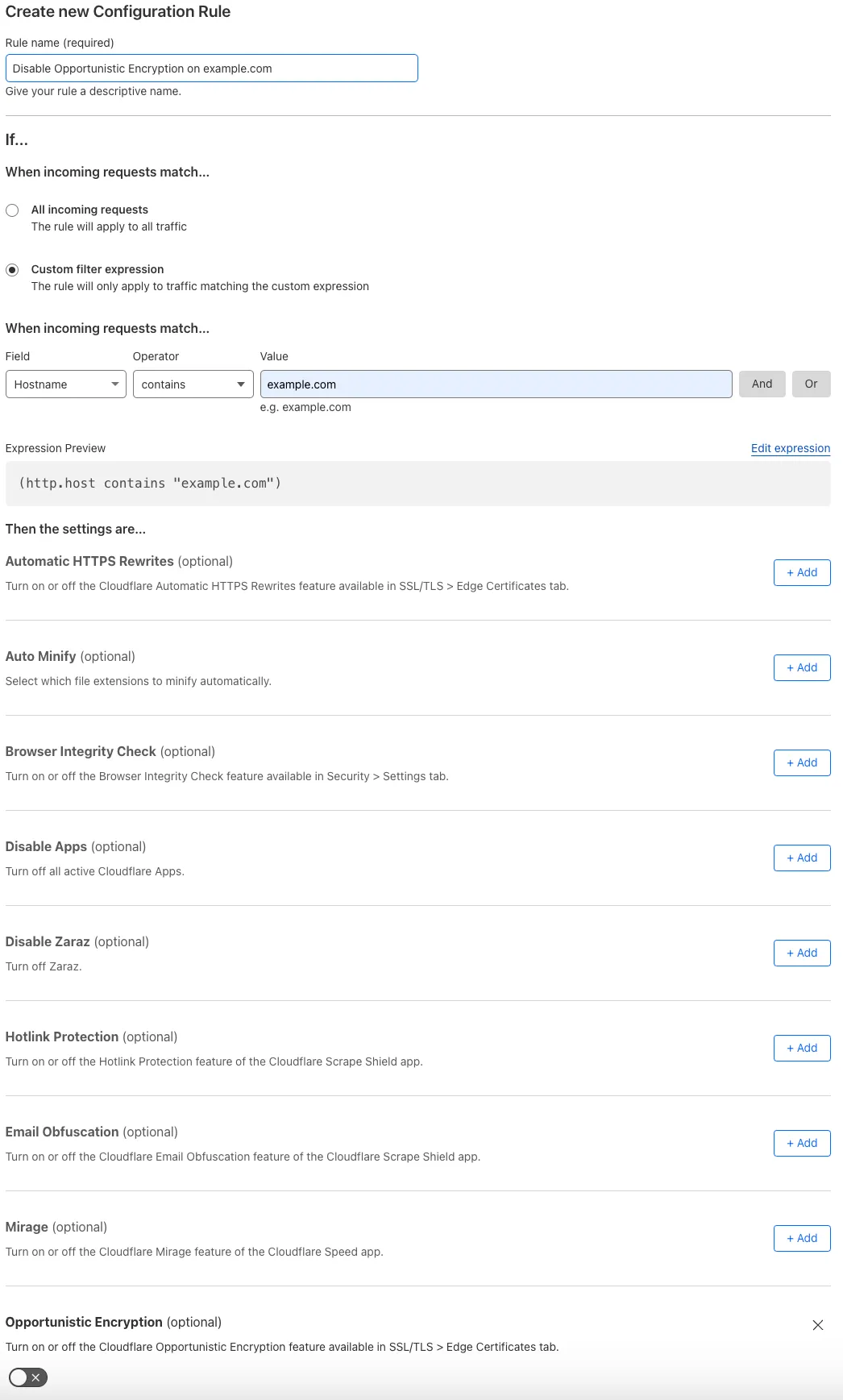
-
创建一条配置规则,对任何包含
example.com的主机名关闭 Opportunistic Encryption:- When incoming requests match(当传入请求匹配时):Custom filter expression(自定义过滤表达式)
- 使用 Expression Builder:
Hostname contains "example.com" - 使用 Expression Editor:
(http.host contains "example.com")
- 使用 Expression Builder:
- Then the settings are(则设置为):
- Setting(设置):Opportunistic Encryption
- Value(值):Off
- Setting(设置):Opportunistic Encryption
- When incoming requests match(当传入请求匹配时):Custom filter expression(自定义过滤表达式)
-
关闭现有 Page Rule,并验证所创建配置规则的行为。
-
若测试成功,删除现有 Page Rule。
| Page Rules 配置 | 迁移为配置规则 |
|---|---|
 |  |
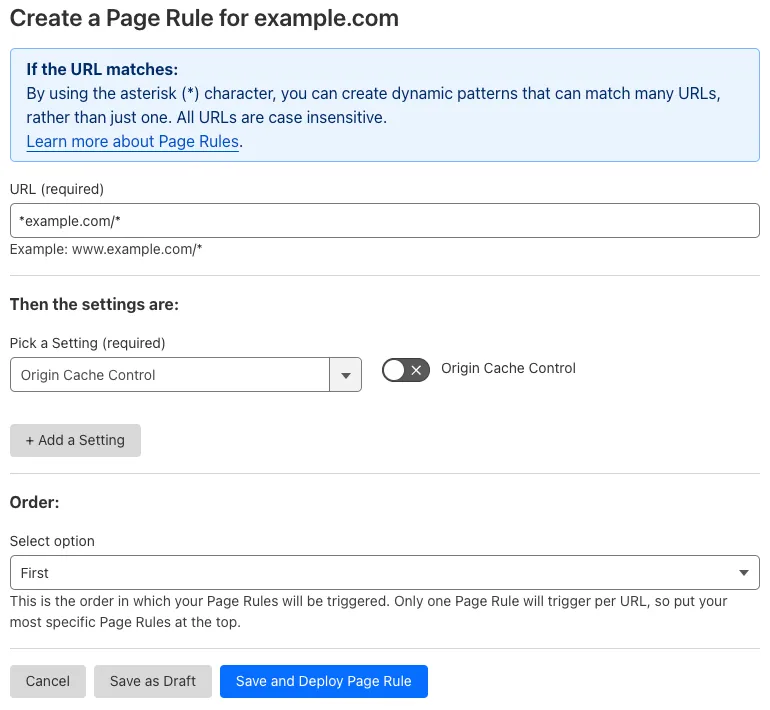
背景:
您配置了一条 Page Rule,对 example.com 的所有子域以及 example.com 域名本身关闭 Origin Cache Control:
- URL(网址):
*example.com/* - Setting(设置):Origin Cache Control
- Value(值):Off
如何迁移:
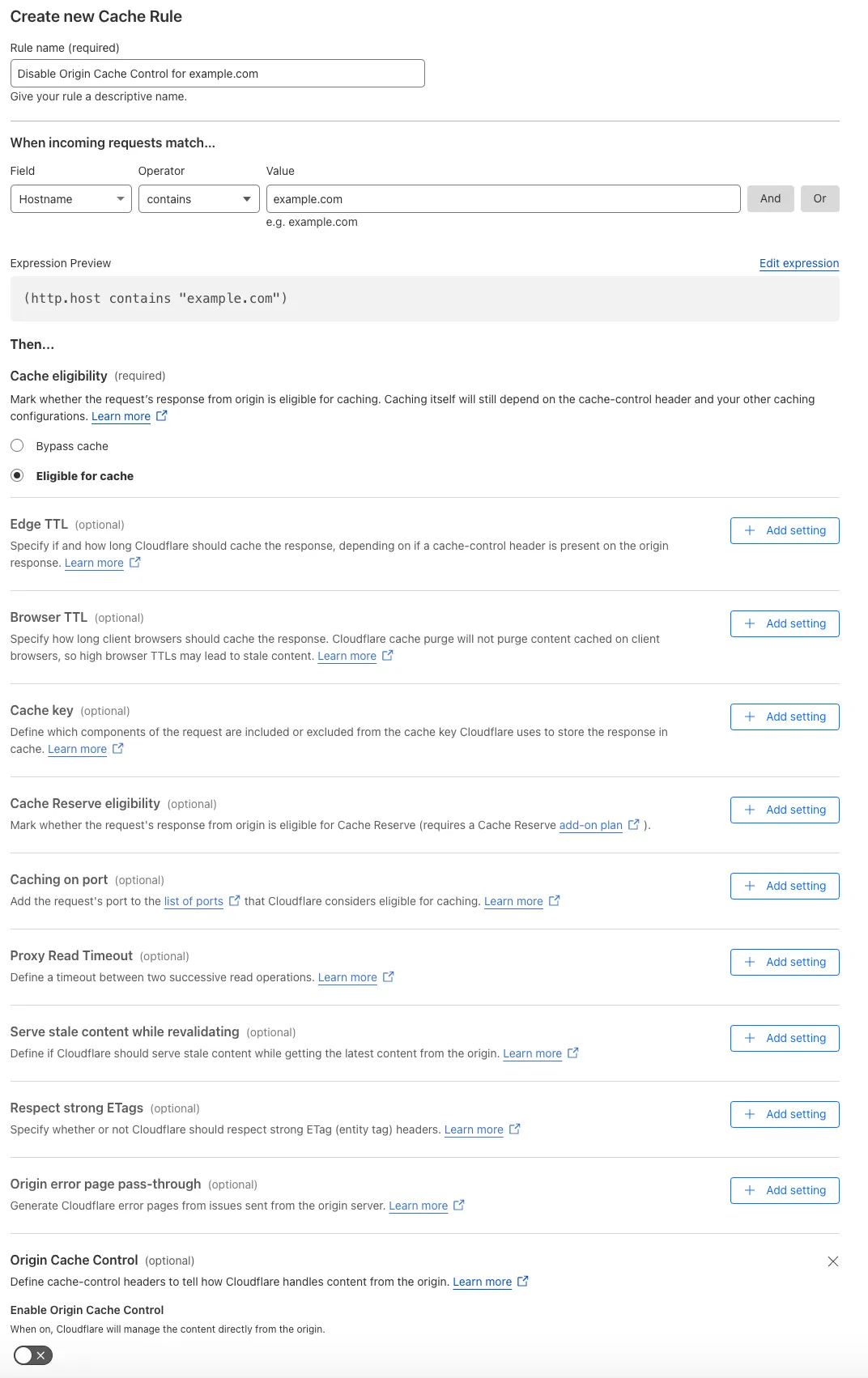
-
创建一条缓存规则,对任何包含
example.com的主机名确定边缘缓存行为:- When incoming requests match(当传入请求匹配时):Custom filter expression(自定义过滤表达式)
- 使用 Expression Builder:
Hostname contains "example.com" - 使用 Expression Editor:
(http.host contains "example.com")
- 使用 Expression Builder:
- Then(然后):
- Cache eligibility(缓存资格):Eligible for cache(符合缓存条件)
- Setting(设置):Origin Cache Control
- Enable Origin Cache Control(启用源站缓存控制):Off
- When incoming requests match(当传入请求匹配时):Custom filter expression(自定义过滤表达式)
-
关闭现有 Page Rule,并验证所创建缓存规则的行为。
-
若测试成功,删除现有 Page Rule。
| Page Rules 配置 | 迁移为缓存规则 |
|---|---|
 |  |
背景:
您配置了一条 Page Rule,对 example.com 的所有子域以及 example.com 域名本身开启 Origin Error Page Pass-thru:
- URL(网址):
*example.com/* - Setting(设置):Origin Error Page Pass-thru
- Value(值):On
如何迁移:
-
创建一条缓存规则,对任何包含
example.com的主机名确定边缘缓存行为:- When incoming requests match(当传入请求匹配时):Custom filter expression(自定义过滤表达式)
- 使用 Expression Builder:
Hostname contains "example.com" - 使用 Expression Editor:
(http.host contains "example.com")
- 使用 Expression Builder:
- Then(然后):
- Cache eligibility(缓存资格):Eligible for cache(符合缓存条件)
- Setting(设置):Origin error page pass-thru
- Use Origin error page pass-thru(使用源站错误页面直通):On
- When incoming requests match(当传入请求匹配时):Custom filter expression(自定义过滤表达式)
-
关闭现有 Page Rule,并验证所创建缓存规则的行为。
-
若测试成功,删除现有 Page Rule。
| Page Rules 配置 | 迁移为缓存规则 |
|---|---|
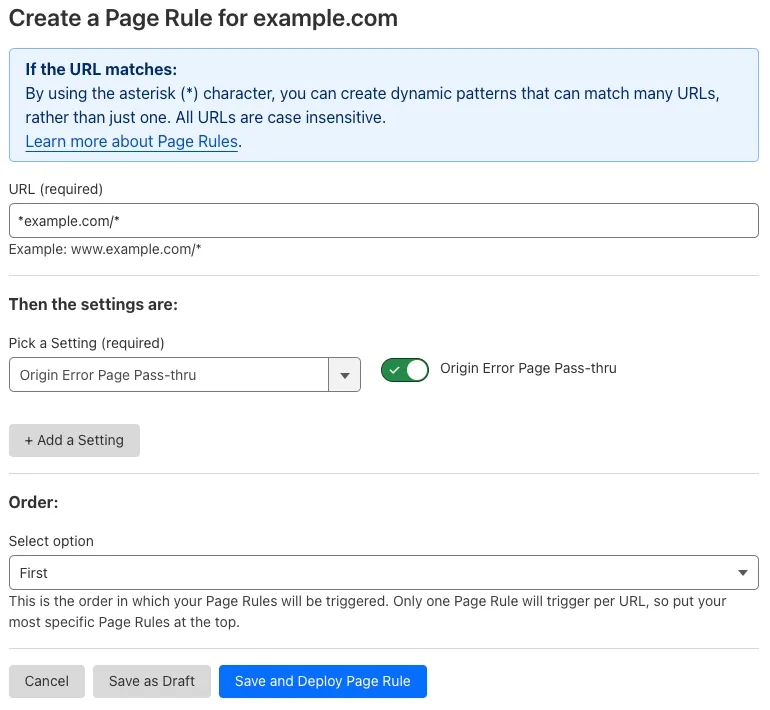 | 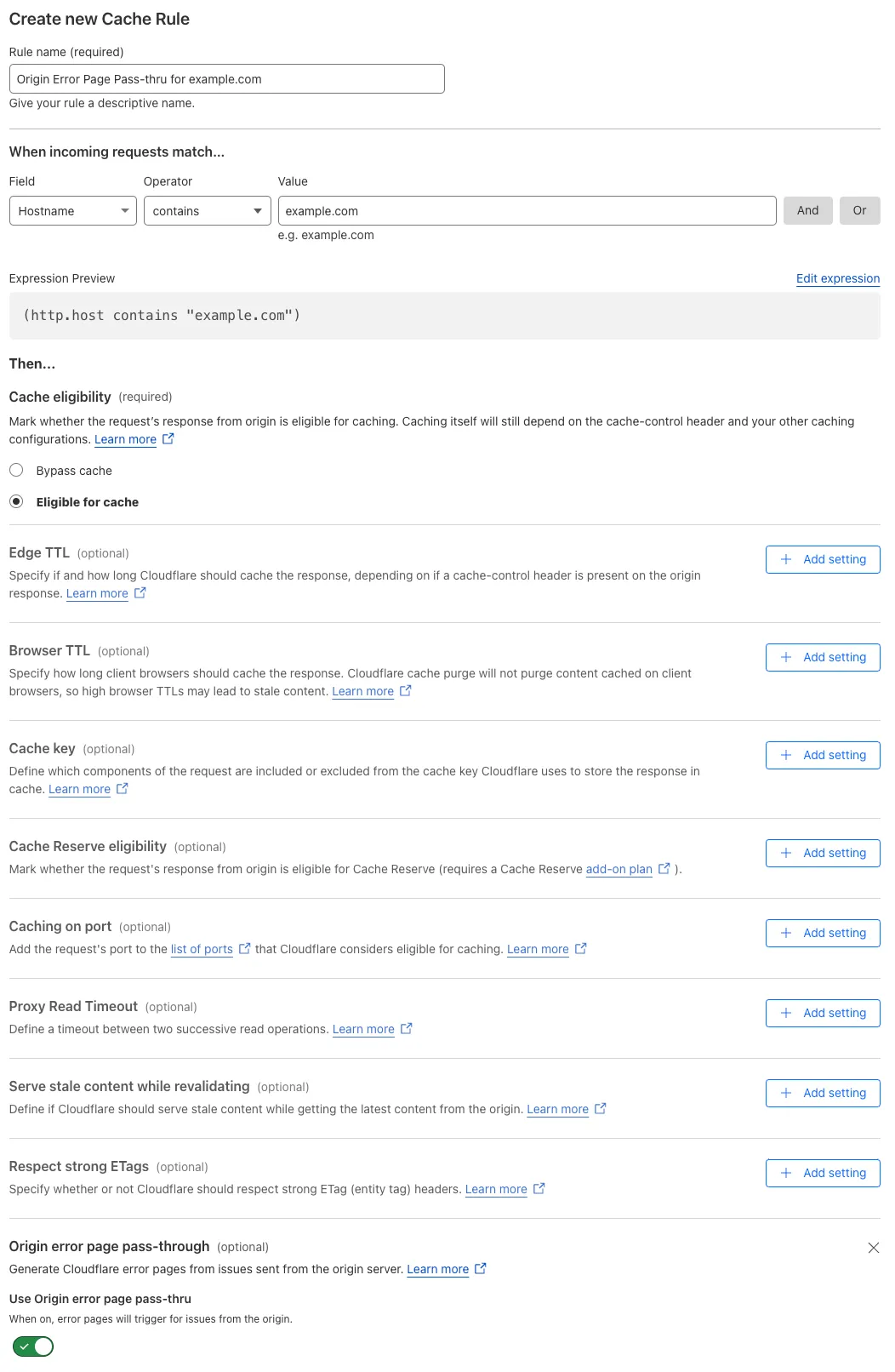 |
背景:
您配置了一条 Page Rule,对 example.com 的所有子域以及 example.com 域名本身关闭 Polish:
- URL(网址):
*example.com/* - Setting(设置):Polish
- Value(值):Off
如何迁移:
-
创建一条配置规则,对任何包含
example.com的主机名关闭 Polish:- When incoming requests match(当传入请求匹配时):Custom filter expression(自定义过滤表达式)
- 使用 Expression Builder:
Hostname contains "example.com" - 使用 Expression Editor:
(http.host contains "example.com")
- 使用 Expression Builder:
- Then the settings are(则设置为):
- Setting(设置):Polish
- Select value(选择值):Off
- Setting(设置):Polish
- When incoming requests match(当传入请求匹配时):Custom filter expression(自定义过滤表达式)
-
关闭现有 Page Rule,并验证所创建配置规则的行为。
-
若测试成功,删除现有 Page Rule。
| Page Rules 配置 | 迁移为配置规则 |
|---|---|
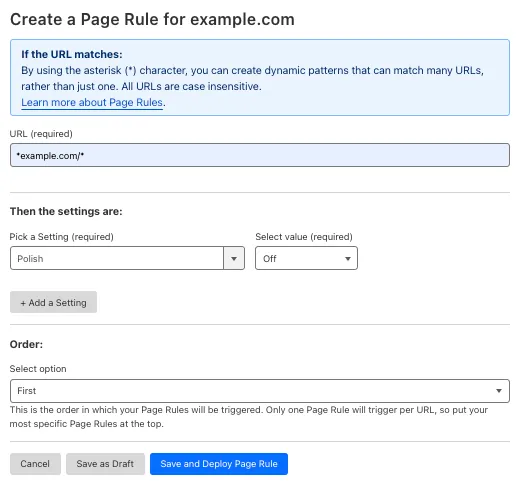 | 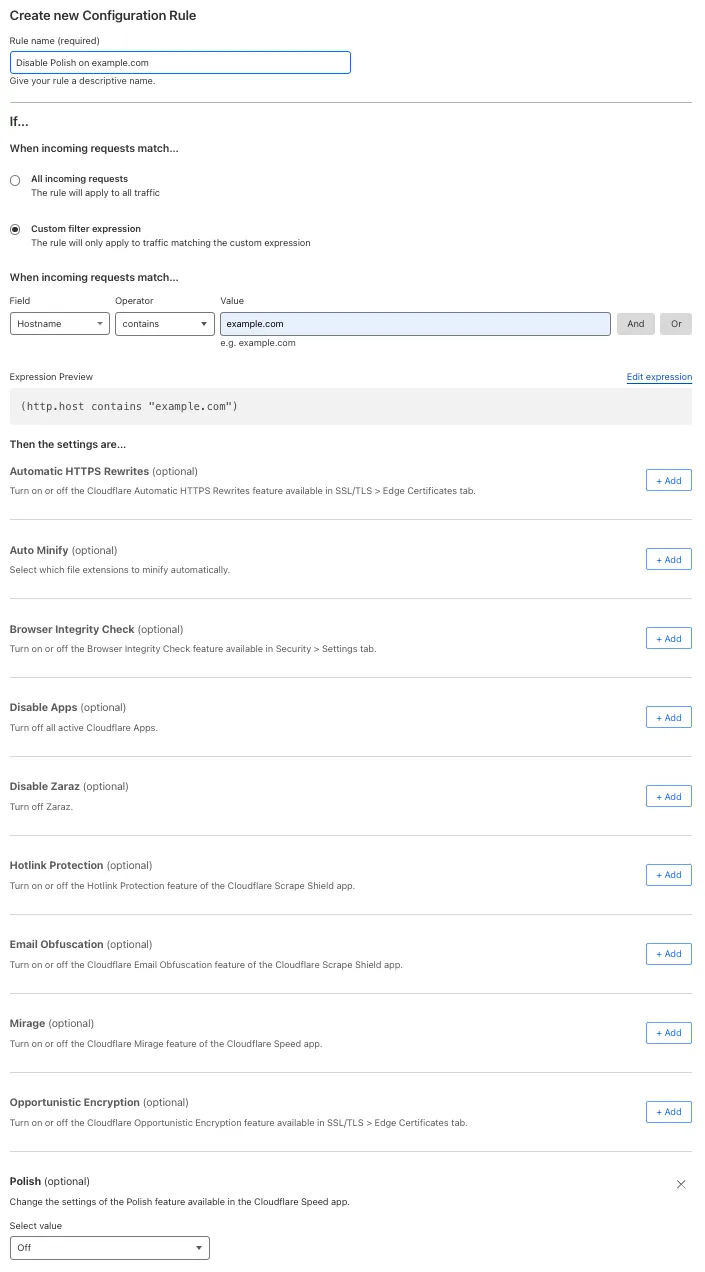 |
背景:
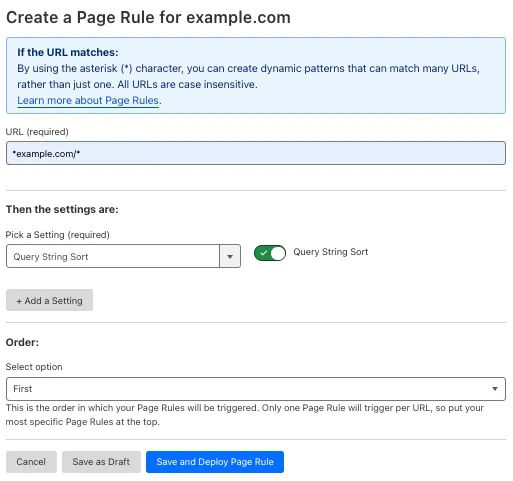
您配置了一条 Page Rule,对 example.com 的所有子域以及 example.com 域名本身开启 Query String Sort:
- URL(网址):
*example.com/* - Setting(设置):Query String Sort
- Value(值):On
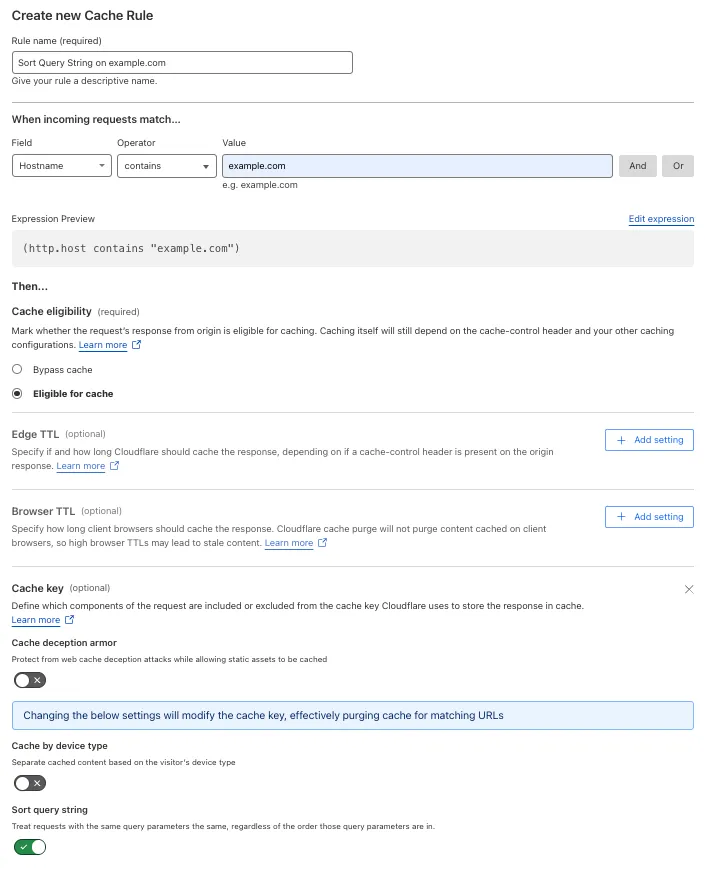
如何迁移:
-
创建一条缓存规则,对任何包含
example.com的主机名,出于缓存目的对查询字符串参数排序:- When incoming requests match(当传入请求匹配时):Custom filter expression(自定义过滤表达式)
- 使用 Expression Builder:
Hostname contains "example.com" - 使用 Expression Editor:
(http.host contains "example.com")
- 使用 Expression Builder:
- Then(然后):
- Cache eligibility(缓存资格):Eligible for cache(符合缓存条件)
- Setting(设置):Cache key
- Sort query string(排序查询字符串):On
- When incoming requests match(当传入请求匹配时):Custom filter expression(自定义过滤表达式)
-
关闭现有 Page Rule,并验证所创建缓存规则的行为。
-
若测试成功,删除现有 Page Rule。
| Page Rules 配置 | 迁移为缓存规则 |
|---|---|
 |  |
背景:
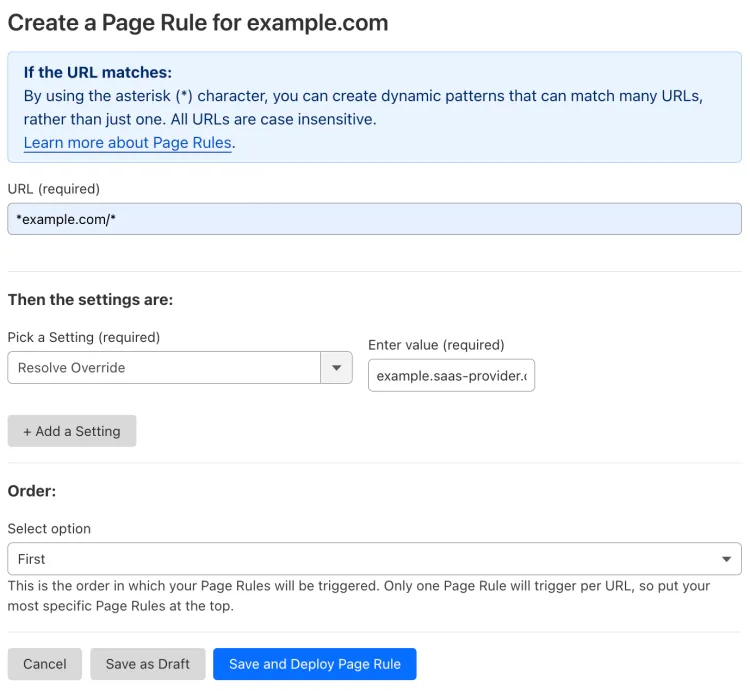
您配置了一条 Page Rule,将发往 example.com 任意子域以及 example.com 域名本身的所有请求的源站更改为 example.saas-provider.com:
- URL(网址):
*example.com/* - Setting(设置):Resolve Override
- Enter value(输入值):
example.saas-provider.com
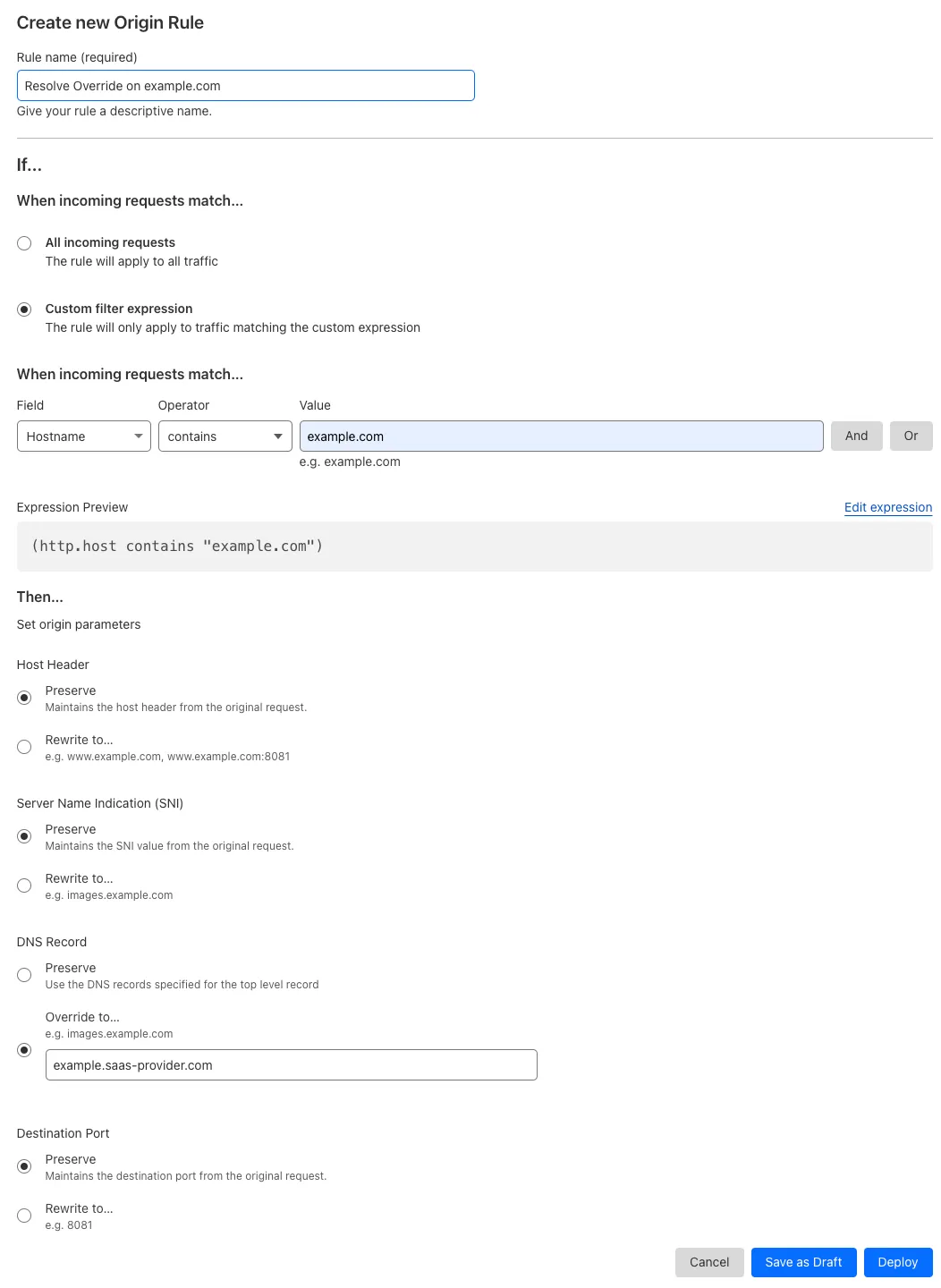
如何迁移:
-
创建一条源站规则,对任何包含
example.com的主机名,将源站覆盖为example.saas-provider.com:- When incoming requests match(当传入请求匹配时):Custom filter expression(自定义过滤表达式)
- 使用 Expression Builder:
Hostname contains "example.com" - 使用 Expression Editor:
(http.host contains "example.com")
- 使用 Expression Builder:
- Then(然后):
- DNS Record(DNS 记录) > Override to(覆盖为):
example.saas-provider.com
- DNS Record(DNS 记录) > Override to(覆盖为):
- When incoming requests match(当传入请求匹配时):Custom filter expression(自定义过滤表达式)
-
关闭现有 Page Rule,并验证所创建源站规则的行为。
-
若测试成功,删除现有 Page Rule。
| Page Rules 配置 | 迁移为源站规则 |
|---|---|
 |  |
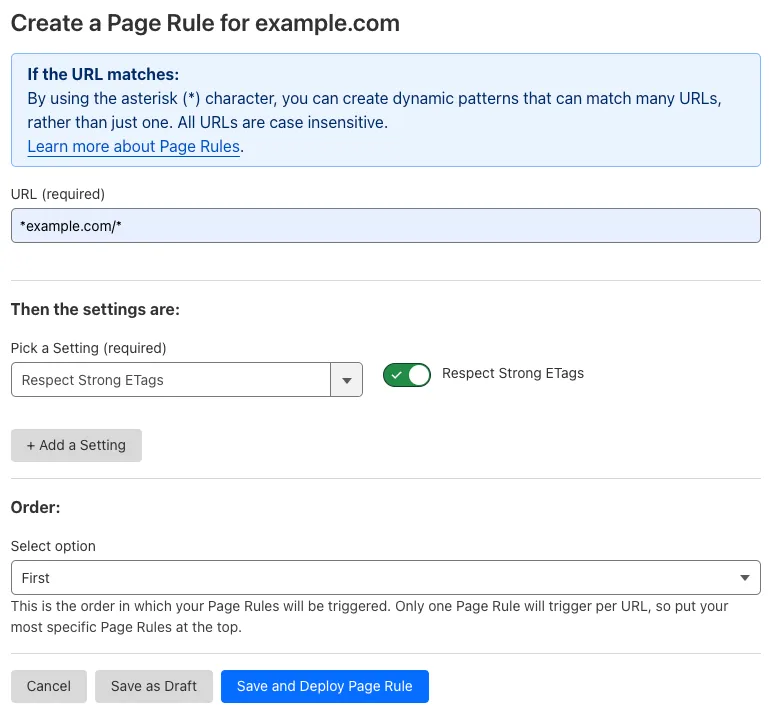
背景:
您配置了一条 Page Rule,对 example.com 的所有子域以及 example.com 域名本身开启逐字节等价性检查:
- URL(网址):
*example.com/* - Setting(设置):Respect Strong ETags
- Value(值):On
如何迁移:
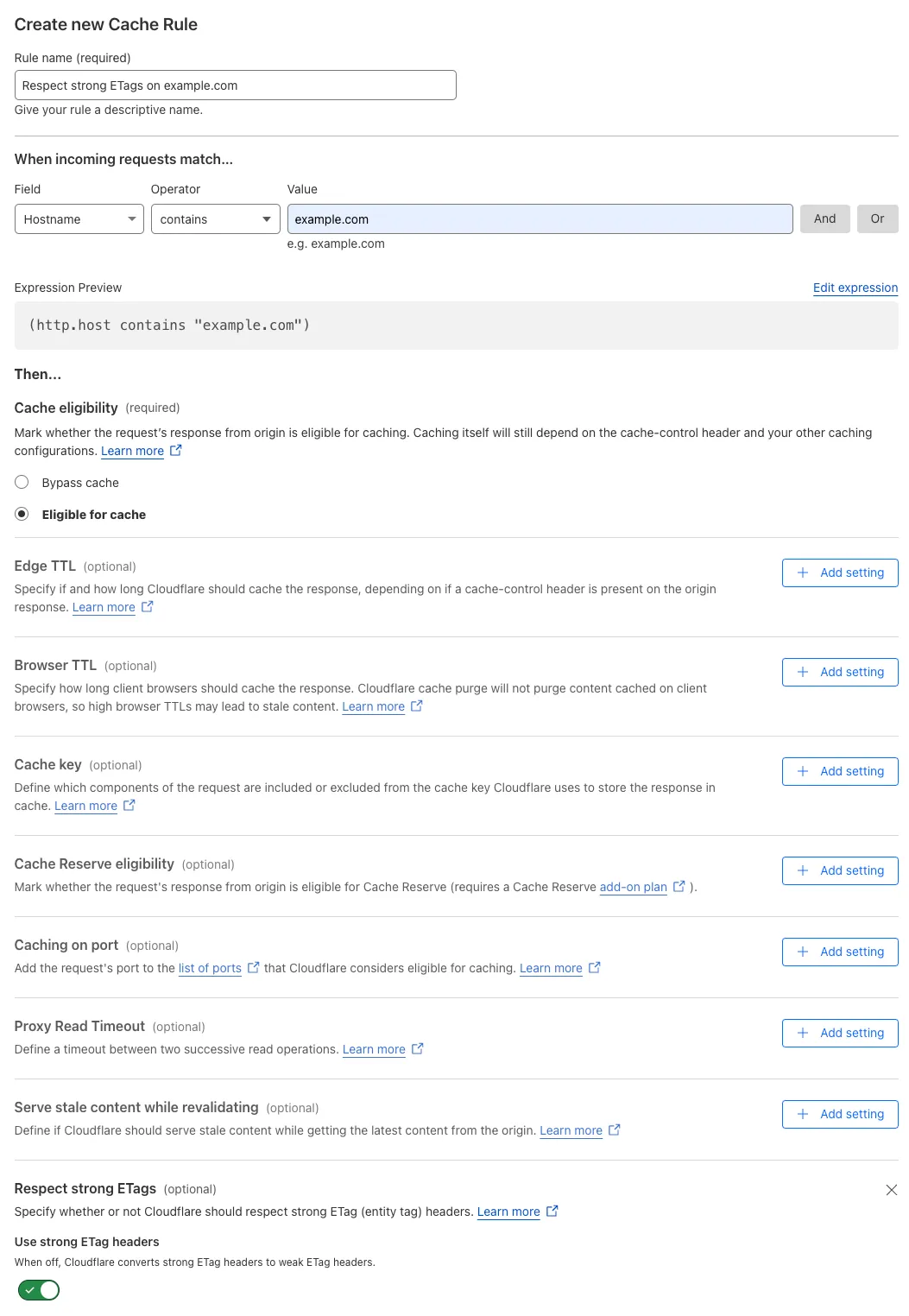
-
创建一条缓存规则,对任何包含
example.com的主机名尊重 strong ETag:- When incoming requests match(当传入请求匹配时):Custom filter expression(自定义过滤表达式)
- 使用 Expression Builder:
Hostname contains "example.com" - 使用 Expression Editor:
(http.host contains "example.com")
- 使用 Expression Builder:
- Then(然后):
- Cache eligibility(缓存资格):Eligible for cache(符合缓存条件)
- Setting(设置):Respect strong ETags
- Use strong ETag headers(使用强 ETag 标头):On
- When incoming requests match(当传入请求匹配时):Custom filter expression(自定义过滤表达式)
-
关闭现有 Page Rule,并验证所创建缓存规则的行为。
-
若测试成功,删除现有 Page Rule。
| Page Rules 配置 | 迁移为缓存规则 |
|---|---|
 |  |
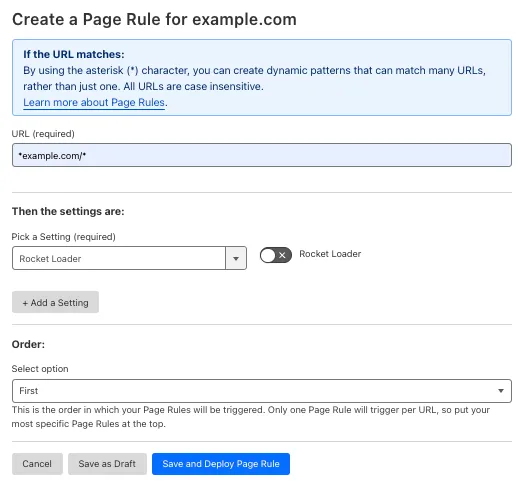
背景:
您配置了一条 Page Rule,对 example.com 的所有子域以及 example.com 域名本身关闭 Rocket Loader:
- URL(网址):
*example.com/* - Setting(设置):Rocket Loader
- Value(值):Off
如何迁移:
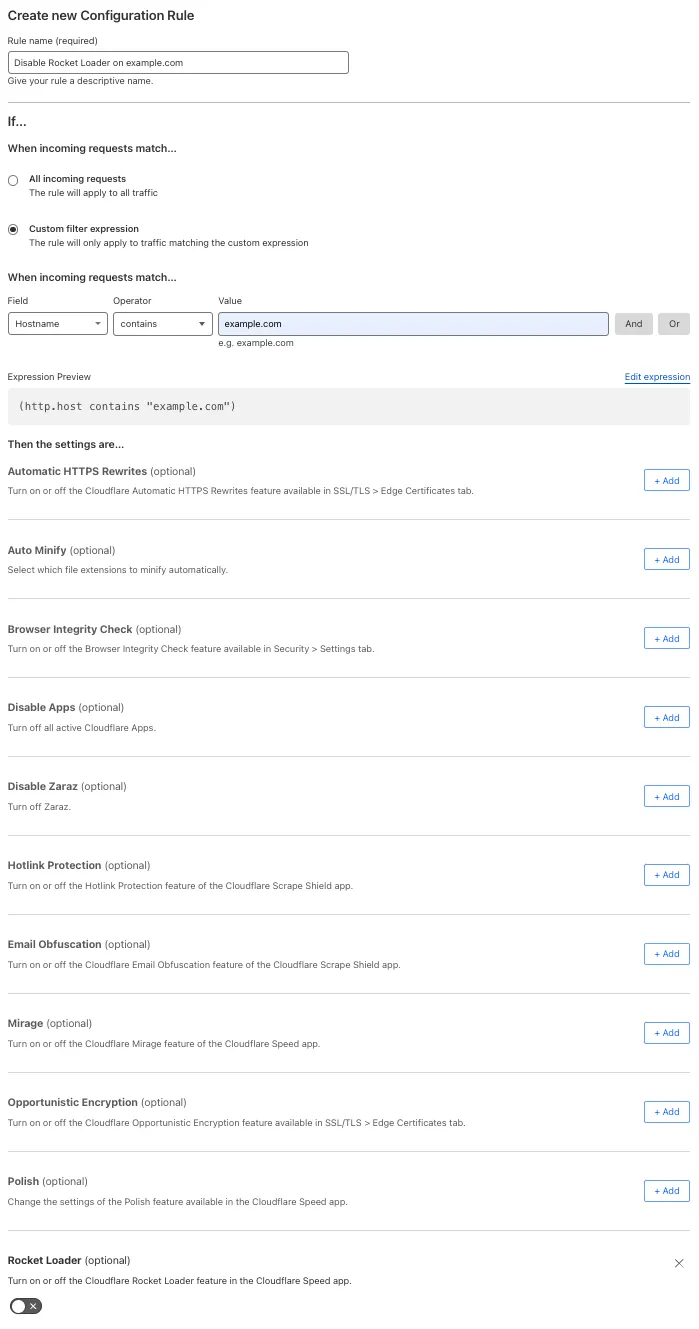
-
创建一条配置规则,对任何包含
example.com的主机名关闭 Rocket Loader:- When incoming requests match(当传入请求匹配时):Custom filter expression(自定义过滤表达式)
- 使用 Expression Builder:
Hostname contains "example.com" - 使用 Expression Editor:
(http.host contains "example.com")
- 使用 Expression Builder:
- Then the settings are(则设置为):
- Setting(设置):Rocket Loader
- Value(值):Off
- Setting(设置):Rocket Loader
- When incoming requests match(当传入请求匹配时):Custom filter expression(自定义过滤表达式)
-
关闭现有 Page Rule,并验证所创建配置规则的行为。
-
若测试成功,删除现有 Page Rule。
| Page Rules 配置 | 迁移为配置规则 |
|---|---|
 |  |
背景:
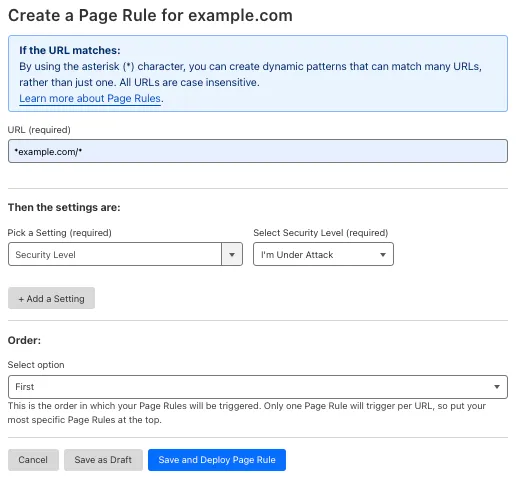
您配置了一条 Page Rule,对 example.com 的所有子域以及 example.com 域名本身将 Security Level 设为 I'm Under Attack:
- URL(网址):
*example.com/* - Setting(设置):Security Level
- Select Security Level(选择安全级别):I'm Under Attack
如何迁移:
-
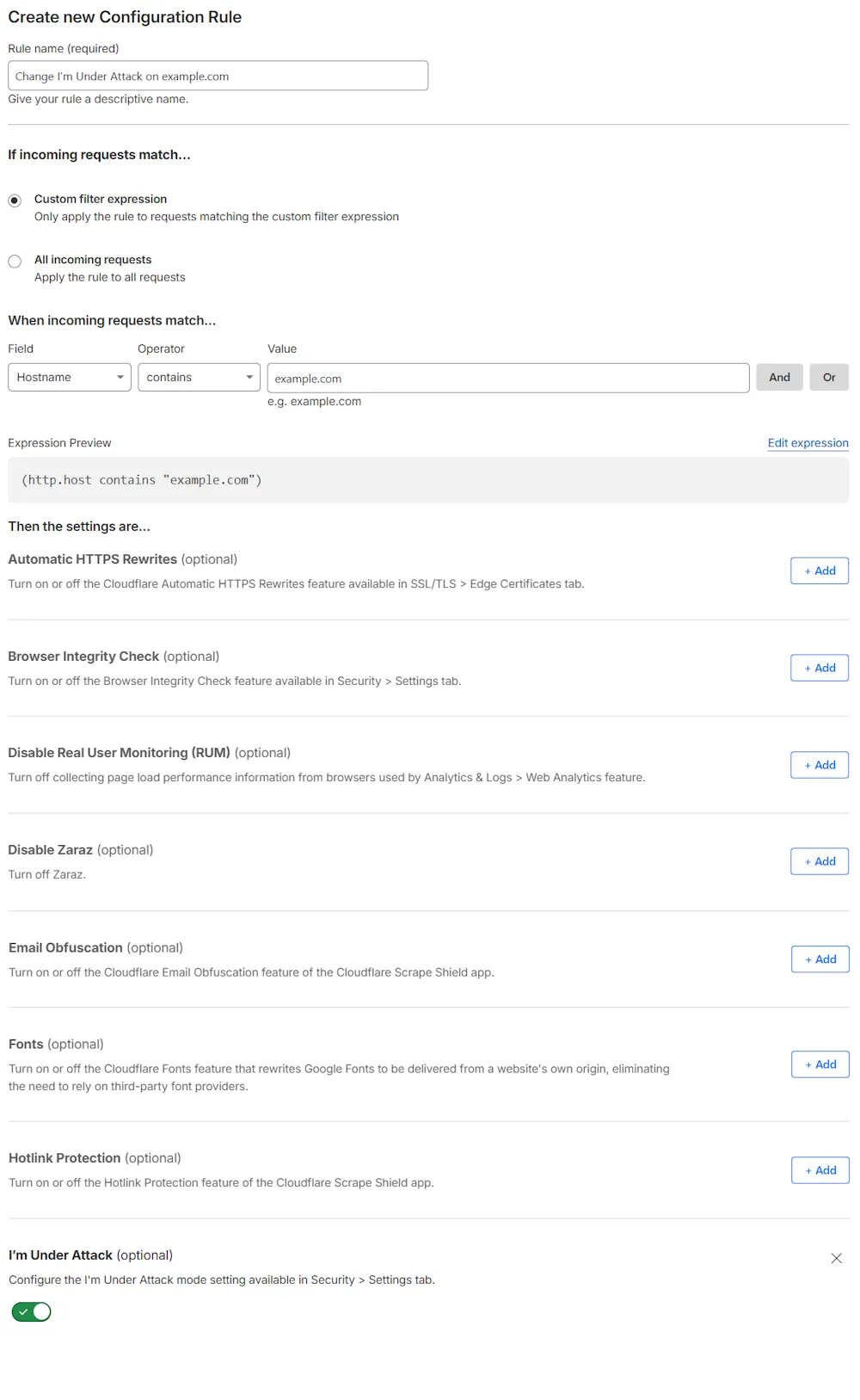
创建一条配置规则,对任何包含
example.com的主机名将 Security Level 设为 I'm Under Attack:- When incoming requests match(当传入请求匹配时):Custom filter expression(自定义过滤表达式)
- 使用 Expression Builder:
Hostname contains "example.com" - 使用 Expression Editor:
(http.host contains "example.com")
- 使用 Expression Builder:
- Then the settings are(则设置为):
- Setting(设置):I'm Under Attack
- Value(值):On
- When incoming requests match(当传入请求匹配时):Custom filter expression(自定义过滤表达式)
-
关闭现有 Page Rule,并验证所创建配置规则的行为。
-
若测试成功,删除现有 Page Rule。
| Page Rules 配置 | 迁移为配置规则 |
|---|---|
 |  |
背景:
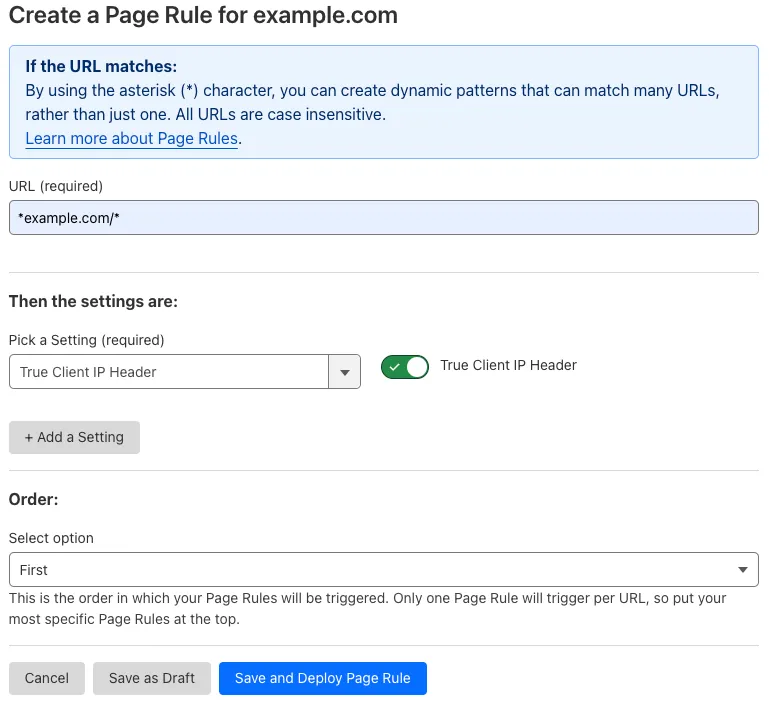
您配置了一条 Page Rule,为发往 example.com 任意子域以及 example.com 域名本身的所有请求添加 True-Client-IP HTTP 标头:
- URL(网址):
*example.com/* - Setting(设置):True Client IP Header
- Value(值):On
如何迁移:
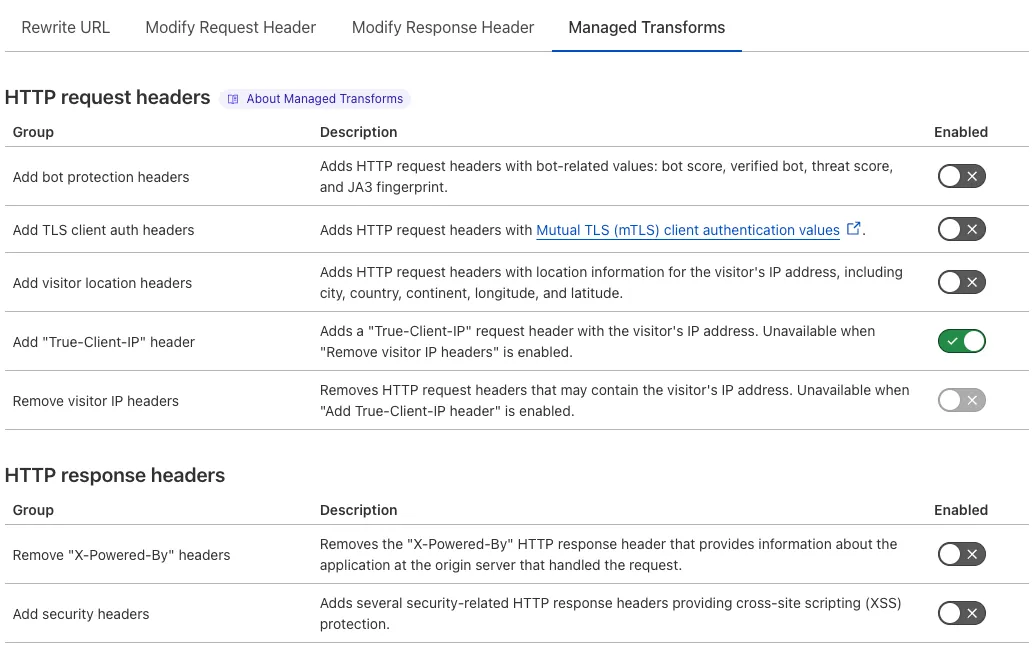
- 开启 Add "True-Client-IP" header(添加 "True-Client-IP" 标头) Managed Transform——这是 Transform Rules 的一项功能——以向所有请求添加
True-Client-IP标头。 - 关闭现有 Page Rule,并验证 Managed Transform 的行为。
- 若测试成功,删除现有 Page Rule。
| Page Rules 配置 | 迁移为 Managed Transform |
|---|---|
 |  |
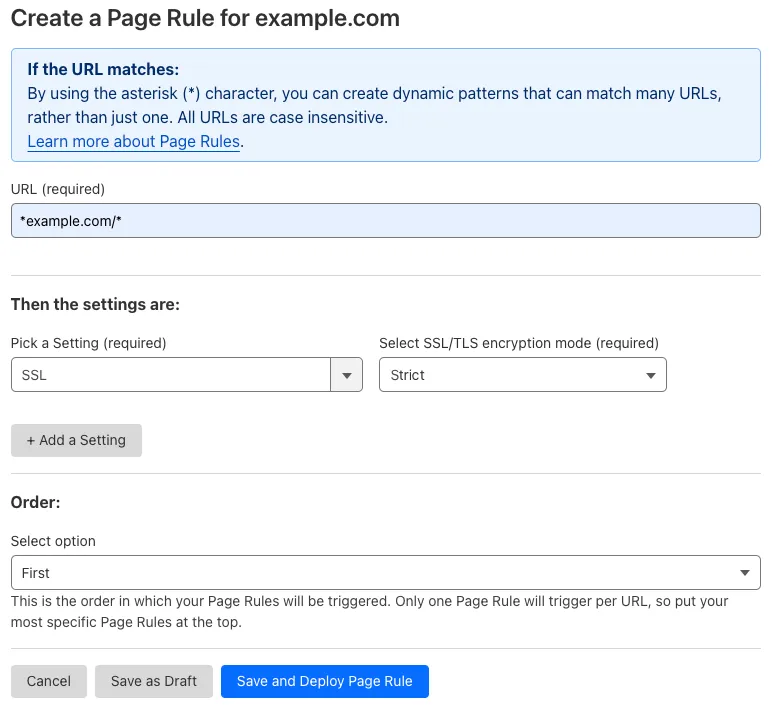
背景:
您配置了一条 Page Rule,对 example.com 的所有子域以及 example.com 域名本身将 SSL 设为 Strict:
- URL(网址):
*example.com/* - Setting(设置):SSL
- Select SSL/TLS encryption mode(选择 SSL/TLS 加密模式):Strict
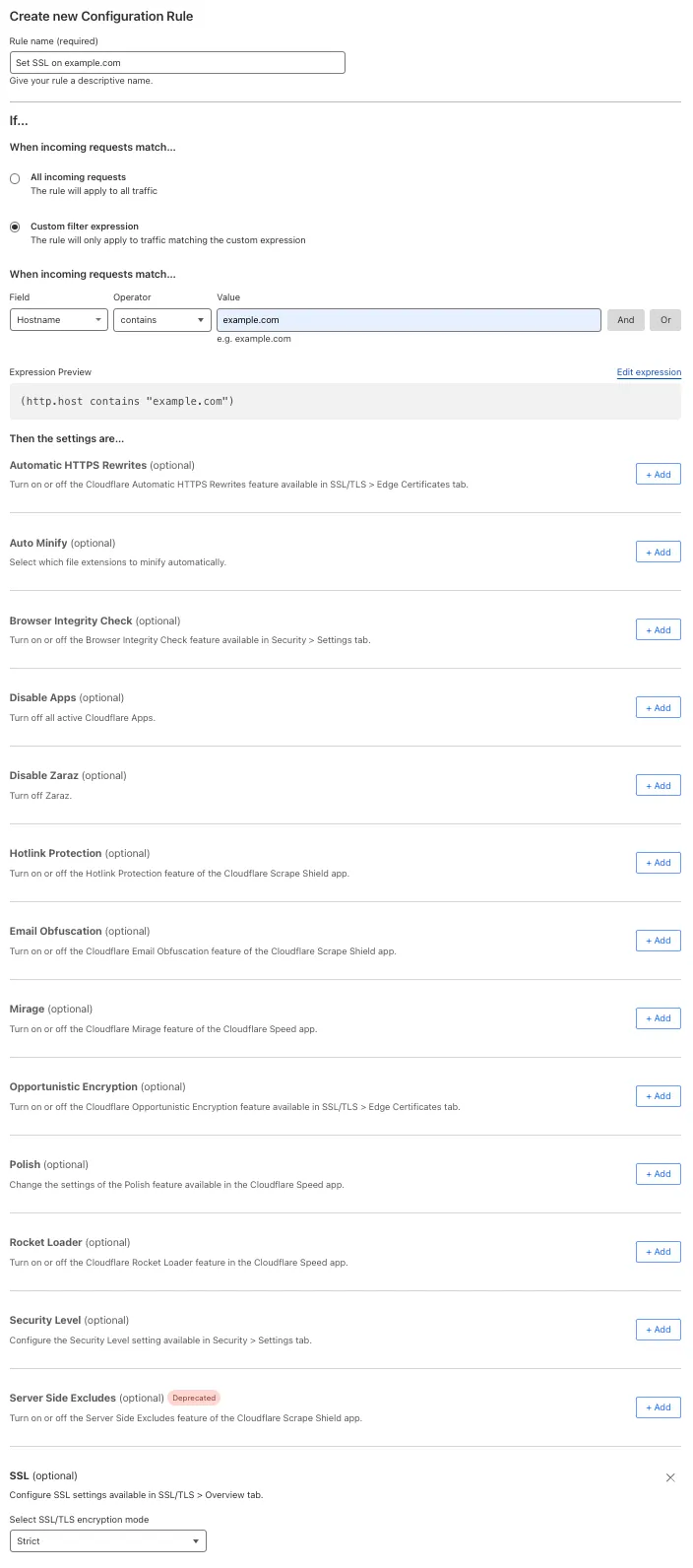
如何迁移:
-
创建一条配置规则,对任何包含
example.com的主机名将 SSL 设为 Strict:- When incoming requests match(当传入请求匹配时):Custom filter expression(自定义过滤表达式)
- 使用 Expression Builder:
Hostname contains "example.com" - 使用 Expression Editor:
(http.host contains "example.com")
- 使用 Expression Builder:
- Then the settings are(则设置为):
- Setting(设置):SSL
- Select SSL/TLS encryption mode(选择 SSL/TLS 加密模式):Strict
- Setting(设置):SSL
- When incoming requests match(当传入请求匹配时):Custom filter expression(自定义过滤表达式)
-
关闭现有 Page Rule,并验证所创建配置规则的行为。
-
若测试成功,删除现有 Page Rule。
| Page Rules 配置 | 迁移为配置规则 |
|---|---|
 |  |
以下 Page Rules 设置不会迁移到其他类型的规则:
- Disable Performance(此设置已弃用)
- Disable Railgun(此设置已弃用,因为 Railgun 已不可用)
- Disable Security(此设置已弃用)
- Response Buffering(此设置已弃用)
- Web Application Firewall(此设置已弃用,因为旧版 WAF managed rules 已弃用)
所有其他 Page Rules 设置将在 2025 年期间迁移。
如有反馈要分享,请参阅我们的 Community 讨论串 ↗。