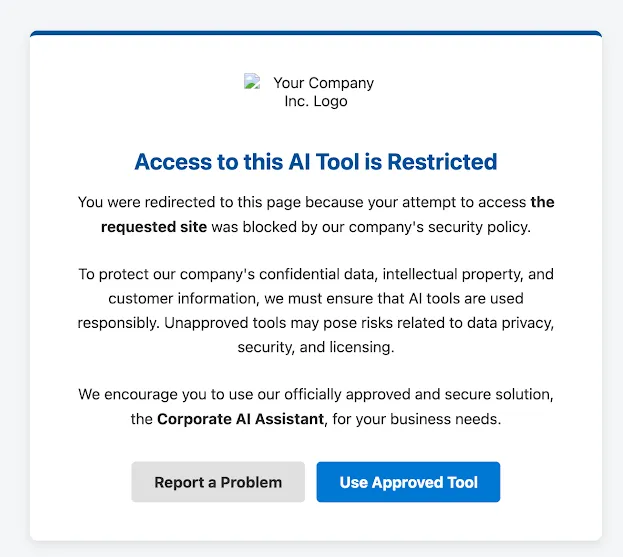
Cloudflare Workers 是搭建自定义用户辅导页面的简便方法。自定义状态页面可以根据 Gateway 发送的关于被拦截请求的信息进行动态处理。
const COMPANY_NAME = "Your Company Inc.";
const APPROVED_TOOL_URL = "https://chat.yourcompany.com"; // 经过批准的 AI 工具 URL
const APPROVED_TOOL_NAME = "Corporate AI Assistant"; // 工具的用户友好名称
const IT_HELPDESK_EMAIL = "[email protected]"; // "报告问题" 按钮的电子邮件
const COMPANY_LOGO_URL = "Your_Logo.svg"; // 公司 Logo 的可公开访问 URL。请替换为你自己的 Logo。

export default {
	async fetch(request) {
		// 1. 从 Gateway 传递的查询字符串中获取被拦截的 URL。
		const url = new URL(request.url);
		const blockedUrlParam = url.searchParams.get("blocked_url");

		// 解码并清理被拦截的 URL 以便展示。
		let blockedHostname = "the requested site";
		let fullBlockedUrl = "an unapproved external tool";
		if (blockedUrlParam) {
			try {
				const decodedUrl = decodeURIComponent(blockedUrlParam);
				fullBlockedUrl = decodedUrl;
				blockedHostname = new URL(decodedUrl).hostname;
			} catch (e) {
				// 如果 URL 格式错误,安全地使用原始参数。
				fullBlockedUrl = blockedUrlParam;
				blockedHostname = blockedUrlParam;
			}
		}

		// 2. 准备 "报告问题" mailto 链接。
		const mailtoSubject = `Business Justification for AI Tool: ${blockedHostname}`;
		const mailtoBody = `Hello IT/Security Team,

I was attempting to access the following website and was redirected to this coaching page:
${fullBlockedUrl}

My business justification for needing this specific tool is:
[**Please describe your business need here**]

Thank you,
[Your Name]`;

		const mailtoLink = `mailto:${IT_HELPDESK_EMAIL}?subject=${encodeURIComponent(mailtoSubject)}&body=${encodeURIComponent(mailtoBody)}`;

		// 3. 生成完整的 HTML 页面。
		const html = generateHTML(blockedHostname, mailtoLink);

		// 4. 将 HTML 作为响应返回。
		return new Response(html, {
			headers: {
				"Content-Type": "text/html;charset=UTF-8",
			},
		});
	},
};

/**
 * 为辅导页面生成完整的 HTML。
 * @param {string} blockedHostname - 用户试图访问的网站的主机名。
 * @param {string} mailtoLink - 用于报告问题的预构建 mailto 链接。
 * @returns {string} - 作为字符串的完整 HTML 文档。
 */
function generateHTML(blockedHostname, mailtoLink) {
	// 使用模板字面量以生成带有嵌入变量的易读 HTML。
	return `
<!DOCTYPE html>
<html lang="en">
<head>
<meta charset="UTF-8">
<meta name="viewport" content="width=device-width, initial-scale=1.0">
<title>AI Tool Usage Policy</title>
<style>
:root {
--primary-color: #00529B;
--secondary-color: #0078D4;
--background-color: #f4f6f8;
--text-color: #333;
--card-bg-color: #ffffff;
--button-primary-bg: #0078D4;
--button-primary-hover: #005a9e;
--button-secondary-bg: #e0e0e0;
--button-secondary-hover: #c7c7c7;
--button-text-color: #ffffff;
--button-secondary-text: #333;
}
body {
font-family: -apple-system, BlinkMacSystemFont, "Segoe UI", Roboto, Helvetica, Arial, sans-serif;
background-color: var(--background-color);
color: var(--text-color);
margin: 0;
display: flex;
justify-content: center;
align-items: center;
min-height: 100vh;
padding: 20px;
box-sizing: border-box;
}
.container {
background-color: var(--card-bg-color);
border-radius: 8px;
box-shadow: 0 4px 12px rgba(0,0,0,0.1);
max-width: 600px;
width: 100%;
text-align: center;
padding: 40px;
border-top: 5px solid var(--primary-color);
box-sizing: border-box;
}
.logo {
max-width: 150px;
margin-bottom: 24px;
}
h1 {
color: var(--primary-color);
font-size: 24px;
margin-bottom: 16px;
}
p {
font-size: 16px;
line-height: 1.6;
margin-bottom: 24px;
}
.highlight {
font-weight: bold;
color: var(--text-color);
}
.button-container {
display: flex;
flex-direction: column;
gap: 12px;
margin-top: 32px;
}
@media (min-width: 600px) {
.button-container {
flex-direction: row;
justify-content: center;
}
}
.button {
display: inline-block;
padding: 12px 24px;
border-radius: 5px;
text-decoration: none;
font-weight: bold;
font-size: 16px;
transition: background-color 0.2s ease;
cursor: pointer;
border: none;
}
.button-primary {
background-color: var(--button-primary-bg);
color: var(--button-text-color);
}
.button-primary:hover {
background-color: var(--button-primary-hover);
}
.button-secondary {
background-color: var(--button-secondary-bg);
color: var(--button-secondary-text);
}
.button-secondary:hover {
background-color: var(--button-secondary-hover);
}
</style>
</head>
<body>
<div class="container">
<img src="${COMPANY_LOGO_URL}" alt="${COMPANY_NAME} Logo" class="logo">
<h1>Access to this AI Tool is Restricted</h1>
<p>
You were redirected to this page because your attempt to access <span class="highlight">${blockedHostname}</span>
was blocked by our company's security policy.
</p>
<p>
To protect our company's confidential data, intellectual property, and customer information, we must ensure that AI tools are used responsibly. Unapproved tools may pose risks related to data privacy, security, and licensing.
</p>
<p>
We encourage you to use our officially approved and secure solution, the
<span class="highlight">${APPROVED_TOOL_NAME}</span>, for your business needs.
</p>
<div class="button-container">
<a href="${mailtoLink}" class="button button-secondary">Report a Problem</a>
<a href="${APPROVED_TOOL_URL}" class="button button-primary">Use Approved Tool</a>
</div>
</div>
</body>
</html>
`;
}
如果成功,你的自定义用户辅导页面将如下图所示。每当用户尝试访问未批准的 AI 工具时,它都会出现。