
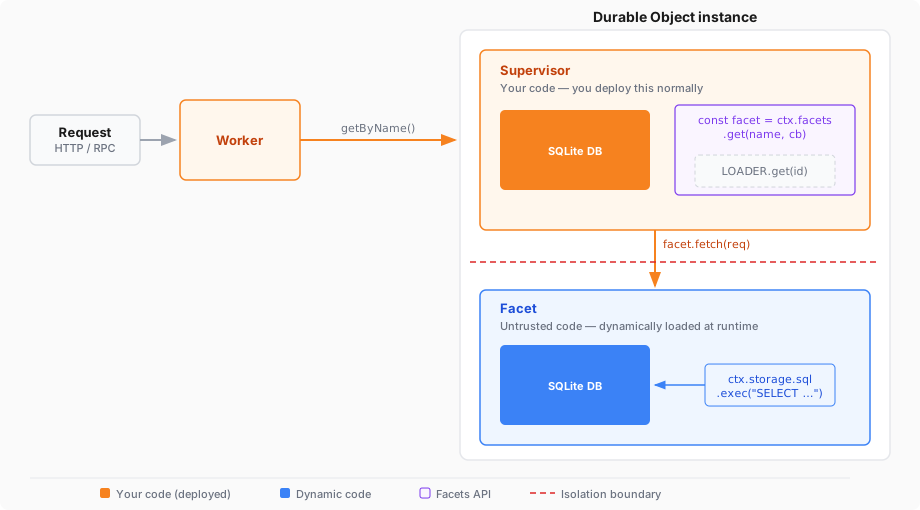
Durable Object Facets 允许您从 Dynamic Worker 加载 Durable Object 类,并将其作为您自己的 Durable Object 的子项运行。该子项(facet)将获得其自己隔离的 SQLite 数据库,而您的类充当控制访问的监管者。
当您希望动态生成的代码(例如由 AI 代理编写的代码)具有持久存储权限,而不直接赋予其访问 Durable Object 命名空间的权限时,此功能非常有用。您的监管者加载代码、创建 facet 并将请求转发给它。您可以掌控动态代码的权限。
基于 facet 的设置具有三个层级:
- 监管者类 (Supervisor class) — 由您编写和部署的普通 Durable Object 类。它配置了与其他任何 Durable Object 相同的 SQLite 存储后端。
- 动态代码 (Dynamic code) — 在运行时通过 Worker Loader API 加载的代码。此代码导出一个扩展了
DurableObject的类。 - Facet — 动态代码类的实例,通过在您的监管者内部调用
this.ctx.facets.get()创建。每个 facet 都有其自己的 SQLite 数据库,与监管者的数据库分开。
监管者的数据库和 facet 的数据库作为同一个整体 Durable Object 的一部分存储在一起。动态代码无法读取监管者的数据库 — 它只能访问自己的数据库。
您的 Worker 需要两样东西:一个带有 SQLite 存储后端的 Durable Object 类,以及一个 Worker Loader 绑定。
{
  "$schema": "./node_modules/wrangler/config-schema.json",
  // Set this to today's date
  "compatibility_date": "2026-08-17",
  "main": "src/index.ts",
  "migrations": [
    {
      "tag": "v1",
      "new_sqlite_classes": [
        "AppRunner"
      ]
    }
  ],
  "worker_loaders": [
    {
      "binding": "LOADER"
    }
  ]
}
# Set this to today's date
compatibility_date = "2026-08-17"
main = "src/index.ts"
[[migrations]]
tag = "v1"
new_sqlite_classes = ["AppRunner"]
[[worker_loaders]]
binding = "LOADER"以下示例展示了一个监管者 Durable Object (AppRunner),它加载动态代码、从中创建一个 facet,并将 HTTP 请求转发给该 facet。
动态代码是一个简单的计数器应用,它使用自己的由 SQLite 支持的存储来跟踪其接收的请求数量。在实际应用中,此代码将来自 AI 代理或用户上传,而不是静态字符串。
import { DurableObject } from "cloudflare:workers";

// In production, this code would come from an AI agent, a database,
// or user input — not a static string.
const AGENT_CODE = `
  import { DurableObject } from "cloudflare:workers";

  export class App extends DurableObject {
    fetch(request) {
      // Note: storage.kv provides simple KV storage backed by SQLite,
			// but you can also use SQL directly via storage.sql. See:
			// https://developers.cloudflare.com/durable-objects/api/sqlite-storage-api/

			let counter = this.ctx.storage.kv.get("counter") || 0;
      ++counter;
      this.ctx.storage.kv.put("counter", counter);

      return new Response("You have made " + counter + " requests.\\n");
    }
  }
`;

// AppRunner is your supervisor. Each instance manages one
// dynamically-loaded application.
export class AppRunner extends DurableObject {
	async fetch(request) {
		// Get a stub pointing to the "app" facet. If the facet has not
		// started yet (or has hibernated), the callback runs to tell the
		// runtime what code to load.
		const facet = this.ctx.facets.get("app", async () => {
			const worker = this.#loadDynamicWorker();

			// Extract the Durable Object class named "App" from the
			// dynamic Worker's exports.
			const appClass = worker.getDurableObjectClass("App");

			return { class: appClass };
		});

		// Forward the request to the facet.
		// You can also call RPC methods on the stub.
		return await facet.fetch(request);
	}

	#loadDynamicWorker() {
		// Use get() so the Worker stays warm across requests.
		// Each unique code version needs a unique ID.
		const codeId = "agent-code-v1";

		return this.env.LOADER.get(codeId, async () => {
			return {
				compatibilityDate: "2026-04-01",
				mainModule: "worker.js",
				modules: { "worker.js": AGENT_CODE },
				globalOutbound: null, // block network access
			};
		});
	}
}

export default {
	async fetch(request, env, ctx) {
		// Look up the AppRunner instance named "my-app".
		const obj = ctx.exports.AppRunner.getByName("my-app");

		// Forward the request to it.
		return await obj.fetch(request);
	},
};
import { DurableObject } from "cloudflare:workers";
// In production, this code would come from an AI agent, a database,
// or user input — not a static string.
const AGENT_CODE = `
import { DurableObject } from "cloudflare:workers";
export class App extends DurableObject {
fetch(request) {
// Note: storage.kv provides simple KV storage backed by SQLite,
// but you can also use SQL directly via storage.sql. See:
// https://developers.cloudflare.com/durable-objects/api/sqlite-storage-api/
let counter = this.ctx.storage.kv.get("counter") || 0;
++counter;
this.ctx.storage.kv.put("counter", counter);
return new Response("You have made " + counter + " requests.\\n");
}
}
`;
// AppRunner is your supervisor. Each instance manages one
// dynamically-loaded application.
export class AppRunner extends DurableObject<Env> {
async fetch(request: Request): Promise<Response> {
// Get a stub pointing to the "app" facet. If the facet has not
// started yet (or has hibernated), the callback runs to tell the
// runtime what code to load.
const facet = this.ctx.facets.get("app", async () => {
const worker = this.#loadDynamicWorker();
// Extract the Durable Object class named "App" from the
// dynamic Worker's exports.
const appClass = worker.getDurableObjectClass("App");
return { class: appClass };
});
// Forward the request to the facet.
// You can also call RPC methods on the stub.
return await facet.fetch(request);
}
#loadDynamicWorker() {
// Use get() so the Worker stays warm across requests.
// Each unique code version needs a unique ID.
const codeId = "agent-code-v1";
return this.env.LOADER.get(codeId, async () => {
return {
compatibilityDate: "2026-04-01",
mainModule: "worker.js",
modules: { "worker.js": AGENT_CODE },
globalOutbound: null, // block network access
};
});
}
}
export default {
async fetch(
request: Request,
env: Env,
ctx: ExecutionContext,
): Promise<Response> {
// Look up the AppRunner instance named "my-app".
const obj = ctx.exports.AppRunner.getByName("my-app");
// Forward the request to it.
return await obj.fetch(request);
},
};在此示例中:
AppRunner是您的监管者 Durable Object。您正常部署它,它拥有一个 Durable Object 命名空间。- 动态代码导出了一个扩展了
DurableObject的类 (App)。该类使用this.ctx.storage读取和写入数据,就像任何 Durable Object 一样。 this.ctx.facets.get("app", callback)创建了该 facet。字符串"app"为该 facet 命名 — 每个名称在父 Durable Object 中都有其自己的 SQLite 数据库。- facet 的数据库与监管者的数据库完全隔离。
AppRunner和App各自有其自己的存储空间,且无法访问对方的存储空间。
在任何 Durable Object 类中都可以使用 this.ctx.facets 对象。它提供了创建、关闭和删除 facet 的方法。单个 Durable Object 可以拥有任意数量具有不同名称的 facet,每个 facet 都有自己独立的 SQLite 数据库。
this.ctx.facets.get(name string, callback () => FacetStartupOptions) Fetcher
创建或恢复具有给定名称的 facet,并返回可用于向其发送请求的存根。
如果 facet 尚未启动或已休眠,运行时将调用 getStartupOptions 以确定要加载的代码。否则,将重用现有的 facet,并且不会调用该回调函数。callback 可以选择为 async (即返回 Promise<FacetStartupOptions>)。
返回的存根行为类似于 Durable Object 存根。您可以在其上调用 .fetch() 以发送 HTTP 请求,或直接调用 RPC 方法。
this.ctx.facets.abort(name string, reason any) void
关闭正在运行的 facet 并使所有现有存根失效。在失效的存根上进行的任何后续调用都将抛出 reason。facet 的存储将被保留。
中止之后,您可以再次调用 get() 重新启动该 facet — 包括使用不同的类。这使得 abort() 适用于代码更新:中止运行旧版本的 facet,然后调用 get(),其回调返回新类。
this.ctx.facets.delete(name string) void
中止 facet(如果正在运行)并永久删除其 SQLite 数据库。如果随后使用相同的名称调用 get(),该 facet 将以一个空的数据库启动。
使用 delete() 清理不再需要的 facet 存储。
由 getStartupOptions 回调返回的对象。
要为 facet 实例化的 Durable Object 类。通过在 Dynamic Worker 存根上调用 worker.getDurableObjectClass("ClassName") 获取它。
该 facet 视为其自己的 ctx.id 的 ID。如果省略,该 facet 将继承父 Durable Object 的 ID。
监管者和每个 facet 都有独立的 SQLite 数据库。动态代码使用标准的 Durable Object 存储 API,所有操作都针对 facet 自己的数据库。
这种隔离意味着您无需信任动态代码就可以使用您的监管者数据。您可以将元数据、计费计数器或访问控制状态存储在监管者的数据库中,而 facet 无法读取或修改其中的任何内容。
在生产环境中,您通常将动态代码本身存储在监管者的数据库中,并在 #loadDynamicWorker() 方法中加载它。这使代码与其管理的 Durable Object 实例配对在一起。