本教程创建一个自定义 Google 表格函数,该函数使用 DNS over HTTPS (DoH)——一种在 HTTPS 上加密 DNS 查询的协议,来查询 Cloudflare 的 1.1.1.1 DNS 解析器。设置完成后,您可以在任何单元格中输入类似 =NSLookup("A", "example.com") 的公式,无需离开电子表格即可检索 DNS 记录。这对于批量域名审计、迁移规划或同时监控多个域名的 DNS 更改非常有用。
首先,打开您的 Google 表格并使用以下代码在 Google Apps Script 中创建一个自定义函数 ↗:
function NSLookup(type, domain, useCache = false, minCacheTTL = 30) {
	// --- 参数验证 ---
	if (typeof type == "undefined") {
		throw new Error("Missing parameter 1 dns type");
	}

	if (typeof domain == "undefined") {
		throw new Error("Missing parameter 2 domain name");
	}

	if (typeof useCache != "boolean") {
		throw new Error("Only boolean values allowed in 3 use cache");
	}

	if (typeof minCacheTTL != "number") {
		throw new Error("Only numeric values allowed in 4 min cache ttl");
	}

	type = type.toUpperCase();
	domain = domain.toLowerCase();

	// --- 可选的缓存层(使用 Google Apps Script CacheService) ---
	let cache = null;
	if (useCache) {
		// 缓存键和哈希
		cacheKey = domain + "@" + type;
		cacheHash = Utilities.base64Encode(cacheKey);
		cacheBinKey = "nslookup-result-" + cacheHash;

		cache = CacheService.getScriptCache();
		const cachedResult = cache.get(cacheBinKey);
		if (cachedResult != null) {
			return cachedResult;
		}
	}

	// --- 向 Cloudflare 1.1.1.1 解析器发起 DNS-over-HTTPS 查询 ---
	const url =
		"https://cloudflare-dns.com/dns-query?name=" +
		encodeURIComponent(domain) +
		"&type=" +
		encodeURIComponent(type);
	const options = {
		muteHttpExceptions: true,
		headers: {
			accept: "application/dns-json",
		},
	};

	const result = UrlFetchApp.fetch(url, options);
	const rc = result.getResponseCode();
	const resultText = result.getContentText();

	if (rc !== 200) {
		throw new Error(rc);
	}

	// --- 标准 DNS 响应代码 ---
	const errors = [
		{ name: "NoError", description: "No Error" }, // 0
		{ name: "FormErr", description: "Format Error" }, // 1
		{ name: "ServFail", description: "Server Failure" }, // 2
		{ name: "NXDomain", description: "Non-Existent Domain" }, // 3
		{ name: "NotImp", description: "Not Implemented" }, // 4
		{ name: "Refused", description: "Query Refused" }, // 5
		{ name: "YXDomain", description: "Name Exists when it should not" }, // 6
		{ name: "YXRRSet", description: "RR Set Exists when it should not" }, // 7
		{ name: "NXRRSet", description: "RR Set that should exist does not" }, // 8
		{ name: "NotAuth", description: "Not Authorized" }, // 9
	];

	const response = JSON.parse(resultText);

	if (response.Status !== 0) {
		return errors[response.Status].name;
	}

	// --- 提取应答记录并确定缓存 TTL ---
	const outputData = [];
	let cacheTTL = 0;

	for (const i in response.Answer) {
		outputData.push(response.Answer[i].data);
		const ttl = response.Answer[i].TTL;
		cacheTTL = Math.min(cacheTTL || ttl, ttl);
	}

	const outputString = outputData.join(",");

	if (useCache) {
		cache.put(cacheBinKey, outputString, Math.max(cacheTTL, minCacheTTL));
	}

	return outputString;
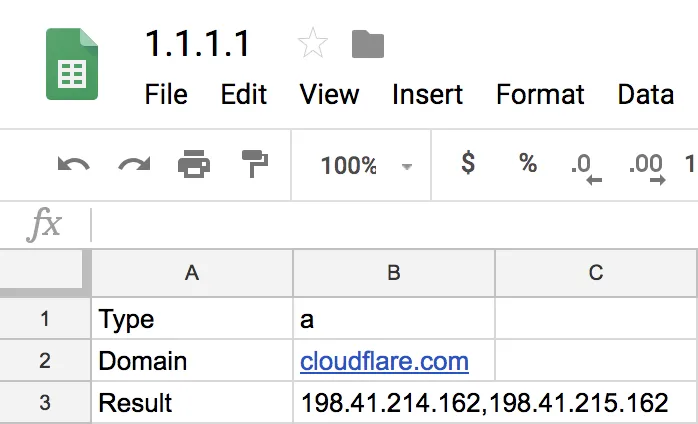
}当您调用包含记录类型和域名的 NSLookup 函数时,单元格将显示对应的 DNS 记录值——即该域名和记录类型返回的 DNS 数据(例如 IP 地址)。
完整的函数签名为:
=NSLookup(type, domain, useCache, minCacheTTL)
| 参数 | 是否必填 | 默认值 | 描述 |
|---|---|---|---|
type |
是 | — | 要查询的 DNS 记录类型(例如 A, AAAA, MX)。 |
domain |
是 | — | 要查询的域名。 |
useCache |
否 | false |
设置为 true 以使用 Google Apps Script 的 CacheService 缓存结果,这能减少大型电子表格中重复的 DNS 查询。 |
minCacheTTL |
否 | 30 |
最小缓存时间(以秒为单位)。实际的 TTL 是此值与 DNS 响应返回的 TTL 中的较大者。 |
支持的 DNS 记录类型
AAAAACAACNAMEDSDNSKEYMXNSNSECNSEC3RRSIGSOATXT
例如,如果单元格 B1 包含 A(记录类型)且 B2 包含 example.com(域名),在另一个单元格中输入以下公式:
=NSLookup(B1, B2)根据您的区域设置,您可能需要使用分号作为参数分隔符:
=NSLookup(B1; B2)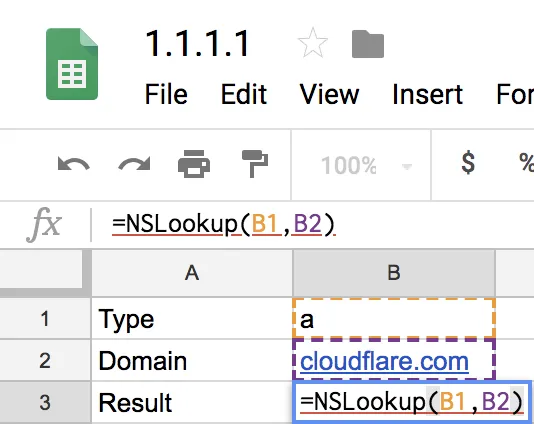
返回该域名的 A 记录:
198.41.214.162, 198.41.215.162