跳转到内容
搜索文档

更新日志

Cloudflare 的最新更新与改进。

在 Activity 记录中预览已发送的电子邮件

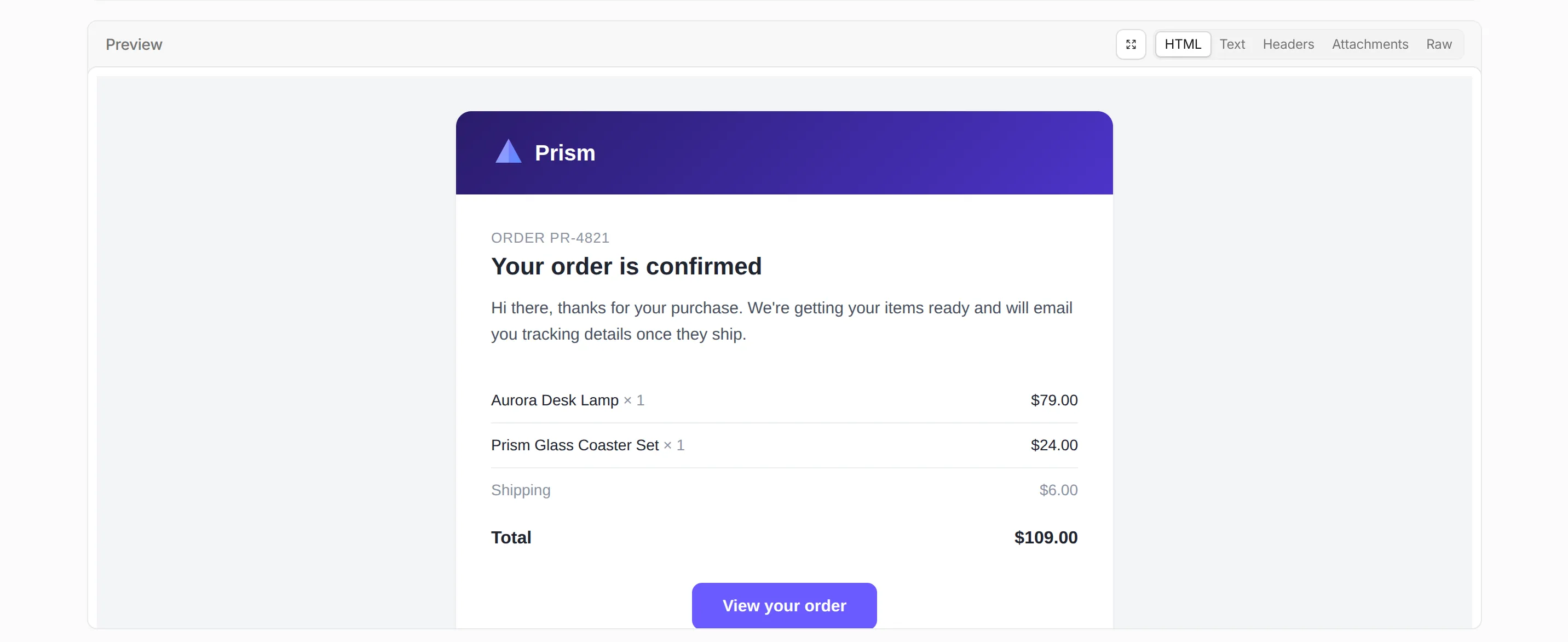
您现在可以直接从 Email Service Activity 记录中预览已发送电子邮件的内容。展开已发送的电子邮件,然后打开全新的 Preview(预览) 部分,通过呈现的 HTML 正文、Text(文本) 正文、Headers(标头)Attachments(附件) 以及完整的 Raw(原始) RFC 5322 源码标签页,检查发送出去的邮件。

在 Email Service Activity 记录中已发送电子邮件的渲染 HTML 预览

此前,Activity 记录仅显示递送和身份验证的元数据,而不显示邮件内容,这使得渲染和内容问题难以调试。邮件预览功能弥补了这一空白。

要启用邮件预览功能,请在您发送域的设置中开启 Email preview(邮件预览)。预览范围包括在开启此设置期间发送的邮件,预览内容将保留大约七天。在 2026 年 7 月 2 日或之后接入的发送域将自动开启 Email preview(邮件预览)

发送域设置中的 Email preview 设置

有关详细信息,请参阅 电子邮件日志

使用 Queues 订阅 Email Sending 事件

您现在可以通过 Queues 事件订阅 订阅 Email Sending 事件,并在队列中接收出站交易性电子邮件的生命周期事件。每个订阅的作用域仅限于一个发送域——可以是区域顶点(如 example.com),也可以是已验证的发送子域(如 send.example.com)。

发布了六种事件类型:message.deliveredmessage.deferredmessage.bouncedmessage.failedmessage.rejectedmessage.complained。使用它们来跟踪送达率、对退信和投诉做出反应,并驱动抑制或重试逻辑。Email Routing 事件不会发布在此数据源上。

每个事件都包含邮件详细信息、递送状态和 SMTP 响应:

{
	"type": "cf.email.sending.message.delivered",
	"source": {
		"type": "email.sending",
		"zoneId": "023e105f4ecef8ad9ca31a8372d0c353",
		"domain": "example.com"
	},
	"payload": {
		"messageId": "0101018f7d0c4d9a-msg-deadbeef",
		"recipient": "[email protected]",
		"terminal": true,
		"delivery": {
			"status": "delivered",
			"smtpStatusCode": "250"
		}
	}
}

请参阅 事件订阅 以查看所有事件类型和示例有效负载。

身份验证的 SMTP 提交功能现已在 beta 阶段可用

您现在可以使用 smtp.mx.cloudflare.net:465 上的身份验证 SMTP 提交,通过 Cloudflare Email Service 发送电子邮件。SMTP 与 REST APIWorkers 绑定 一起构成了发送交易性电子邮件的第三种方式——这对于已经采用 SMTP 协议的现有应用程序以及语言原生 SMTP 库(如 Nodemailer、smtplib、PHPMailer、JavaMail)非常有用。

设置
主机 (Host) smtp.mx.cloudflare.net
端口 (Port) 465 (隐式 TLS)
AUTH PLAINLOGIN
用户名 (Username) api_token
密码 (Password) 具有 Email Sending: Edit 权限的 Cloudflare API 令牌(账户所有或用户所有)

提交将进入与 REST API 和 Workers 绑定相同的递送管道:相同的限制、自动 DKIM 和 ARC 签名,以及共享的仪表板日志。

使用单条命令发送您的第一封电子邮件:

curl --ssl-reqd \
  --url "smtps://smtp.mx.cloudflare.com:465" \
  --user "api_token:<API_TOKEN>" \
  --mail-from "[email protected]" \
  --mail-rcpt "[email protected]" \
  --upload-file mail.txt

有关身份验证详细信息、响应代码和特定语言的示例,请参阅 SMTP 参考

发送带有命名收件人地址的电子邮件

除了现有的 from 支持外,您现在还可以在发送电子邮件时为收件人地址添加显示名称。为 toccbccreplyTofrom 传递一个包含 email 和可选 name 字段的对象:

src/index.jsjs
export default {
	async fetch(request, env) {
		const response = await env.EMAIL.send({
			from: { email: "[email protected]", name: "Support Team" },
			to: { email: "[email protected]", name: "Jane Doe" },
			cc: [
				"[email protected]",
				{ email: "[email protected]", name: "Engineering Team" },
			],
			subject: "Welcome!",
			html: "<h1>Thanks for joining!</h1>",
			text: "Thanks for joining!",
		});

		return Response.json({ messageId: response.messageId });
	},
};
src/index.tsts
export default {
	async fetch(request, env): Promise<Response> {
		const response = await env.EMAIL.send({
			from: { email: "[email protected]", name: "Support Team" },
			to: { email: "[email protected]", name: "Jane Doe" },
			cc: [
				"[email protected]",
				{ email: "[email protected]", name: "Engineering Team" },
			],
			subject: "Welcome!",
			html: "<h1>Thanks for joining!</h1>",
			text: "Thanks for joining!",
		});

		return Response.json({ messageId: response.messageId });
	},
} satisfies ExportedHandler<Env>;

为实现向后兼容,纯字符串形式仍受到完整支持,并且您可以在同一个数组中混合使用字符串和命名对象。

有关完整的请求示例,请参阅 Workers APIREST API 文档。